
Inspiring
February 18, 2019
Question

Can't open .txt file in extendscript

  • February 18, 2019
  • 1 reply
  • 1351 views

Hello,
Beginner at extendscript so apologies in advance.

I'm trying to open a .txt file and read it's content with a Photoshop script, but i get the following error message:
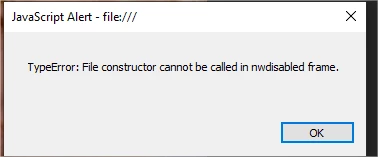
Through my own research it seems as it complains that node.js is not enabled. I have enabled it in my manifest.xml file as seen here:
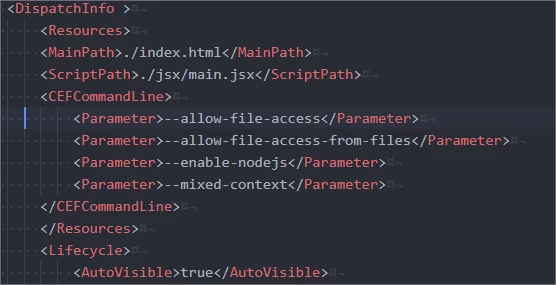
But i still get the error. I also at one point call the "__Dirname" prefix to get my scripts path, but it complains about not being referenced.

What am i doing wrong?

This topic has been closed for replies.

1 reply

Kukurykus
Legend
February 18, 2019

(fle = File(Folder.userData + '/Adobe/CEP/extensions/tech_art_folder_path.txt')).open('r'), r = fle.read(), fle.close(), alert(r)

JojjeSAuthor
Inspiring
February 18, 2019

This gave me 3 errors depending on my changes:

1. unchanged)

2. replace folder with absolute path)

3. with "new File()" and absolute path)

Kukurykus
Legend
February 18, 2019

I only show how to read content of .txt file without any extension you use. Check if that works in first instance...