This is not how I would print (see below for "Photoshop Manages Color") but FYI, our HP 8750 does include colour controls but only if you:
1: select "printer manages color" in Photoshop
and next in print settings
2: select "vendor matching"

"vendor matching" means that the HP driver software manages colour [not the operating system]
you'll see that my mac driver also offers ColorSync as an option [above].
When that’s selected, the expanded color section [see below] basically tells me that HP cannot control the colour.
Next, still in print settings / "paper type/quality"
3: click to expand color options and you'll see a greyscale option, make sure one of the color options is selected.
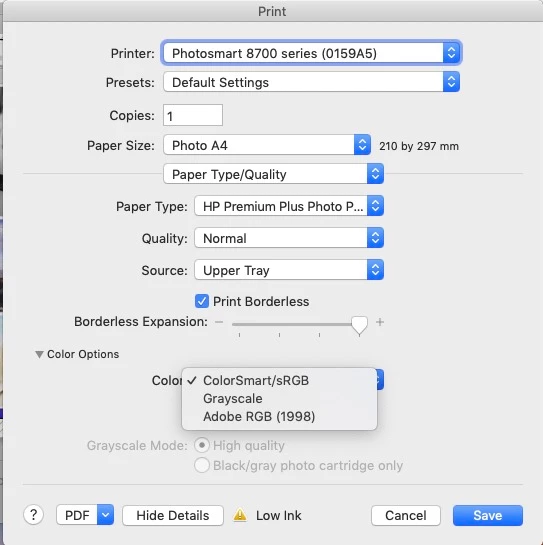
honestly its because of such options hidden in different places in different print drivers that "Photoshop Manages Color" works best.
I hope this helps
neil barstow, colourmanagement net :: adobe forum volunteer
google me "neil barstow colourmanagement" for lots of free articles on colour management
[please only use the blue reply button at the top of the page, this maintains the original thread title and chronological order of posts]



 AdChoices