
neonmamacita
Inspiring
March 29, 2024
Answered

Can't select by clicking on object anymore?

  • March 29, 2024
  • 6 replies
  • 16463 views

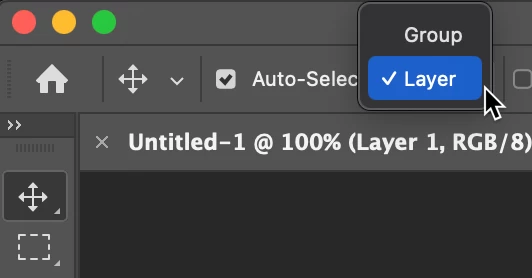
I've noticed that I can no longer select by clicking on an object in the image anymore. Now I need to go into the layers panel and select from there. The exception is auto-select, which lets me select the object by clicking on it. But I don't like auto-select, it too frequently selects the wrong object. 


Photoshop, please let us select from clicking again!
Correct answer melissapiccone

While I respect Jeff and Conrad's choices, I prefer to leave it set to automatically select my layers. 

6 replies

Participant
April 10, 2025

1. Where is the Move Tool bar at the top? 

2. What's the Windows keyboard shortcuts?

c.pfaffenbichler
Community Expert
Community Expert
April 11, 2025
quote

1. Where is the Move Tool bar at the top? 

No such thing. 

The Options Bar changes according to the selected Tool and can be hidden/shown via Window > Options. 

Participant
September 27, 2024

This is by far the dumbest update to photoshop. None of the peoples responses help me at all I still cant select what i click on to move it. I have no idea why they decided to change it


c.pfaffenbichler
Community Expert
Community Expert
September 28, 2024

Please provide at least a meaningful description of your problem and post the oft-requested screenshots with the pertinent Panels visible. 

Otherwise your complaint is useless. 

c.pfaffenbichler
Community Expert
Community Expert
March 31, 2024

Could you please post screenshots with the pertinent Panels (Toolbar, Layers, Options Bar, …) visible? 

melissapiccone
Community Expert
melissapicconeCommunity ExpertCorrect answer
Community Expert
March 31, 2024

While I respect Jeff and Conrad's choices, I prefer to leave it set to automatically select my layers. 

Melissa Piccone | Adobe Trainer | Online Courses Author | Fine Artist
neonmamacita
Inspiring
September 16, 2024

Results in too many incorrect selections

Legend
September 16, 2024

I MIGHT turn Auto-Select off once a year, and I'm in Photoshop almost daily. Just saying, I don't have problems.

Conrad_C
Community Expert
Community Expert
March 29, 2024

Jeff’s solution is what I also do: Leave Auto-Select off, but any time you do want to click to select with the Move tool, hold down the Command key on macOS (Ctrl key in Windows). Adding the right-click opens the layer select menu, but if you just want to select a layer by clicking then you only need to add the Command key.


Note that the Command/Ctrl key toggles the Auto-Select setting, so if Auto-Select is enabled, Command temporarily disables it; but if it’s disabled, Command temporarily enables it. It’s one of the keyboard overrides in Photoshop, similar to holding down the Control key to override the current snap setting.


In short, with the Move tool:

Click = respect the current Auto-Select setting.

Command-click = do the opposite of whatever Auto-Select is currently set to.

Right-click (or Control-click on macOS) = pop up a list of all layers under the pointer, so you can select one.


(I don’t think the Option key actually does anything here?)

Jeff Arola
Community Expert
Community Expert
March 29, 2024

With Auto Select off in the Move Tool options and some other tool selected you

can Cmd-Option right click in the docment area to select layers/objects.


You can also Cmd right click in the document area and select the layer from the list that appears.

The layer your cursor is clicking on should be highlighted in the list.