
Participant
December 4, 2017
Answered

Can't select from foreground/background in Layer Style color picker

  • December 4, 2017
  • 2 replies
  • 1349 views

Hello, I've noticed a minor issue in Photoshop CC that really messes with my workflow. Whenever I use the Color Picker from within the Layer Style window, it won't allow me to grab my currently selected foreground or background color. I can grab just about any color off the screen except for those two panels. Oftentimes I will use those two colors as a temporary storage for a color I plan to use.

Eyedropper select a color > give an object a stroke > grab that color from my currently selected foreground.

I was definitely able to follow this workflow in past versions of Photoshop so I don't know if this was a conscious design change or simply a bug.

In this example screenshot, I am adding a stroke to that grey circle. I am trying to use the color picker to grab that green color that I currently have as my foreground color, but it won't let me pick it up.
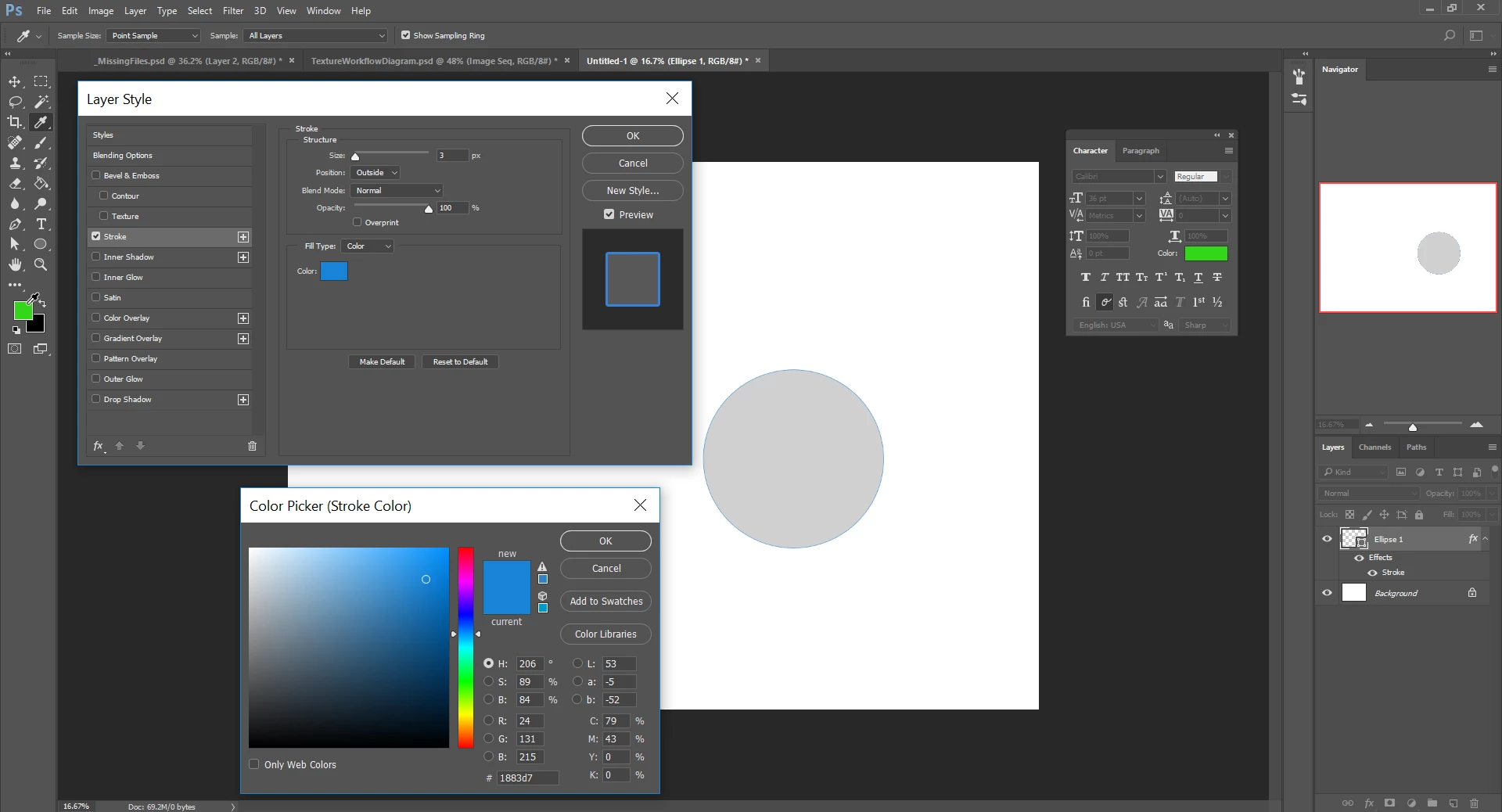
I am running Photoshop Creative Cloud 2017.1.1 Release (20170425.r.252 x64)
My OS is Windows 10 and my graphics card is NVIDIA Quadro P5000

Thanks in advance for any help you can offer!

This topic has been closed for replies.
Correct answer barbara_a7746676

I'm using Photoshop CC 2017, 19.0, and can't replicate that issue. I would suggest upgrading.

2 replies

Barb Binder
Community Expert
Community Expert
December 4, 2017

I'm always hesitant to upgrade mid-project because it sometimes causes compatibility issues

This is a such a good point, srakar_sme, so for others who may read this thread in the future:

A lot of users don't realize that they can keep the old version installed when they upgrade any of the Adobe apps. By default, all previous versions of Creative Cloud apps are uninstalled when you update to the latest version. To keep the old one while upgrading, just click Advanced Options after you click on Upgrade, and deselect Remove old versions to retain previously installed versions of software.

And remember that with your active subscription, you can always reinstall old versions if you forget and the new one isn't working for you.

https://helpx.adobe.com/creative-cloud/help/creative-cloud-updates.html

~Barb

~Barb at Rocky Mountain Training
barbara_a7746676
Community Expert
barbara_a7746676Community ExpertCorrect answer
Community Expert
December 4, 2017

I'm using Photoshop CC 2017, 19.0, and can't replicate that issue. I would suggest upgrading.

Participant
December 4, 2017

I'm always hesitant to upgrade mid-project because it sometimes causes compatibility issues, but with your confirmation that the issue didn't exist in 19.0 I figured I'd give it a shot. Upon trying the new version, the issue is completely gone. Seems it was a bug after all.

Thanks for the suggestion Barbara!

barbara_a7746676
Community Expert
Community Expert
December 4, 2017

You're welcome!

Just so that you are aware, 19.1 is the most current version, but it introduced a bug in the Character panel such that when making changes to text there is no live preview until you ok the change. I'm waiting for that to be fixed before updating from 19.0 to 19.1