

Can't select the layer I want
This is a new behavior I've noticed when I use Photoshop. It's possible this has something to do with my installation/settings.
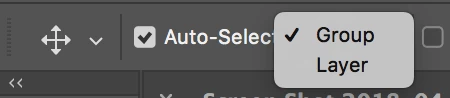
As seen in the image below, I have three layers that I'm working with and I want to move the top one i.e. the text layer that reads 52 GB available. I select it and when I click anywhere on the image to move that layer, Photoshop shifts to Layer 1 on its own and starts moving Layer 1. I select the top text layer again and the moment I click on the image, Photoshop again selects Layer 1 on its own.
Interestingly though, I can use the arrow keys on my keyboard to move the layer. So I can't manipulate that layer on the image using my mouse.
Any idea what's causing this?

By the way, I subscribe to Creative Cloud so I have the latest version of Photoshop installed on my Windows 10 machine. I don't see any updates available and the version of Photoshop reads: Photoshop CC 19.1.3 Release
 AdChoices