
Mr. Content
Known Participant
June 24, 2021
Answered

Can you batch resize by percentage?

  • June 24, 2021
  • 3 replies
  • 5390 views

Ok i have about 60 photos that range in size from 1080p 4:3 to 6k 16:9 and some are portrait and others are landscape. I want to send these to a client to choose the ones she wants graded/developed.


I know how to batch resize when all of the photos are the same size but how would i process all of this batch so that they are all no larger than 1920px in H or W?
Correct answer Jeff Arola

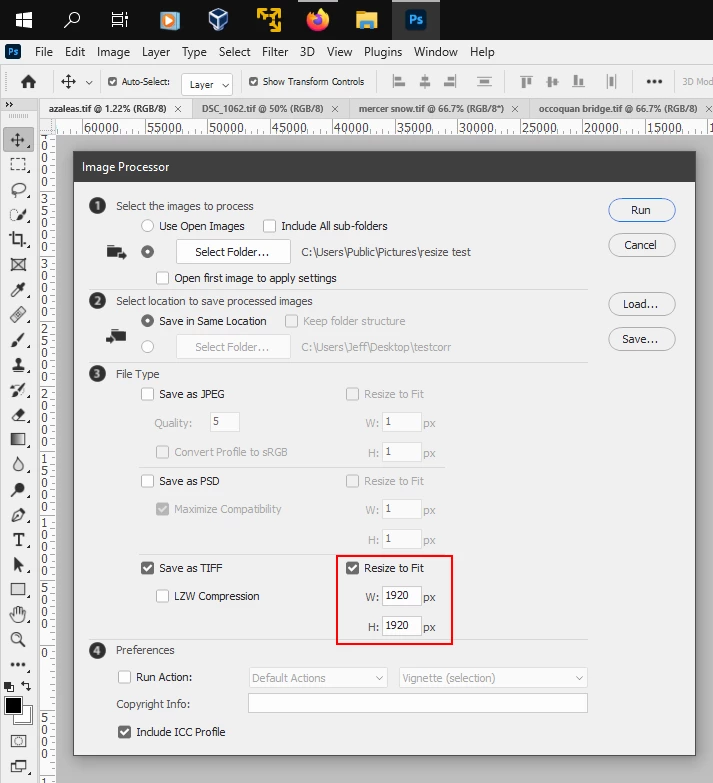
In photoshop you can use File>Scripts>Image Processor and in the Resize to Fit fields enter 1920 in in both.

That will then resize your images to 1920 on the long side.


3 replies

Stephen Marsh
Community Expert
Community Expert
June 24, 2021

As JJMac suggested, File > Automate > Fit Image


I don't think that you need to over complicate this, just enter 1920px in both width and height and the original aspect ratio will be maintained. Record this into an action for use with batch... Or as Jeff suggested, use IPP:


Image Processor Pro / v3_2 betas


Mr. Content
Known Participant
July 8, 2021

thanks

Jeff Arola
Community Expert
Jeff ArolaCommunity ExpertCorrect answer
Community Expert
June 24, 2021

In photoshop you can use File>Scripts>Image Processor and in the Resize to Fit fields enter 1920 in in both.

That will then resize your images to 1920 on the long side.


JJMack
Community Expert
Community Expert
June 24, 2021

The image would need to be cropped or distorted to a common Aspect ratio then resized.  You could also use Adobe "Fit Image" plug-in to resize all you imagse to fit within a 1920 x 1080  camvas size The image's aspect ration will not change all the resized image will not have a 16:9 sapect ration 

JJMack
Mr. Content
Known Participant
June 24, 2021

Ok. I thonk that Adobe should ad the ability to constain one demesion of a batch of randomly sized photos to never exceed X, but not change the original aspect of the file. I thought it was just a deep feature that i did not know about. 


Can bridge separate by like sizes, or show more resolution and frame info in the interface?

Bojan Živković11378569
Community Expert
Community Expert
June 24, 2021

In Bridge open Window > Filter panel and see what it can sort. You can sort by orientation/aspect ratio but not by resolution, as far as I know.