Participant
April 29, 2021
Question

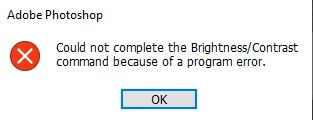
Cannot change Brightness/Contrast because of a Program error
  • April 29, 2021
  • 1 reply
  • 2510 views

Whenever I try to change the Brightness/Contrast on certain layers i get this error. I have already uninstalled and reinstalled Photoshop without success. 

This topic has been closed for replies.

1 reply

jane-e
Community Expert
Community Expert
April 29, 2021

@gregorpotter1 wrote:


... on certain layers...


Since this is happening on some layers and not others, can you show some screen shots of the Layers panel in both cases where you get the error and also where you succeed? What is different about the layers where is works and where it doesn't? Also, make sure you are not on a layer with no pixels.


Is there anything else different, such as color mode or bits or ???


You may need to reset preferences, but let us see a screenshot first.


~ Jane


Participant
April 29, 2021

I am able to change the brightness/contrast whith 'Pillar 1' layer selected.

When 'Pillar 3 is selected I get the error. The only things different about the layers are the positions and the patterns are random, they use the same colours, brushes etc. just I hand painted them so yes they are different.

jane-e
Community Expert
Community Expert
April 30, 2021

That seems very odd. We can't see the top of your Layer panel. Are there any settings there for either layer?


~ Jane