
Inspiring
January 8, 2022
Question

Cannot change default color profile for new documents (Defaults to Don't Color Manage this Document)

  • January 8, 2022
  • 4 replies
  • 1072 views

Here's a screenshot of my new document window:
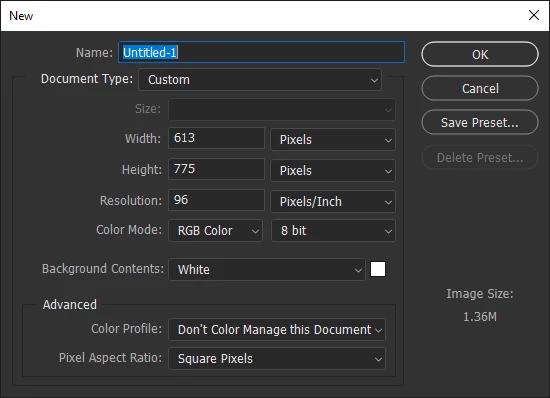
 
Notice under Advanced that the default is "Don't Color Manage this Document". I want to change this to ensure that sRGB is default.

Before you ask, I have changed the working space to sRGB. Here's a screenshot:
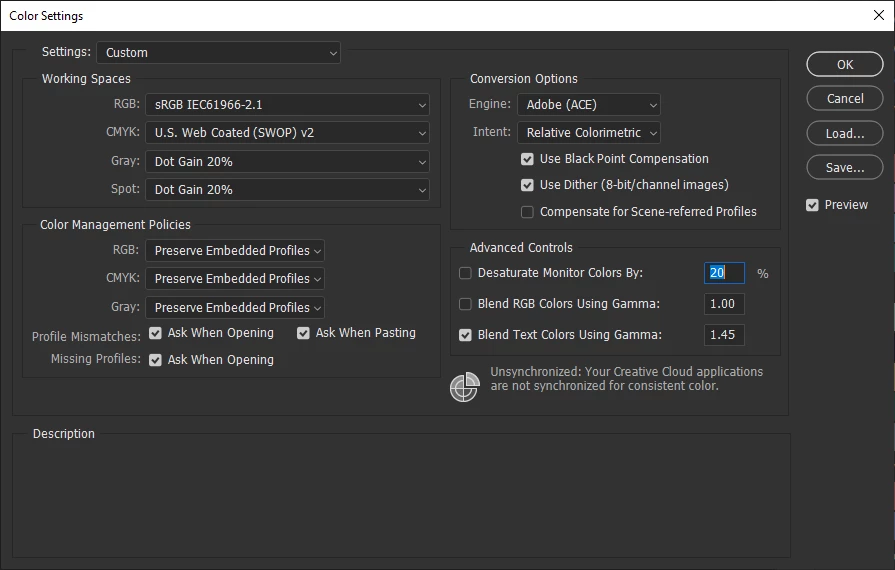
 

How can I accomplish this? Any help would be greatly appreciated.

Jay

This topic has been closed for replies.

4 replies

Known Participant
August 16, 2022

I am having this problem too, would it be a bad idea if Photoshop let you set a default colourspace for new documents in the settings?


I reset my preferences but Photoshop periodically forgets what my previous new document choice was. I'd much rather have this choice set up in my settings.


Mac 18,3 MacOS 12.5

Kukurykus
Legend
March 6, 2022

Did you find solution to your problem yourself, or maybe one of given answer helped to you?

Inspiring
March 11, 2022

I haven't really found a definitive solution. Sometimes it sticks to sRGB, other times it defaults to unmanaged. I've just decided to live with it.

TheDigitalDog
Inspiring
March 11, 2022

I'm not sure the settings of preferences affect this dialog.


What you should try is saving your color settings as a user-created preset with sRGB as the RGB Working Space and the other dialog settings as desired. Then click the Save... button and save off a .CSF file in the proper location and see if this sticks (it should).


I am on a Mac, but there should be a similar path/location on Windows for this .CSF file.

Author “Color Management for Photographers" & "Photoshop CC Color Management/pluralsight"
NB, colourmanagement
Community Expert
Community Expert
January 12, 2022

Hres some more info on resetting preferences:

Here’s some info on how to do that:


https://helpx.adobe.com/photoshop/using/preferences.html

And

https://community.adobe.com/t5/photoshop-ecosystem-discussions/quick-tips-how-to-reset-photoshop-preferences/td-p/12502668


You may want to backup your settings and your custom presets, brushes & actions before restoring Photoshop's preferences.

Here is general info that:  https://helpx.adobe.com/photoshop/using/preferences.html#BackupPhotoshoppreferences


Also take a look at the following article and check if that helps: 

https://helpx.adobe.com/photoshop/using/printing-color-management-photoshop1.html


It may even be time to reinstall Photoshop.


Use the Adobe CC cleaner tool to remove all traces first.

Uninstall Photoshop BUT make sure to choose the option “Yes, remove app preference”.


Once that process finishes, start the installation process and look into the “Advanced Options”. Uncheck “Import previous settings and preferences” and choose to “Remove old versions”.


I hope this helps

neil barstow, colourmanagement net :: adobe forum volunteer

google me "neil barstow colourmanagement" for lots of free articles on colour management

[please only use the blue reply button at the top of the page, this maintains the original thread title and chronological order of posts]

Ged_Traynor
Community Expert
Community Expert
January 9, 2022

Hi

Try a preference reset