

user82573258
Inspiring
January 17, 2023
Question

Cannot disable faux bold style

  • January 17, 2023
  • 2 replies
  • 787 views

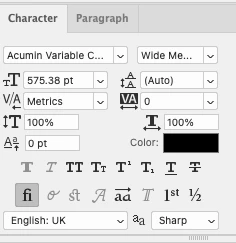
I'm using the Acumin Variable font, and no matter what style / weight I use, I am unable to convert to the text to a shape.


I keep getting the following error:

"Could not complete the Convert to Shape command because the type layer uses a faux bold style."


I did try switching to Arial and then back to Acumin, which seemed to work once. But I've tried it again on another text box and still can't convert to a shape when using Acumin.


The 'faux bold' option is ghosted out.


Is there a way around this?
 

This topic has been closed for replies.

2 replies

Bojan Živković11378569
Community Expert
Community Expert
January 18, 2023

I do not have problem on Windows, Photoshop 24.1.0. Acumin Variable Concept > Wide Medium can be converted to shape. Open Properties panel (with Type layer selected) scroll down to section Quick Actions, expand it and click on Convert to Shape button. I tested with single line and paragraph text.


At my side Faux bold is also greyed out on Character panel, by the way.

Kevin Stohlmeyer
Community Expert
Community Expert
January 17, 2023

Did you select the individual text not just the frame? It could be applied to just one character.

user82573258
Inspiring
January 17, 2023

It seems to do it either way, it's also just the one character inside the frame. I wonder if it's just something to do with the font