

Copy link to clipboard
Copied
**NOT SPAM** Please don't mark it as so, I'm trying to get help to find a solution to this error I'm running into, thank you!
Hey all I'm running into a ESTK error when running my script. The script will run a file, make it's checks and move on to the next file. It'll do this for a couple until it reaches a certain template and give me the error stated in the Subject Line. Any help would be greatly appreciated!
Goal: The goal of this script is to check a files text layers to see if the ALL CAPS setting is turned on and doesn't already exist for any layer, if true "<RT_f>" gets added to the layer name. If false, the file is meant to be closed and jump back into the for loop for the next file.
A couple things I need to adjust that I'm aware of are when the script opens the file and this prompt pops up
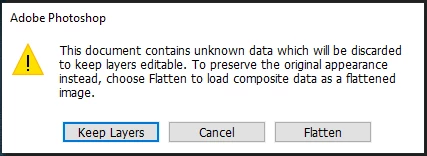
I still need to figure out how to always apply the "Keep Layers" option (if anyone know I would be forever thankful)
I will attach a couple files that will run fine against this script and a few that produce the Subject Line error.
Script:
//#target Photoshop
var files = Folder('/c/temps/psd').getFiles(/.psd$/i)
for (var i = 0; i < files.length; i++) {
var fileRef = files[i]
var docRef = app.open(fileRef)
var ifChanges = false
$.writeln(fileRef)
try {
for (var a = 0; a < docRef.layers.length; a++) {
var curLayer = docRef.layers[a]
try {
if (
curLayer.kind == LayerKind.TEXT &&
curLayer.textItem.capitalization == TextCase.ALLCAPS &&
curLayer.name.indexOf('<RT_f>') == -1
) {
curLayer.name = '<RT_f>' + curLayer.name
ifChanges = true
}
} catch (e) {
docRef.close(SaveOptions.DONOTSAVECHANGES);
continue;
}
}
if (ifChanges) {
$.writeln(fileRef.Name)
docRef.save();
}
docRef.close();
} catch (e) {
docRef.close(SaveOptions.DONOTSAVECHANGES);
continue;
}
}
The console log was added to help me identify which file the error was populating for (file will be included) and to hopefully get an answer as to why some files returned 'undefined' (but I'm not too worried about this one.
That being said I have already googled that error and nothing has popped up. The only solution I have tried is to simply delete that file BUT there are multiple files that populate the error message from the Subject Line.
In the files provided 'BCBH-KW10224-3K001.psd' is a sample file that will bring up this error in ESTK
I have to run this against 18k files so any help and/or solutions would be incredibly appreciated.
Put at beginning:
function allCaps() {
sTT = stringIDToTypeID, currentTool = 'typeCreateOrEditTool';
(ref = new ActionReference()).putProperty(sTT('property'), sTT('tool'))
ref.putClass(sTT('application')); return typeIDToStringID(executeActionGet(ref)
.getObjectValue(sTT('currentToolOptions')).getObjectValue(sTT('textToolCharacterOptions'))
.getObjectValue(sTT('textStyle')).getEnumerationValue(sTT('fontCaps'))) == 'allCaps'
}
then replace:
curLayer.textItem.capitalization == TextCase.ALLCA...
Copy link to clipboard
Copied
Loll why anyone could think your post is a spam? It's like regular guy goes to metro and shouts out to people he's not an terrorist 😄
The problem is on second layer (first text one) of said file when checking (not set) capitalization. Of course when it's unset the script shouldn't break, so something is wrong here indeed. I would check it myself but I don't have font you use for that layer. I can change it to other but then the layer unfortunately gets corrected. Upload that font so I may test it right way.
Copy link to clipboard
Copied
Hahaha I said the same thing when my previous post received the spam notification!
Thank you for your fast response! And just for clarification we're talking about the BCBH-KW10224-3K001.psd file right? It's not letting me attach the font, so here is the link
https://drive.google.com/drive/folders/1yfVIZKjfcVtR_1ckjAweMd9CsHzaNOz3?usp=sharing
If you need any more fonts please don't hesitate to ask, when I get home I'll make a zip folder with all the fonts that each file that I have provided uses to make tests easier you you!
Copy link to clipboard
Copied
Put at beginning:
function allCaps() {
sTT = stringIDToTypeID, currentTool = 'typeCreateOrEditTool';
(ref = new ActionReference()).putProperty(sTT('property'), sTT('tool'))
ref.putClass(sTT('application')); return typeIDToStringID(executeActionGet(ref)
.getObjectValue(sTT('currentToolOptions')).getObjectValue(sTT('textToolCharacterOptions'))
.getObjectValue(sTT('textStyle')).getEnumerationValue(sTT('fontCaps'))) == 'allCaps'
}
then replace:
curLayer.textItem.capitalization == TextCase.ALLCAPS
to:
(docRef.activeLayer = curLayer, allCaps()) &&
Copy link to clipboard
Copied
Wow thank you so much for that! I don't seem to be getting the error anymore! Really appreciate that swift help on this @Kukurykus !!
On a side note do you know a way to select the "Keep Layers" option when opening a photoshop file?
I found another post saying that it's not possible but my heart doesn't want to believe it haha
Copy link to clipboard
Copied
@Kukurykus I spoke too soon, I'm attaching the file that it gave the same error on. The fonts for that file have been added to this link
https://drive.google.com/drive/folders/1yfVIZKjfcVtR_1ckjAweMd9CsHzaNOz3?usp=sharing
Copy link to clipboard
Copied
UPDATE:
I found the mistake, I replaced the wrong line of code. The script has been running for some time now and have not received the error. @Kukurykus you are amazing, my praises and thanks go out to you!
Really wish I could run app.open(fileRef) and apply a "Keep Layers" options without having to manually click that prompt when it pops up but from what I read I have very little control over .open()
Anyways thank you for the help!
Copy link to clipboard
Copied
Update Photoshop to newest release that handles that composite data. Which one you have?
Copy link to clipboard
Copied
Right now I'm running 22.3.1
I can't go newer because I'm running this script on a virtual machine. On my local machine I'm running the newest release 23.2 and I still get "Keep Layers" prompt when running the script.
Copy link to clipboard
Copied
This dialog I have in CS6, while in 23.2 that file opens normally.
Copy link to clipboard
Copied
I just updated my local to 23.2 and you are totally correct!
Now just to add a GPU to the virtual machine I run my scripts on!
Thank you again for all your help!
Copy link to clipboard
Copied
I'm confused: 'I'm running the newest release 23.2 and I still get "Keep Layers"'.
Copy link to clipboard
Copied
That was my mistake, I thought I was on 23.2 on my local but I was running the same version that the virtual machine had.
I ran an update to 23.2 and that fixed the prompt issue
Get ready! An upgraded Adobe Community experience is coming in January.
Learn more