
Participating Frequently
April 17, 2023
Answered

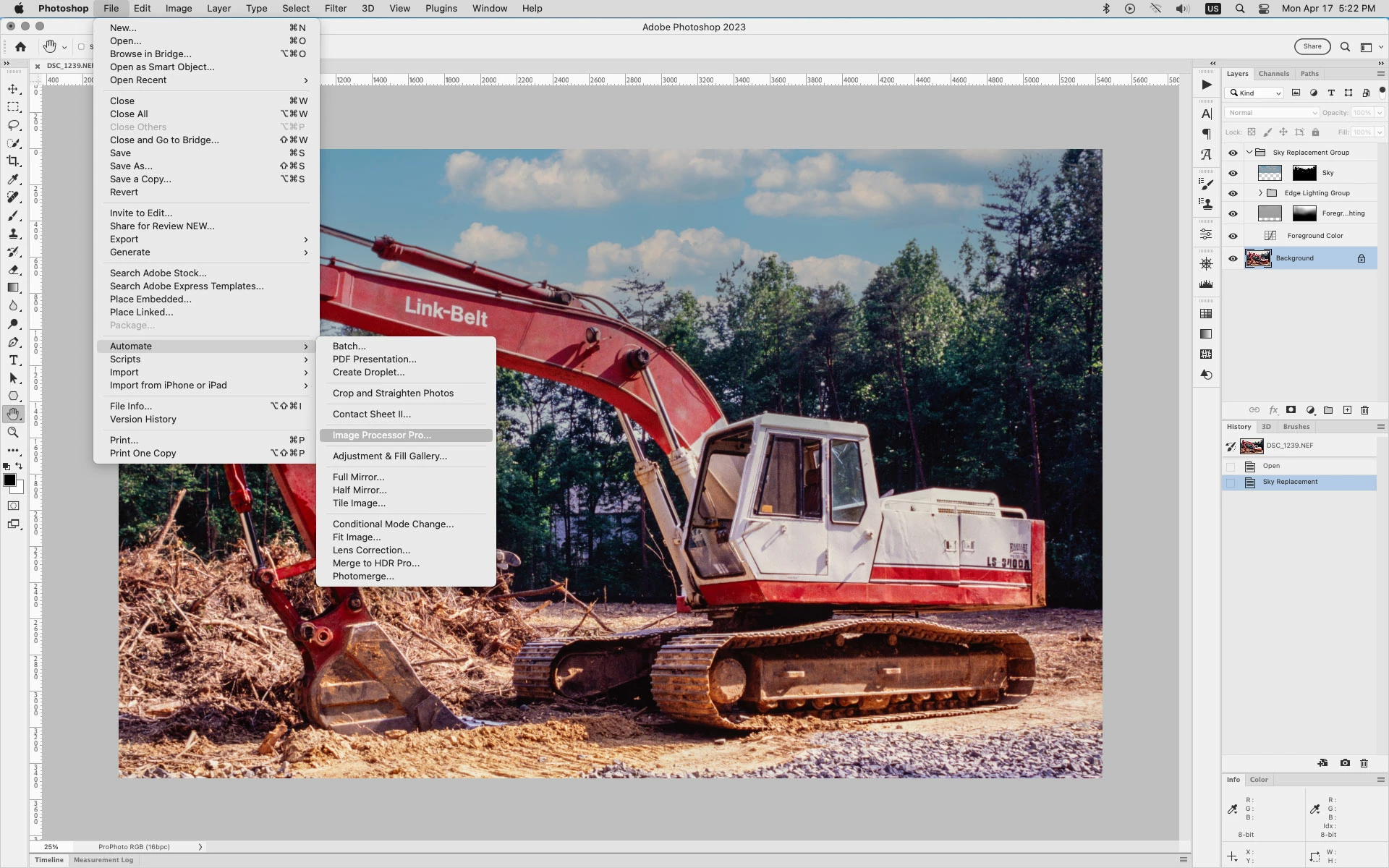
Cannot find Image Processor Pro in Photoshop 2023

  • April 17, 2023
  • 2 replies
  • 6919 views

Does anyone know if Image Processor Pro is still supported in Photoshop 2023?  I'm running OSX 12.0.1


I used it frequently with Photoshop 2022 but haven't used it in a while.  Now that I'm using Photoshop 2023 I cannot seem to find it.  If memory serves, it should appear under File > Scripts.  Is this correct?  


I've reinstalled the software following the instructions from the most recent sourceforge download, and I've restarted photoshop, but no luck so far.  


I hope there may still be a way to use the script.  I've used it within recursive actions to export an image with a sequential file name each time the action runs, and I haven't been able to find any other way to do this.  


Thank you for any help out there.


This topic has been closed for replies.
Correct answer Jeff Arola

Yes the Image Processor Pro is still supported in photoshop 2023 under File>Automate>Image Processor Pro


I would go thru the directions again.


2 replies

Jeff Arola
Community Expert
Jeff ArolaCommunity ExpertCorrect answer
Community Expert
April 17, 2023

Yes the Image Processor Pro is still supported in photoshop 2023 under File>Automate>Image Processor Pro


I would go thru the directions again.


Participating Frequently
April 18, 2023

Indeed it does.  I needed to reinstall in the 2023 folder and all is working now.  Thank you.

Participant
March 8, 2024

Thank you for the reply. I am looking to save all as .jpg files. 


I wonder if Image Processor can help me save some time or would I have to run it 12 different times if I got 12 sizes?


Hello! Just tried out the Image Processor Pro to rezise png's into 300 DPI JPEG format. It works almost perfect. For some reason though it doesn't fully "follow" the Width and Height specifications that I enter. After running it, the new files show a different value for the Hight (see screenshots). Anyone got any idea why this is happening and how to get the images to exactly follow the enterer width and height specs?

Participating Frequently
April 17, 2023

Replying to my own post.  I now remember that it was located under File > Automate.  I don't see it there either.