
Participant
April 4, 2016
Answered

Cannot find red eye tool in CC 2015

  • April 4, 2016
  • 6 replies
  • 19237 views

Anyone else having this issue? Everything online says the red eye tool should be nested under the spot healing brush tool. Instead, my spot healing brush tool, healing brush tool, and patch tool are all visible simultaneously, and the red eye tool is absolutely nowhere to be found:
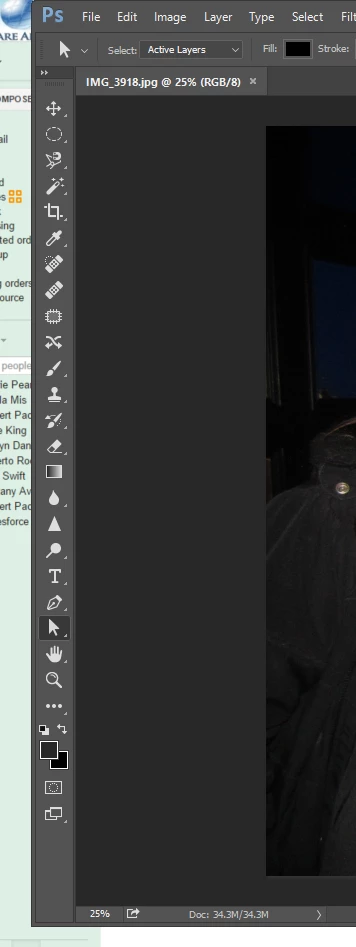
Am I missing something incredibly simple??

This topic has been closed for replies.
Correct answer bobfox1606


This procedure put the Red Eye tool back into the toolbar.

Open Photoshop; then Edit; Toolbar; Restore Defaults.

6 replies

Participant
June 6, 2019

This worked perfect! Thanks.

Participant
February 3, 2018

Thank you, this worked!  Come on Adobe, took me a half hour to find this article just to restore a commonly used tool to a location loyal users were used to finding it.

stuartt65615980
Participant
September 3, 2017

does not work, it does not exist in the list of available tools in CC 2017.

Colin Holgate
Inspiring
September 3, 2017

At the bottom of the tools is a ... icon. Clicking on that shows you all the tools there are, and you can select the Spot Healing Brush Tool. Once that is in the set of tools, Red Eye Tool is the bottom item in the icon's drop down menu.

Participant
March 19, 2017

Thank you, it worked perfectly!

Trevor.Dennis
Community Expert
Community Expert
March 19, 2017

The line 'all visible at the same time' suggests Camera RAW.

Remember we had several people with issues after the customizable toolbar was introduced.  Depending on how your workspace was laid out before the update, a good few people had missing tools.  The fix was to reset the toolbar to default:

Trevor.Dennis
Community Expert
Community Expert
March 19, 2017

Incidentally, my preferred method of dealing with (other people's) red eye is to use a Hue Saturation adjustment layer targeting Reds.  Targeting specific colours can be an incredibly useful approach as it often needs minimal masking.  Fixing Chromatic aberration with cyans and magentas will often have almost no effect on the rest of the image, but is easily painted in with the layer mask.

ECA2420Author
Participant
April 5, 2016

Sorry to be obtuse here, but I'm still not sure where or how to find the red eye tool. I realize there are other ways to do remove red eye, but the red eye tool is simplest (to me), and I would really like to, well, use it! Just confused why my Photoshop program does not have it nested in the same menu as everyone else's, and therefore how I can find it.

And unfortunately I'm not sure where to find the window you're showing the additional red eye option menu displayed.

Thank you,

JJMack
Community Expert
Community Expert
April 5, 2016

One screen windows I show is Photoshop main user interface window with Photoshop Tool Bar in it and the Red eye tool  in nested with Photoshop's other healing tools in the tool bar.  The other window I show is Adobe Camera Raw user interface it to has a red eye tool.

Why do other not nest their tool in the same place Photoshop does after all Photoshop is the golden standard,  Could be other are not up to the task and lack many tools that Photoshop has.

Photoshop UI

Photoshop tool bar with spot healing brusg tool selected.

The other healing tool nested with the spot healing brush tool

JJMack
Participant
April 23, 2016

Question wasn't answered. My Photoshop CC 2015 tool bar DOES NOT include the red-eye tool. Someone from Adobe please address this problem. Four healing tools are shown. Right-clicking shows nothing else.

JJMack
Community Expert
Community Expert
April 4, 2016

Yes that there are more than on way to remove Red-eye. And more than one Red-eve tool.

JJMack