
Inspiring
April 14, 2022
Answered

Cannot find View Mode after select and mask

  • April 14, 2022
  • 2 replies
  • 4076 views

I am trying to remove the background behind a person and need to refine around the hair. However, when I google for how to do this all descriptions mentions i should Select and Mask and then there should be a View Mode in the workspace, but I cannot find where this is. Is it only available in Photoshop CC (and thus not in my Adobe Photoshop Version: 23.1.1 x64)?
This topic has been closed for replies.
Correct answer Conrad_C

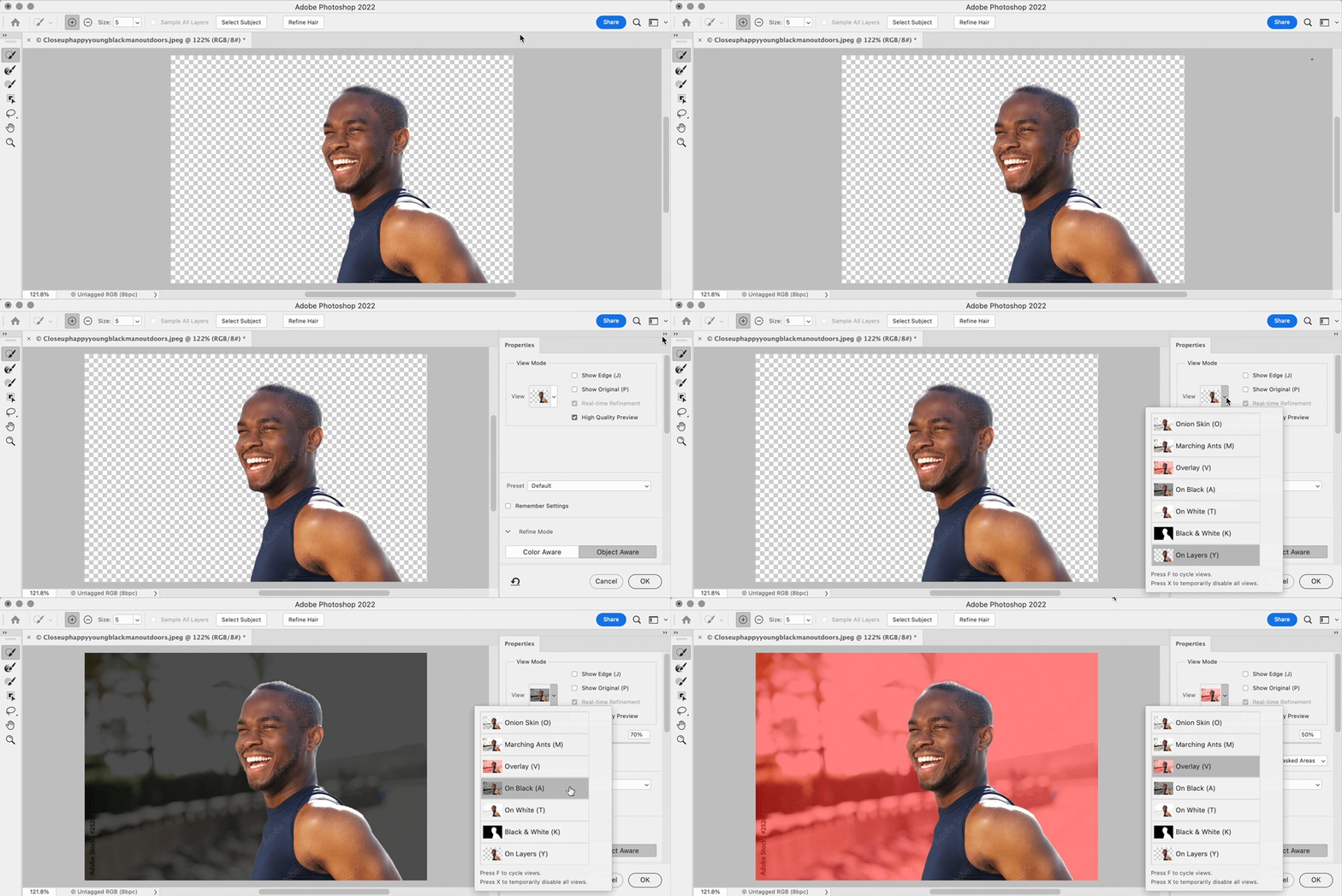
If Photoshop is really inside Select and Mask, but you don’t see View Mode, can you see any of the right panel stack? If not, see if using Reset Select and Mask (shown in the demo below) helps you restore what you should be seeing. Or, if you do see the right panel stack but everything is blank below the Properties tab, double-click the Properties tab to expand it.


2 replies

melissapiccone
Community Expert
Community Expert
April 15, 2022

At the top of select and mask it says view mode. You can click on the little down arrow next to the thumbnail to change your view mode.

Melissa Piccone | Adobe Trainer | Online Courses Author | Fine Artist
Participant
November 14, 2023

What do you do tho if "view mode" is just not there? 


melissapiccone
Community Expert
Community Expert
November 14, 2023

Can you post a screenshot? I would start by resetting your preferences. 

Melissa Piccone | Adobe Trainer | Online Courses Author | Fine Artist
c.pfaffenbichler
Community Expert
Community Expert
April 15, 2022

There seems to be a Layer Mask already, so what did you start from exactly? 

Photoshop 23.3.0 is the current version, but Select and Mask has been available for several versions already. 


What have you done for all-purpose trouble-shooting so far? 

Restoring Preferences after making sure all customized presets like Actions, Patterns, Brushes etc. have been saved might be a good starting point:

https://helpx.adobe.com/photoshop/using/preferences.html

https://helpx.adobe.com/photoshop/kb/basic-trouble-shooting-steps.html

Inspiring
April 15, 2022

I didn't know I have to do troubleshooting just yet - I am just trying to find out where to find the view mode window. The light grey mask appears since I have clicked "select and mask". I am trying to follow the adobe instructions (see attached screenshot), but cannot find the view mode.

Conrad_C
Community Expert
Conrad_CCommunity ExpertCorrect answer
Community Expert
April 15, 2022

If Photoshop is really inside Select and Mask, but you don’t see View Mode, can you see any of the right panel stack? If not, see if using Reset Select and Mask (shown in the demo below) helps you restore what you should be seeing. Or, if you do see the right panel stack but everything is blank below the Properties tab, double-click the Properties tab to expand it.