New Participant
October 25, 2023
Answered

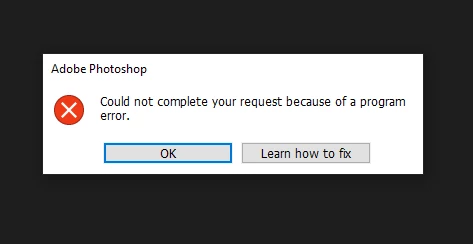
Cannot open files due to "program error"

  • October 25, 2023
  • 6 replies
  • 7663 views

Was just trying to open a .jpg and this keeps popping up. I've done everything under "Learn how to fix", deleted presets, disabled GPU excelleration, updated windows, updated graphics drivers, disabled graphics drivers, uninstalled, re-installed an older version, restarted my computer - I did everything.


I checked the forums and it's all the same advice and mostly frustrated people in the comments with no resolution still even though Adobe has known since 2021 based on the dates of the posts. I guess my post is just to let Adobe know that the bug still persists. Unfortunately, I don't have anymore time to troubleshoot this. If I can't even fix it with an uninstall/reinstall, I'm going to have to cancel my subscription because Photoshop has been rendered useless.
 

Correct answer Damnengine

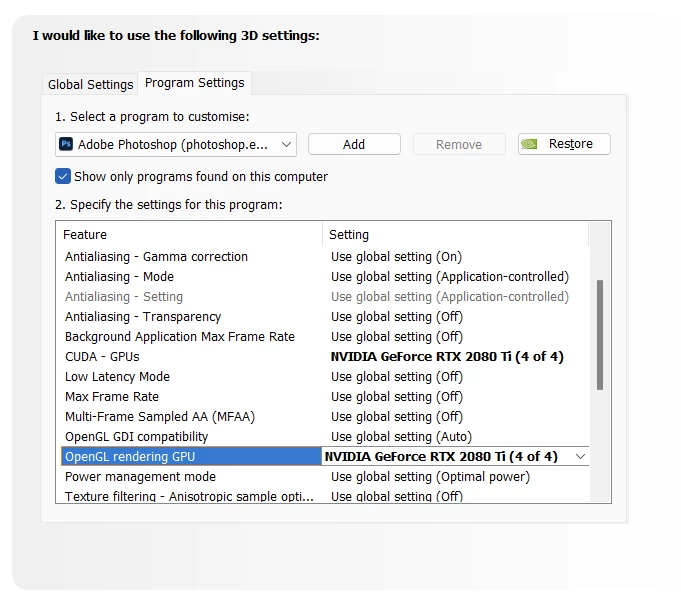
Perhaps this will help some other people who encounter this issue, I have 4 GPUs in my machine and I now assigned one of the GPUs that's not connected to any of my monitors to Photoshop, which seemed to have solve my issue. It'd be really helpful if you could switch the GPU in Photoshop itself btw.


6 replies

Cobra Kai
Participating Frequently
September 29, 2025

I tried absolutely everything to open a PSD file with this error. What worked? I simply went to Photopea online and free, opened and saved a copy of my file. Easy and worked perfectly. 

Cobra Kai
Participating Frequently
September 29, 2025

I see Dgiart_Studio2045 above gave this answer above. Sorry I was unable to delete this.

New Participant
April 1, 2025

that error is coming because of file not saved properly or moving files, the good news is It can be fixed.

Solution:

1. Open Photopea Online Photo Editor

2. Upload your psd file.

3. Go to File>Save as PSD

4. Now open that new psd save file in your photoshop it is now fixed.


Known Participant
April 23, 2025

@Dgiart_Studio2045 Thanks you!! this worked for me

New Participant
June 16, 2024

I understand why this "program error" might happen if the Photoshop settings changed or the installation became corrupted. But why would it happen on only one PSD when I can open other PSDs as usual?

It must be something changed or embedded in that file, right? Not something wrong with Photoshop in general.

Damnengine
DamnengineCorrect answer
Participating Frequently
October 29, 2023

Perhaps this will help some other people who encounter this issue, I have 4 GPUs in my machine and I now assigned one of the GPUs that's not connected to any of my monitors to Photoshop, which seemed to have solve my issue. It'd be really helpful if you could switch the GPU in Photoshop itself btw.


Damnengine
Participating Frequently
October 28, 2023

I'm having the same problem and Adobe is not offering a good solution, telling people to reinstall is honestly pretty infuriating, like we have nothing better to do. It's a bug that seems to reoccur every so many versions, usually the "solution" (which is actually just a bad workaround) is to turn of the GPU, which does impact viewport perfomance. My way around is, is to turn off the GPU, open one document I don't need to work on, then turn on the GPU again and like that I can work.

Pete.Green
Community Manager
Community Manager
October 25, 2023

Sorry for the program error trouble @Elizabeth33163533330o,


Does this happen with all .jpgs that you're trying to open? or particular ones?

You might try using the Cleaner tool to uninstall all things Adobe and reinstall and see if that fixes it. 


Let us know how it goes for you.

Regards,

PG