

Inspiring
October 8, 2021
Answered

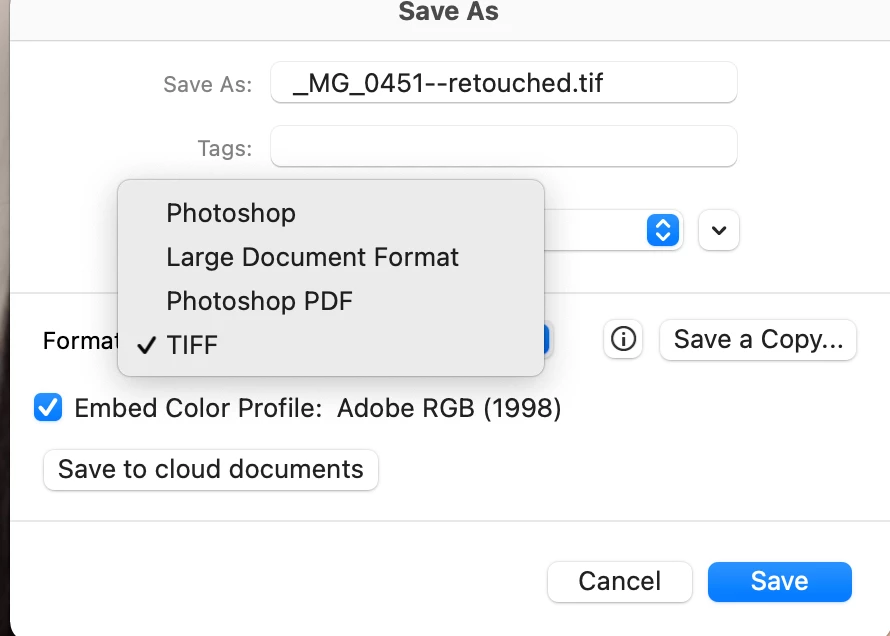
Cannot save as a jpeg

  • October 8, 2021
  • 2 replies
  • 987 views


The hits just keep coming. NEver seen this in my 20 years in PS, now cannot save as a jpeg????


This topic has been closed for replies.
Correct answer John Waller

This was a major issue back in May 2021 with the Photoshop 22.4 release which was fixed in 22.4.2 with a preference setting.


We're now up  to version 22.5.1 so sounds like you need to either a) update or b) check the Legacy Save As box in Preferences. The warning explains the significance of checking the box.


It was an Adobe solution to a change introduced in Big Sur by Apple.

Reason for it is explained here

https://petapixel.com/2021/05/18/photoshops-save-as-function-has-changed-on-mac-heres-why/

2 replies

John Waller
Community Expert
John WallerCommunity ExpertCorrect answer
Community Expert
October 8, 2021

This was a major issue back in May 2021 with the Photoshop 22.4 release which was fixed in 22.4.2 with a preference setting.


We're now up  to version 22.5.1 so sounds like you need to either a) update or b) check the Legacy Save As box in Preferences. The warning explains the significance of checking the box.


It was an Adobe solution to a change introduced in Big Sur by Apple.

Reason for it is explained here

https://petapixel.com/2021/05/18/photoshops-save-as-function-has-changed-on-mac-heres-why/

Participant
October 29, 2022

We seem to be back at the same point. With legacy save as, I managed to be able to save directly to jpeg, but it's still the raw-file that is open afterwards, so I have to click through all the "do you want to save the raw-file" dialogues. Losing so much time with this! Is there a way to fix it?

D Fosse
Community Expert
Community Expert
October 29, 2022

Jpeg doesn't support 16 bit depth, layers or alpha channels. If you have any of those in your open file, Photoshop will protect the original and save out a jpeg copy. So the original remains open until you decide what to do with the full data.


Jpeg is such a limited file format that very little of what you can do in Photoshop will be possible to save as jpeg.

Stephen Marsh
Community Expert
Community Expert
October 8, 2021

You must have missed all the uproar over this... You either press the "save a copy" button that you can see in your screenshot, or if running a fairly up to date version (22.4.2 >) you can go into Preferences > File Handling > Enable legacy "Save As" and read the warning/note.


https://helpx.adobe.com/photoshop/using/saving-images.html
