Participant
March 28, 2023
Answered

Cannot use Photoshop V24.3 to open a jpg file

  • March 28, 2023
  • 3 replies
  • 512 views

After I update Photoshop to v24.3 I cannot load a jpk file to photoshop properly.  The screen is going to flash after a jpg file is oladed into Photoshop V24.3

This topic has been closed for replies.
Correct answer Ged_Traynor

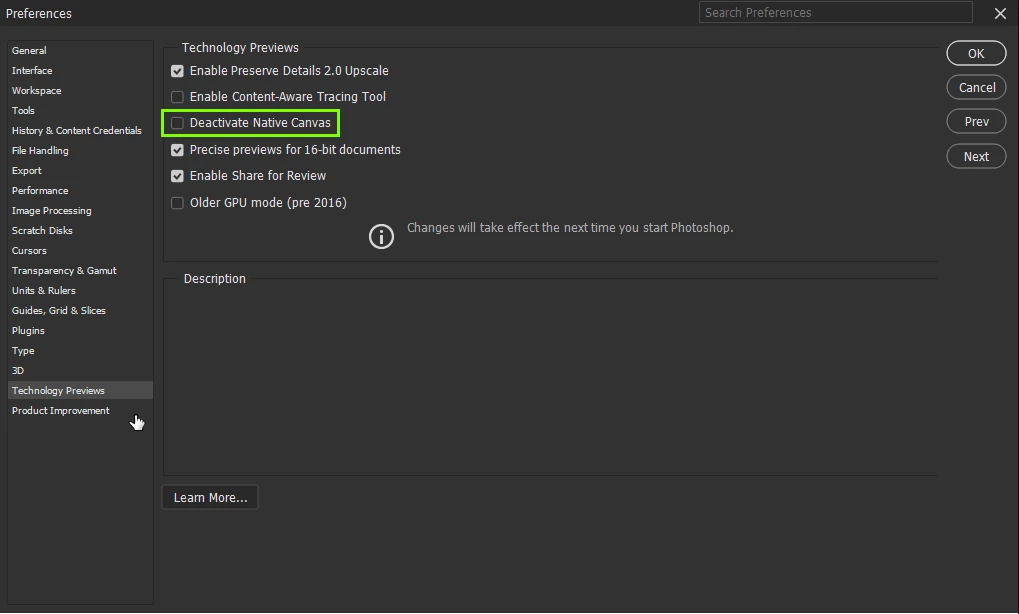
@Dawei26754783zjao enable this option in preferences and restart Photoshop
3 replies

Ged_Traynor
Community Expert
Community Expert
March 28, 2023

It's not really a bug as such, it's an issue that affects people with older GPU's, people with newer GPU's are not having the issue.

Photoshop GPU requirements are changing with each new update, enabling deactivate native canvas should fix the issue for you.

Participant
March 28, 2023

After I reinstalled Photoshop V24.2.1 the screen flash problem is gone and I can load jpg file and the file from Bridge 

 V13.0.3.  Does this means that Photoshop V24.3 has a bug?

Ged_Traynor
Community Expert
Ged_TraynorCommunity ExpertCorrect answer
Community Expert
March 28, 2023

@Dawei26754783zjao enable this option in preferences and restart Photoshop

Participant
March 28, 2023

Hi Gad_Traynor,

Many thanks for your response.  After I reinstalled PS V24.3 looks everything is going to ok whatever I select the option of the deactivate native canvas or not.


Dawei Xu