
Participant
November 1, 2019
Answered

Cant sample texture with mixer brush

  • November 1, 2019
  • 2 replies
  • 2541 views

There has been a previous post on this but it hasn't been answered.

When using the mixer brush on a windows pc if I press Alt +click instead of a sample icon (like the clone stamp) I get an eyedropper and I can only select the colour. There are other posts on this around the net but no answers.

Hope someone can help

Alan
Correct answer magical_workmanship5FD1

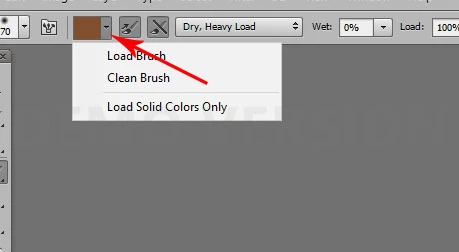
Click the down arrow on the brush color and make certain Load Solid Colors Only is unchecked.

2 replies

magical_workmanship5FD1
Participating Frequently
November 1, 2019

Click the down arrow on the brush color and make certain Load Solid Colors Only is unchecked.

Participant
November 1, 2019

You have just saved my sanity!! That was it the load solid colours only was checked. Thank you, thank Sir! J+Have a good weekend.

Cheers Alan

November 1, 2019

Hi

It works as intended for me, Windows 10 with Photoshop CC 2019 version 20.0.7

Have you tried resetting the tools