Known Participant
March 23, 2020
Answered

Canvas extension color

  • March 23, 2020
  • 6 replies
  • 16053 views

Under the image option when I select canvas size , I found that canvas extension color option is disabled. Therefore I unable to change the color. Please help how to enable the canvas extension color option.

Thank you 

    This topic has been closed for replies.
    Correct answer Jeff Arola

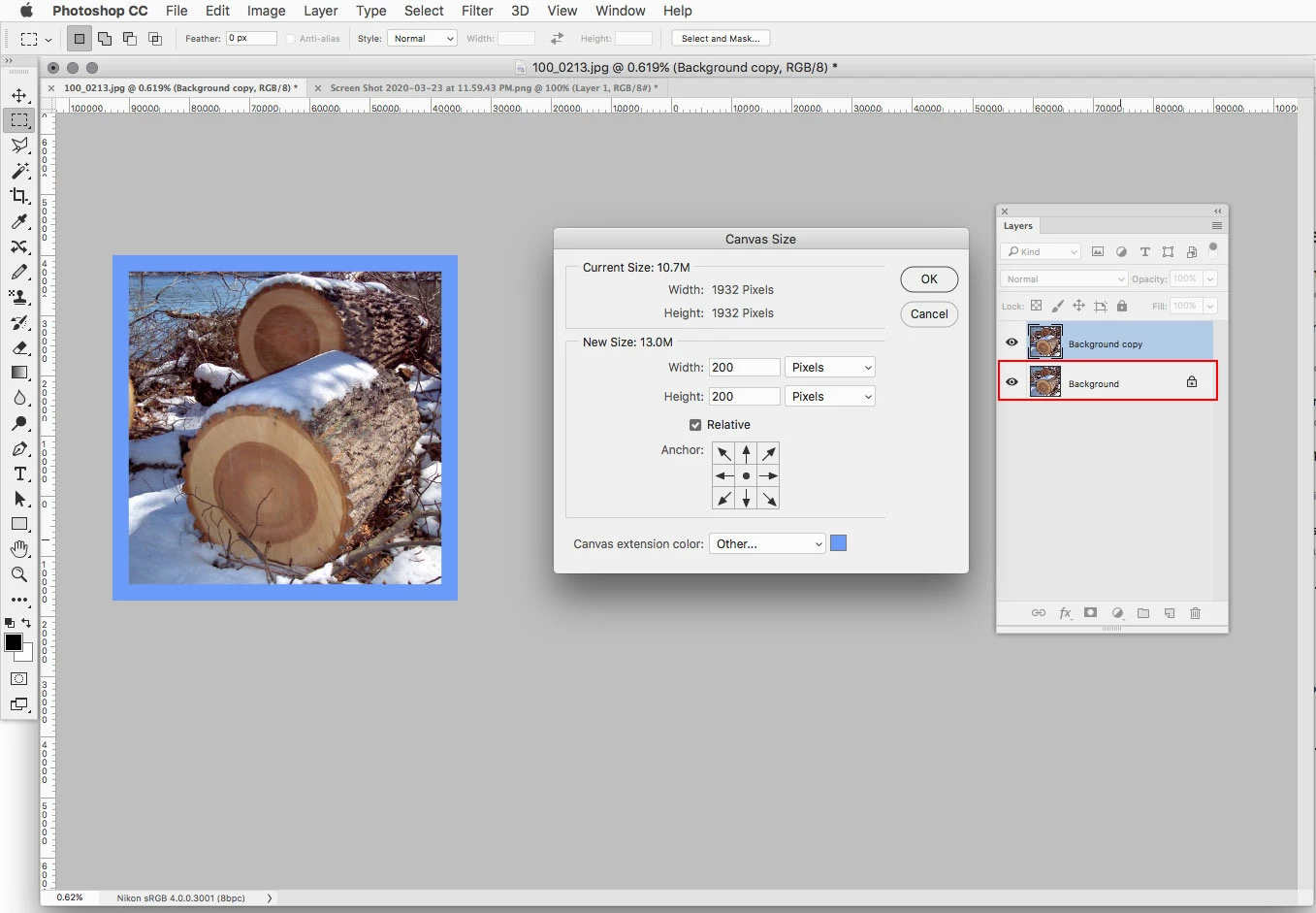
    Your Image needs a Background Layer in order for the Canvas extension color to be available.
     

    6 replies

    April 26, 2023

    Mine wasn't working either with the added locked layer. I ended up saving my file as a .jpg then used that .jpg file instead of the .png, and the canvas color worked fine after that with just the single layer. 

    Participant
    December 7, 2020

    Hi, this is not working for me and I already have a background layer. When I select a new color for the canvas eextension, it doesn't apply it. It stays white. 

    Jeff Arola
    Community Expert
    Community Expert
    December 7, 2020

    What version of photoshop and operating system are you using?


    Can you post a screenshot so we can the Layers panel and your image?

    Participant
    December 7, 2020

    It should be the latest version. It says Photoshop version 22.0.1 

    Computer operating on Windows 10. 


    Jeff Arola
    Community Expert
    Community Expert
    July 2, 2020

    The reason is your document does not have a Background Layer.


    You can turn Layer 1 into a Background Layer by going to Layer>New>Background from Layer


    Angela9731
    Participant
    June 17, 2024

    Thank you!

    July 2, 2020

    why can't change my canvas color? please help me
    my canvas color is block

    Jeff Arola
    Community Expert
    Jeff ArolaCommunity ExpertCorrect answer
    Community Expert
    March 24, 2020

    Your Image needs a Background Layer in order for the Canvas extension color to be available.


    Known Participant
    March 31, 2020

    Thank you so much.

    Peru Bob
    Community Expert
    Community Expert
    March 23, 2020

    I've moved this from the poorly named Community Help forum (which is the forum for issues using the forums) to the Get Started forum.

    What Adobe software are you using?  I'll move it to the appropriate forum.

    Known Participant
    March 23, 2020
    Photoshop 2020