
Participant
July 19, 2022
Beantwortet

Canvas - strange behavior

  • July 19, 2022
  • 4 Antworten
  • 438 Ansichten

In new PS, and one older version, when I open function canvas with Ctrl+Alt+C dimensions for picture are zero.
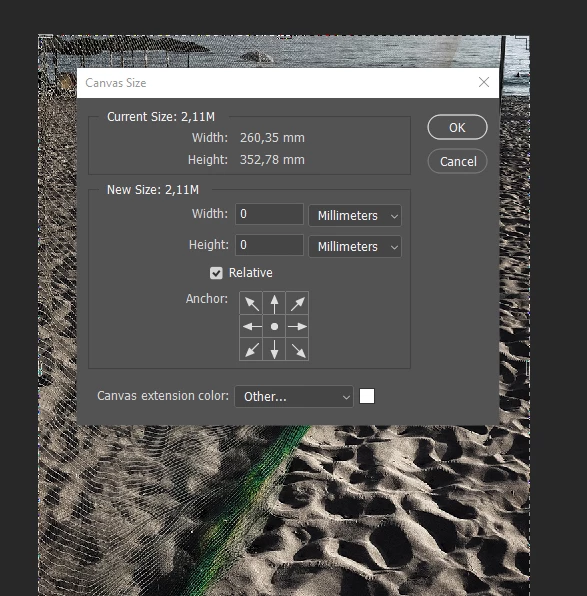
If I write in dimensions of picture with calculation for dimension of paspartu results are unpredictable.


In older wersion PS when press Ctrl+Alt+C

result is
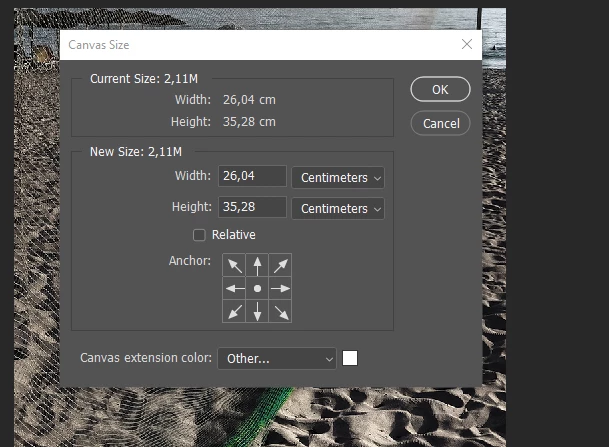
and everything working fine and precise.


Best regads

Zoran Dordevic

Dieses Thema wurde für Antworten geschlossen.
Beste Antwort von nikunj.m

Hi @limijer


Sorry about the trouble with Photoshop. Would you mind sharing the version of Photoshop you're on along with the version of Windows you're working on? Which version of Photoshop is the second screenshot from?


I tried reproducing the issue using the latest version of Photoshop (23.4.2) on Windows 10 but was not able to.

You can try to reset the preferences of Photoshop using the steps mentioned here: https://helpx.adobe.com/photoshop/using/preferences.html#Manually

Please backup your settings prior to resetting the preferences. You can check: https://helpx.adobe.com/photoshop/using/preferences.html#BackupPhotoshoppreferences


Let us know how it goes!

Regards,

Nikunj

4 Antworten

Jason Burnett
Inspiring
August 10, 2022

This is simply because you have the relative option selected. Deselecting Relative will show you your original dimensions. If you enter a number when it says 0,0 for relative, that's how much you want to change the canvas relative to your current size. 0,0 would be no change. Shrink it by 1 inch in both directions, simply select relative and add -1in -1in and TaDa! it will subtract one inch from each dimension. This has been standard for Photoshop as long as I can remember.

Trevor.Dennis
Community Expert
Community Expert
August 10, 2022

A good call Jason, and another example of why screenshots are so helpful.

nikunj.m
Community Manager
Community Manager
July 20, 2022

Glad that helped! Let us know if you need help with anything else.


Thanks,

Nikunj

limijerAutor
Participant
July 20, 2022

Hello Nikunj. Thank you for time and willing to help.

I use 23.4.2 Release. I noticed problem about 2-3 days before upgrade at newest version (July 19).

All workin well in version 21.2.12

*******************************

After reseting preferences, all working well. Thank you very very much for help!

Best regards

Zoran Dordevic

nikunj.m
Community Manager
nikunj.mCommunity ManagerAntwort
Community Manager
July 19, 2022

Hi @limijer


Sorry about the trouble with Photoshop. Would you mind sharing the version of Photoshop you're on along with the version of Windows you're working on? Which version of Photoshop is the second screenshot from?


I tried reproducing the issue using the latest version of Photoshop (23.4.2) on Windows 10 but was not able to.

You can try to reset the preferences of Photoshop using the steps mentioned here: https://helpx.adobe.com/photoshop/using/preferences.html#Manually

Please backup your settings prior to resetting the preferences. You can check: https://helpx.adobe.com/photoshop/using/preferences.html#BackupPhotoshoppreferences


Let us know how it goes!

Regards,

Nikunj