glaustin
Inspiring
April 27, 2016
Answered

CC 2015: How do I Apply a Brush Stroke as a Stroke on a Shape?

  • April 27, 2016
  • 2 replies
  • 39299 views

Hi Guys

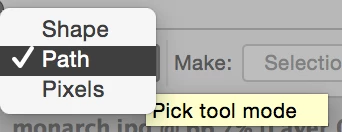
I have just used the ellipse shape tool to draw a circle and I want to use a brush stroke for the stroke. At the moment the moment the stroke path is greyed out and the only stroke I can apply is a narrow, solid stroke from the Path's toolbar. The toolbar is set to 'shape', but if I try path I can't seem to do anything.

Can I do this in CC 2015 and if so, how?

Regards,

Graham
This topic has been closed for replies.
Correct answer jane-e

Select the Path mode before you draw, then draw a Path instead of a Shape.

In the Brushes panel, select your brush and whatever options, such as size.

In the Swatches or Color or Tools panel, select your foreground color

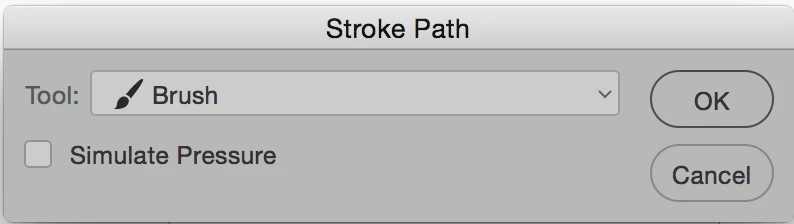
In the Paths panel, Stroke the path > Select Brush and it will use your current Brush settings and foreground color. You can use the panel menu or the button at the bottom of the panel.

2 replies

JJMack
Community Expert
Community Expert
April 27, 2016

For stroke to be available some layer that can be stroked must be Photoshop's current target.

JJMack
Participating Frequently
February 13, 2023

Oh my gosh, this was making me crazy.  This finally fixed my issue as well.  Thanks!!

jane-e
Community Expert
jane-eCommunity ExpertCorrect answer
Community Expert
April 27, 2016

Select the Path mode before you draw, then draw a Path instead of a Shape.

In the Brushes panel, select your brush and whatever options, such as size.

In the Swatches or Color or Tools panel, select your foreground color

In the Paths panel, Stroke the path > Select Brush and it will use your current Brush settings and foreground color. You can use the panel menu or the button at the bottom of the panel.