
justins48383101
Participant
March 4, 2019
Answered

CC 2019 changes the way Adjustment layers are selected, is there any way to disable?

  • March 4, 2019
  • 2 replies
  • 701 views

In CC 2019, when you select an adjustment layer, the cursor instantly highlights the first numeric box in the adjustment layers properties box. This causes frustration when you click on the adjustment layer and then press delete, you then have to deal with the error "Invalid numeric entry. An integer between -100 and 100 is required.  Previous value inserted."

Its not a huge deal, but it is really annoying when it keeps happening...Is there anyway to turn this off so that it does not automatically highlight the first numeric box. I like a lot of the other changes in 2019, but this one is really driving me nuts haha. Thanks.
This topic has been closed for replies.
Correct answer Semaphoric

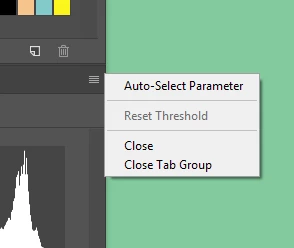
In the Properties panel menu, un-check "Auto Select Parameter".


2 replies

Semaphoric
Community Expert
SemaphoricCommunity ExpertCorrect answer
Community Expert
March 4, 2019

In the Properties panel menu, un-check "Auto Select Parameter".


justins48383101
Participant
March 4, 2019

Thank you! Worked like a charm.

Chuck Uebele
Community Expert
Community Expert
March 4, 2019

I'm not finding that to be the case. What adjustment layer are you having issues with?

justins48383101
Participant
March 4, 2019

Hi, it is happening with all of the adjustment layers that have a place that you can enter a numeric value. I also included a picture in case it is helpful. This was not present before I updated, so I'm hoping there is a way to turn it off. Thank you for your time.
The affected layers would be:

selective color

theshold

posterize

channel mixer

photo filter

black& white

color balance

hue/saturation

vibrance

exposure

levels

brightness/contrast