

JJMack
Community Expert
Community Expert
October 16, 2018
Answered

CC 2019 new Frame feature scaling

  • October 16, 2018
  • 1 reply
  • 3514 views

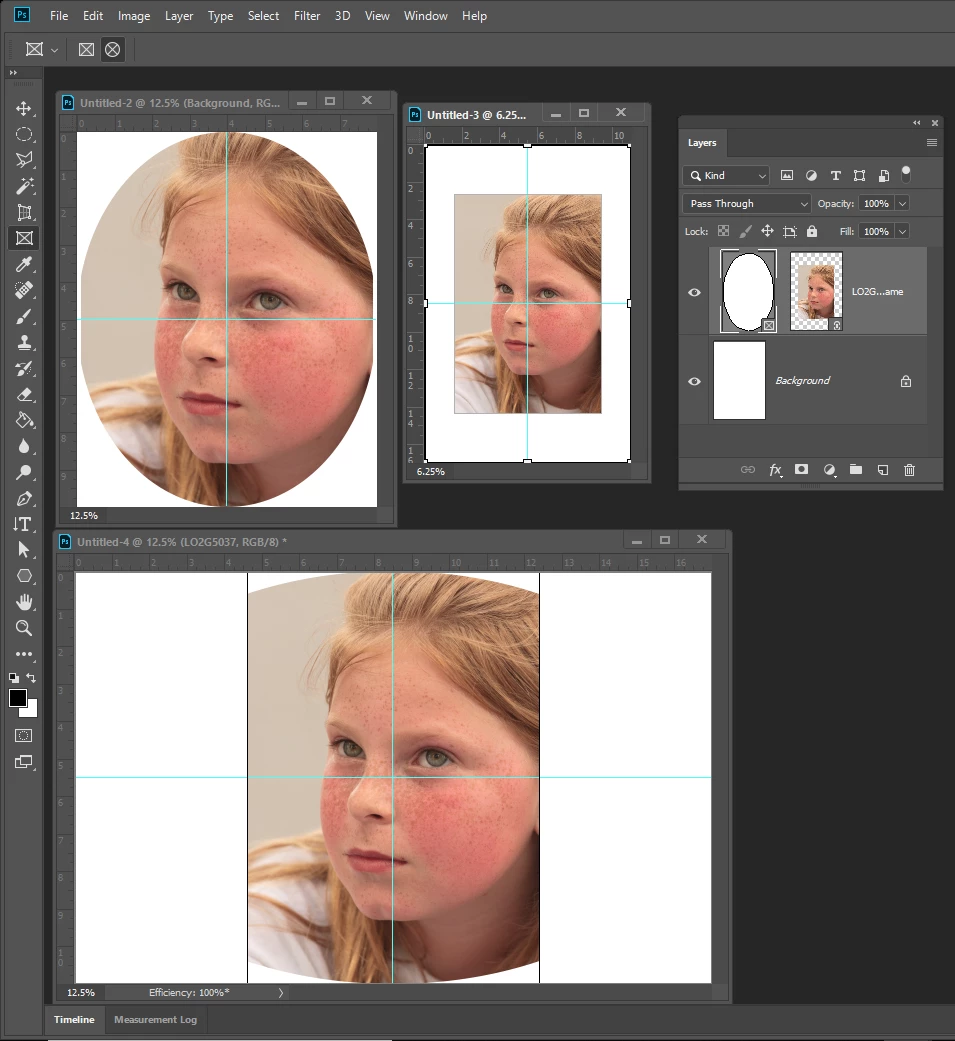
Seems to have a problem with its image scaling populating  frames. Her three example  of placing a 2:3 Portrait into a elliptical frame,  Documents have different sizes and aspect ratio.  In one the image was just not scaled to the correct width close but no cigar. In second large portrait document  the image was scaled to a rectangle the did not come close to filling the frame.  The  in the Landscape document the portrait image was not scaled to fill the frames width.   I know the portrait composition would not be acceptable if scale to fill the frame it is just as unacceptable not filling the frame.   IMO I feel Photoshop should scale the image to fill the frame area and let the user decide it the clipped composition is acceptable.
    This topic has been closed for replies.
    Correct answer JJMack

    I believe it may be Resize when place preference is messing  up your new Frame feature.  I had to deal with that in my Photo Collage Toolkit scripts in CS2.

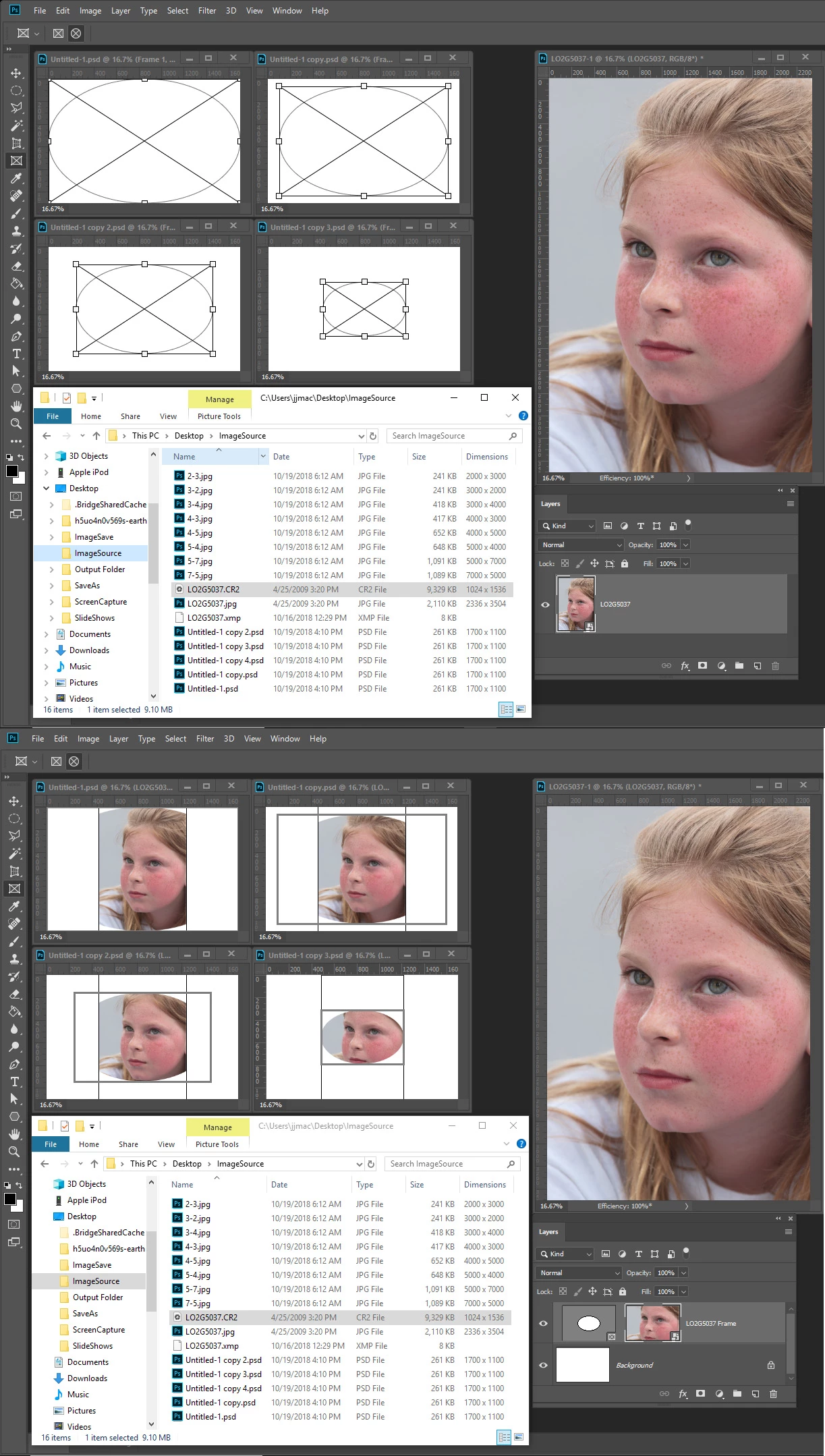
    Here I created a 1700x1100 px  100dpi  which is smaller than my portrait 8MP RAW CR2 file  2336x3505px size.  I create a full canvas size frame  17:11 aspect ratio.   I then duped the document three time and scale the frame in the duplicated documents down some while maintaining  the 17:11 aspect ratio.  I then dropped my CR2 RAW file on each frame the result show four different downsizing  one is actually correct.


    Adobe need to do a better job designing, developing and testing software.

    This is tyhe first time I ever marked one of my replies as correct.  But I believe it is somthing Adobe need to do.

    1 reply

    ChristopherButler
    Adobe Employee
    Adobe Employee
    October 19, 2018

    When placing layers in a Frame, we scale down, but do not scale up. So if the pixel dimension of the content is smaller than the Frame, we just place at native size.

    This was a feature design decision. Unfortunately, The Frame Tool drag and drop behavior is being pitched as "fill the Frame" behavior.

    Is the request to automatically scale up as well? Or have a gesture that does that?

    JJMack
    Community Expert
    JJMackCommunity ExpertAuthor
    Community Expert
    October 19, 2018

    The only reason I'm looking at the new Frame feature is to see if I can use them the in my Photo Collage Toolkit.   My toolkit has two short comings IMO.  It is limited to 53 image because Photoshop  Alpha channel limit is 53. The other is rotation and perspective.  From My testing I can easily see I can use Photoshop Frames to remove the 53 Image  limit.

    However Photoshop Frame scaling you tell me will not scale small image up.  Currently I also see like my toolkit it  also does not place in image with rotation and perspective distortion. 

    IMO it not worth changing my package if all I can do is lift the 53 Image limit at the cost of complicating  my template design and covering all existing template to use Frames instead of Alpha channels.

    I do not feel the 53 limit is that bad for my toolkit has a script that tile out as many image as you want to up to Photoshop 8,000 layers limit. That script does not use smart object layer to cutout the overhead required for embedded smart objects the Place image filse size to reduce load place places on  Photoshop.

    My package main function is automatic population of Collage template.   Though one script has interactive Collage assisted population like  Photoshop new frame tool.  Template are normally Batch populated or populate automatically and left open in Photoshop so the user can tweak the placed smart object image adjust their composition, add rotation and perspective etc.

    If Adobe add support for rotation and distortion I would most likely op for using frames layer.  I don't see frames as a great addition.  I started automatically populating Collage in CS2.

    The Frame tool should work as documented IMO.  I opened a Adobe preset 11x17 300dpi document a was using it Portrait and Landscape orientation  testing to see how mismatch Aspect Ratio would be handled  and was surprised when a 8.2 Raw File was not resize like documented.  I had no problem correcting the scaling.

    I expect the Portrait to Landscape composition to be bad . I did not expect the portrait to be scaled down in size when it should have been scaled up in size. I believe Place resize  when placing option is messing Frame implmentation.

    JJMack
    JJMack
    Community Expert
    JJMackCommunity ExpertAuthor
    Community Expert
    October 20, 2018

    Regarding the Preference "Resize during place" If left unchecked. I think it's doing exactly what you told it to do, which is to not resize newly placed content.

    However, I think it's the ppi conversion that's messing things up. I'll bet your incoming image reports itself at 300 ppi, while your destination document is 100 ppi. There seems to be a calculation that is resampling the incoming image down to 100 ppi before we do the Frame size-to-fit calculation. I've managed to reproduce this behavior with my own files.

    This is a bug, and I've logged it as PS-21236.

    In the meantime, if your 1700x1100 destination document was 300 ppi when you placed your images in the Frames, I think it should work properly. If you can confirm, I'd appreciate it.

    Thanks!

    Edit add:

    Alternatively, you can tell Camera Raw to deliver the image data at 100 ppi, and then you can leave your destination document alone.

    I'm speculating here, but this issue might be specific to Camera Raw. I'm not sure yet. I'll need to try with other formats with mismatched ppi between source and destination.


    No that was my original test. The  placed CR2 Raw image should have been scaled up in size to fill the frame as documented but the new feature does not resize up in size,  Instead the Image was scaled down in size because the default Adobe place  preference is to scale placed image smart object to fit on canvas.  So not only was the image not scaled up in size it was scaled down in size to fit on canvas. The smart object was scaled down in size to fit on canvas. The new feature has issues plan and simple..

    Additionally if my machine enters sleep mode while Photoshop is up.  When my machine is woken up from sleep most of the times Photoshop is none responsive and I have to terminated Photoshop with the task manage. When I restart Photoshop, Photoshop open the recovery files the were created.  CC 2019 has issues.

    I also can not drag an image from an open document and drop it on a frame layer.  When I do a new layer is added to the document with the frame layer the frame is not populated/filled what ever you want to call it. The new feature does not work well at all..

    JJMack