
MichaelCluff
Participating Frequently
June 17, 2015
Answered

CC2015 Error on PC: "Something went wrong initializing Creative Cloud Libraries" - how to repair?

  • June 17, 2015
  • 38 replies
  • 27132 views

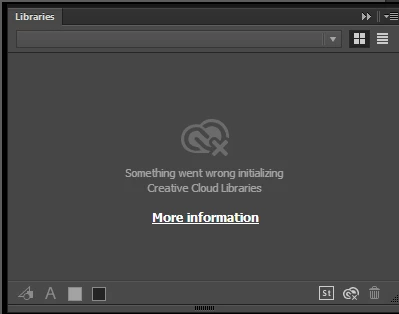
Upgraded all of my apps to CC2015, but when trying to use the Libraries features I get the error (pictured below): "Something went wrong initializing Creative Cloud Libraries".


The tooltip over the Creative Cloud logo says "Failed to Initialize." While the "more information" link (Creative Cloud Help | Creative Cloud Libraries) redirects to the generic Libraries Help.


How to repair? So far this is the case for Illustrator and Photoshop on my PC. (This is not a problem on my Mac.)

This topic has been closed for replies.
Correct answer danny_jack_johnson

This worked for me. With Photoshop or Illustrator running (If on a mac), go to your activity monitor and look for CCLibrary. Click the X to stop the the service, it will automatically restart and your library will reappear.

38 replies

Apologize4AllTheEmoticons
Adobe Employee
Adobe Employee
July 28, 2015

Hello,

Sorry you're having issues with this service, if the problem has not been resolved I've attached a link below for using a log collector tool below:

https://helpx.adobe.com/creative-cloud/kb/cc-log-collector.html


If you run this tool and and send us the resulting zip file it will help us diagnose the issue you are seeing.

Thanks,

Jason

Jeffthoughtlongandhard
Participant
July 17, 2015

I had this problem too. I tried reseting the hosts file on my mac, I tried turning off my firewall, no luck. Then I disconnected from the wifi network at my school, and connected to my iPhone's hotspot, and it worked. This problem could be related to your wifi network. Hope this helps.

danny_jack_johnson
danny_jack_johnsonCorrect answer
Participant
July 28, 2015

This worked for me. With Photoshop or Illustrator running (If on a mac), go to your activity monitor and look for CCLibrary. Click the X to stop the the service, it will automatically restart and your library will reappear.

RmnsCosta
Participant
July 28, 2015

Thank you. Reseting the CCLibrary on the activity monitor worked for me.

Participant
July 15, 2015

Still can't get this workingh for me on my mac.. tried the host clear out etc... re in stall.. real shame as its just not good enough.. should just work!!

Participant
July 15, 2015

Has anyone found a proper fix for this??? I have tried everything and I am still getting the error in all CC apps. Come on Adobe! This is almost unacceptable...

Ma_Joad
Participating Frequently
July 15, 2015

Hi

I also tried everything until i completely reset the host file and suddenly it worked.

Did you try ?

Participant
July 15, 2015

Hi, AlanPerfet, thanks for your reply. I had checked my host file and it was fine, but the libraries panel was still not loading.

However, I just now deleted the contents of the host file, saved it, and then put the contents back and saved again. Signed out of CC and then signed back in, and now the library panel is working fine.

Strange, but it seems to be working again for now

MrSlash
Participant
July 7, 2015

Hi, I had the same issue. CC Libraries need to use an internet connection to retrieve all the assets. If it's not working don't forget to check:

The host file should look like this

##

# Host Database

#

# localhost is used to configure the loopback interface

# when the system is booting.  Do not change this entry.

##

127.0.0.1 localhost

255.255.255.255 broadcasthost

::1             localhost

fe80::1%lo0 localhost

Hope it helps!

Ma_Joad
Participating Frequently
July 7, 2015

Perfect, it works perfectly well now !

ponto2002
Participant
June 27, 2015

i have the same issue and i noticed something weird, i use my laptop where i got my installation on 2 different internet connections at home and work to my surprise cc libraries load on my work  connection but not my home's.

Ma_Joad
Participating Frequently
June 29, 2015

Same issue with me. I tried to connect to my libraries at work and everything is fine. Since this is the same kind of direct internet connexion with proxy or firewall i really can't see what can be the problem. It's really annoying that no adobe server specialist can track whatever is going wrong with our libraries.

Participant
June 22, 2015

Same issue here. It affects all installed 2015 CC apps.

Participant
June 29, 2015

It seems to be fixed on my computer (Mac + Yosemite)

Ma_Joad
Participating Frequently
June 22, 2015

Ok a quick update on my issue. I tried to reinstall all the app : didnt work. I tried to install 2014 CC apps : didnt work either.

I had 4 chats with customer assistance and none was able to find a solution.

I also tried to look for a solution with Extension Manager but it failed again.

My Color Themes are working by the way..

Really, i cant see what's going wrong with those libraries !

Ma_Joad
Participating Frequently
June 22, 2015

Same issue here, i tried everything :

- hosts

- deconnect CC

- restart mac

- New admin session

Jahnu_AU
Inspiring
June 20, 2015

No idea what happened but mine started working again today (Win 8.1 Pro). Nothing done to the suite, just out of the blue started working across all apps. Not much help I know, but may give some hope.