
Exit
  • Global community
    • Language:
      • Deutsch
      • English
      • Español
      • Français
      • Português
  • 日本語コミュニティ
  • 한국 커뮤니티
0

CC2022 Brush size dynamics always on

Engaged ,
Mar 15, 2022 Mar 15, 2022

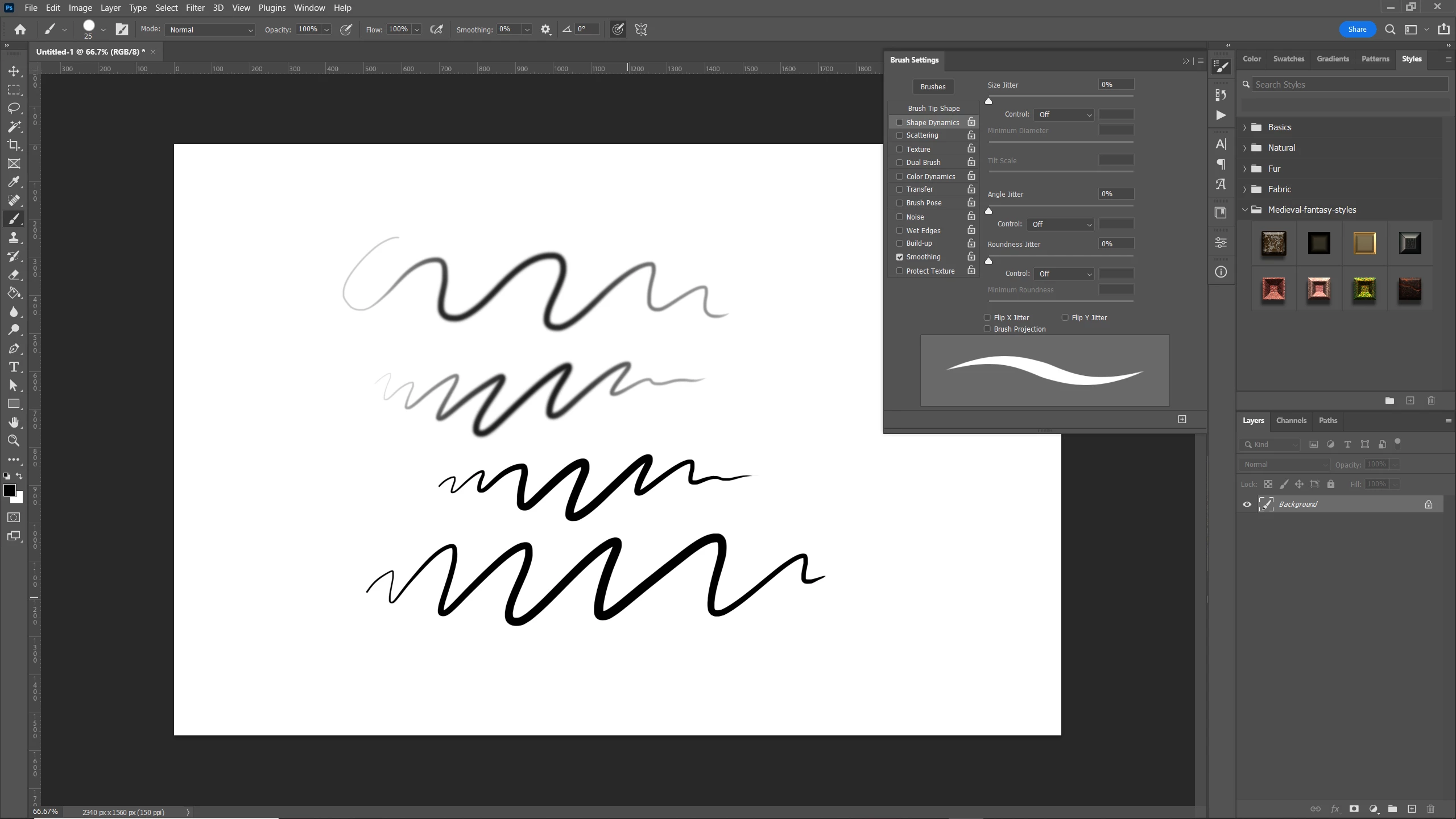
Having a very strange, but not entirely unsurprising issue with Photoshop. The size dynamics of all brushes is always actuve. I've tried using the standard hard and sof round brushes (see the attached image) and there is pen pressure controlling the size. 


Unchecking size dynamics and even selecting 'off; from the dropdown dows nothing. All the other brush settings can be changed and the brush window shows the previews as normal. Size dynamics is always on. Usin a wacom intuous and all drivers are up to date. Also updated to the latest version of Phososhop (23.2.2)

I've also tried the fix of creating a custom PSDUserConfig text file from this thread:


https://community.adobe.com/t5/photoshop-ecosystem-discussions/dont-work-pen-pressure-photoshop-cc-2...


Which always fixed pen pressure issues in photoshop. Not this time 😞 Any ideas what is going on, or anyone else notcing this? Im using Windows 10 (12 core with 64GB ram)
Untitled-2.jpg

TOPICS
Windows
687
Translate
Report
Community guidelines
Be kind and respectful, give credit to the original source of content, and search for duplicates before posting. Learn more
community guidelines

correct answers 1 Correct answer

Engaged , Mar 15, 2022 Mar 15, 2022

Thanks @Ged_Traynor but no joy. I did however reset the preferences and that seems to have done the trick. 

Really bizarre one that! If it rears its head again I'll flag it.

Translate
Adobe
Community Expert ,
Mar 15, 2022 Mar 15, 2022

Hi

Not noticing the issue on my end, on Windows 10 with Photoshop version 23.2.2, I also have a Wacom Intuos

Try resetting the Tools

2022-03-15 17_44_42-.png

Translate
Report
Community guidelines
Be kind and respectful, give credit to the original source of content, and search for duplicates before posting. Learn more
community guidelines
Engaged ,
Mar 15, 2022 Mar 15, 2022

Thanks @Ged_Traynor but no joy. I did however reset the preferences and that seems to have done the trick. 

Really bizarre one that! If it rears its head again I'll flag it.

Translate
Report
Community guidelines
Be kind and respectful, give credit to the original source of content, and search for duplicates before posting. Learn more
community guidelines
Adobe Employee ,
Mar 15, 2022 Mar 15, 2022

Did you happen to keep a copy of your preferences that had the bad setting? I'd like a copy.

Translate
Report
Community guidelines
Be kind and respectful, give credit to the original source of content, and search for duplicates before posting. Learn more
community guidelines
Engaged ,
Mar 15, 2022 Mar 15, 2022

Hi @J453 I m afraid i didn't, i thought i did but i actually copied the 2020 preferences file to my desktop not the 2022 one, sorry

Translate
Report
Community guidelines
Be kind and respectful, give credit to the original source of content, and search for duplicates before posting. Learn more
community guidelines
New Here ,
Oct 26, 2023 Oct 26, 2023
LATEST

Was having this issue as well, finally figured it out.  Press this button on your horizontal tool barScreenshot2023-10-26_0euOcDRS-004403.jpg

Translate
Report
Community guidelines
Be kind and respectful, give credit to the original source of content, and search for duplicates before posting. Learn more
community guidelines