Exit
  • Global community
    • Language:
      • Deutsch
      • English
      • Español
      • Français
      • Português
  • 日本語コミュニティ
  • 한국 커뮤니티
0

change a drawing color

Participant ,
Dec 30, 2017 Dec 30, 2017

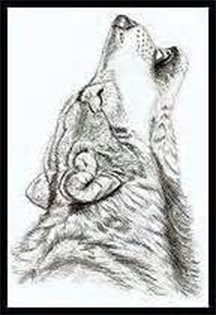
I have a drawing that I want to change from black to red, for wood burning purpose

wolf.jpg

I'm missing a step in this tutorial.

https://www.google.com/search?rlz=1C1KMZB_enUS572US572&q=how+to+change+a+black+line+drawing+to+color...

397
Translate
Report
Community guidelines
Be kind and respectful, give credit to the original source of content, and search for duplicates before posting. Learn more
community guidelines
Adobe
Community Expert ,
Dec 30, 2017 Dec 30, 2017

I did not not look at your tutorial, but this is how to colorize

Translate
Report
Community guidelines
Be kind and respectful, give credit to the original source of content, and search for duplicates before posting. Learn more
community guidelines
Community Expert ,
Dec 30, 2017 Dec 30, 2017

Hi

Trevor's method is correct for making the dog range from pure black to red. If you want all pure red (no black in it) try this.

1. Go to the channels panel and select the red channel

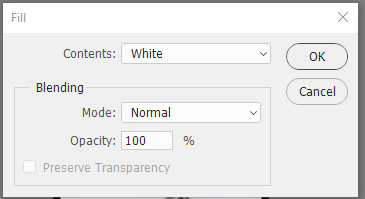
2. Press Shift+F5 and fill with White

3. Done - all areas that were previously black are now pure red - just as if red ink had been used

Dave

Translate
Report
Community guidelines
Be kind and respectful, give credit to the original source of content, and search for duplicates before posting. Learn more
community guidelines
Participant ,
Dec 30, 2017 Dec 30, 2017

Thank you for your suggestions.  I also have seen a way to use the color overly.  Which the video talks about which I like.  I'm having problem getting the correct background.  The reason I use a different color than black, is it makes it easier to see what area I haven't burned.  I would like to use a lighter shade of red.

thanks

Mike

Translate
Report
Community guidelines
Be kind and respectful, give credit to the original source of content, and search for duplicates before posting. Learn more
community guidelines
Community Expert ,
Dec 30, 2017 Dec 30, 2017

Hi

Ok Try this .

1. Add a fill layer (Layer - New Fill Layer - Solid color ) in the color you want to use

2. Change the blending mode to screen

Dave

Translate
Report
Community guidelines
Be kind and respectful, give credit to the original source of content, and search for duplicates before posting. Learn more
community guidelines
Participant ,
Dec 30, 2017 Dec 30, 2017

That's what I was trying to figure out is how to get the drawing on it's own background

thanks

Mike

Translate
Report
Community guidelines
Be kind and respectful, give credit to the original source of content, and search for duplicates before posting. Learn more
community guidelines
Community Expert ,
Dec 30, 2017 Dec 30, 2017
LATEST

If you use the methods above - then you don't need to get rid of the white. However if you want to :

1. In the channels panel click on the RGB channel then at the bottom load channel as selection
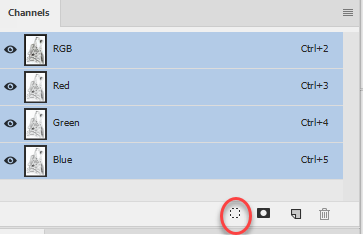
2. Add a layer mask hiding the selection (Layer >Layer Mask >Hide Selection)

You can now add your color overlay as a layer effect (I've added a white bottom layer so you can see it)

Dave

Translate
Report
Community guidelines
Be kind and respectful, give credit to the original source of content, and search for duplicates before posting. Learn more
community guidelines