
Participant
November 30, 2022
Answered

Change Color to Orange

  • November 30, 2022
  • 1 reply
  • 1687 views

Hello,


This is my first post.  I'm fairly new to Photoshop but have had some good success so far.  I am using Windows 11, Photoshop 24.  


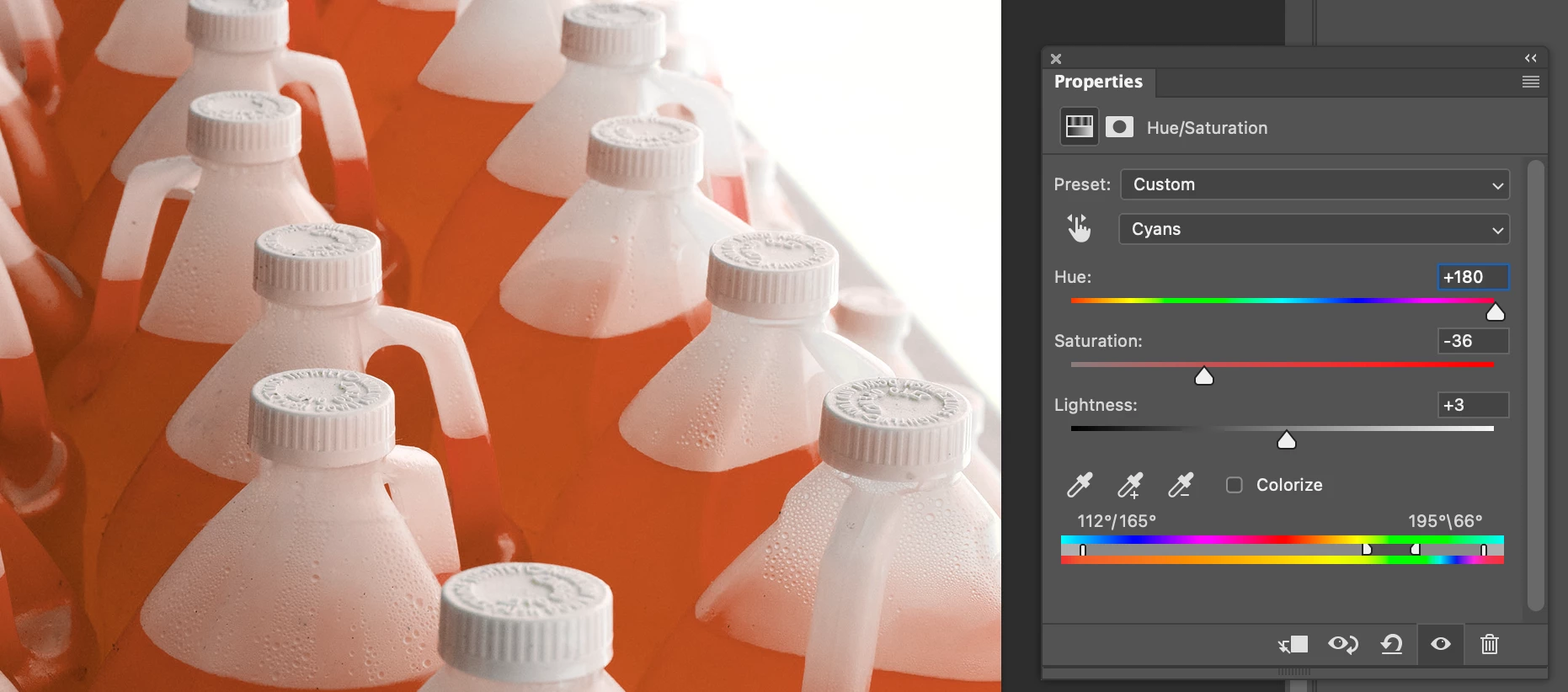
I have a photo of some jugs with fluid in them.  The original photo has blue fluid.  I need to change the color of the fluid to:  magenta, green, purple and orange.  I have successfully changed the colors to magenta, green and purple but I can't seem to get it to orange.  Any suggestions?  See attached photo.


This topic has been closed for replies.
Correct answer Kevin Stohlmeyer

I would use a Hue Saturation Adjustment Layer and choose the Cyan channel to adjust the hue accordingly:

From there you can adjust levels, etc to brighten the image.


1 reply

Kevin Stohlmeyer
Community Expert
Kevin StohlmeyerCommunity ExpertCorrect answer
Community Expert
November 30, 2022

I would use a Hue Saturation Adjustment Layer and choose the Cyan channel to adjust the hue accordingly:

From there you can adjust levels, etc to brighten the image.


Kevin Stohlmeyer
Community Expert
Community Expert
November 30, 2022

Added bonus - you can also use the mask attached to the layer to isolate your adjustments further.

Participant
December 1, 2022

Kevin,


Thank you!  In between our messages, what I did was

1. Changed the color space to LAB. 

2. Selected a color range.  

3. Made a Hue / Saturation Adjustment Layer to get to the desired orange.

4.  Made a Brightness / Contract Adjustment layer.


This worked.  But, your method obviously worked too.  THANK YOU.