Participant
July 17, 2017
Answered

Change colour in animated gif

  • July 17, 2017
  • 4 replies
  • 53473 views

I have an animated gif and need to change the colour - I'm new to Photoshop

    This topic has been closed for replies.
    Correct answer davescm

    Hi Dave Thanks

    I'm just looking to change to a single color - Red.

    I tried  "Save For Web (Legacy), but double click on individual colors in the export dialog's Color Table, to change that specific color"  but the GIF is only showing grayed out Color Table.

    When I get the colors working how do I get each individual circle in the GIF to change to RED

    Thanks


    Put a solid color fill layer at the top of the layer stack. Set the blending mode to color

    Then Export - Save for web with settings as shown
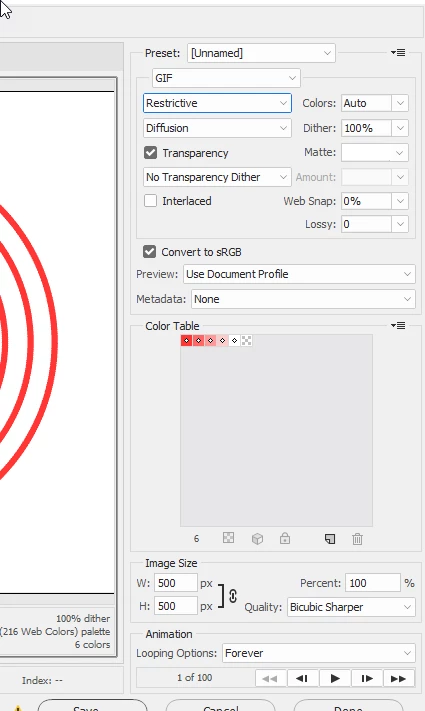
    Dave

    4 replies

    Participant
    September 2, 2023

    change the color


    Participant
    September 2, 2023
    scope-of-digital-marketing-content.gif
    Semaphoric
    Community Expert
    Community Expert
    July 17, 2017

    I can think of a couple of approaches, depending on what sort of change you want.

    Open the GIF in Photoshop. It will come in as a bunch of layers, one for each frame. If your animation is like a video, with a wide range of colors, you could put a Hue/Saturation Adjustment Layer as the topmost layer, and you can adjust the color in the Properties panel. When you add the Adjustment Layer, it will come in with a mask, which you can paint on to restrict the effect to specific areas.When you have things the way you want, File > Export > Save For Web (Legacy).

    If your animation is simple, with only a few colors, you could just open it in Photoshop, and Save For Web (Legacy), but double click on individual colors in the export dialog's Color Table, to change that specific color.

    c.pfaffenbichler
    Community Expert
    Community Expert
    July 17, 2017

    Unless you provide more information, in particular the image in question or a meaningful screenshot (including the relevant Panels), it might be difficult to provide pertinent advice.

    Participant
    July 17, 2017

    Hi, this is the image - Thanks

    c.pfaffenbichler
    Community Expert
    Community Expert
    May 17, 2019

    Sorry .... but the animation won't be transparent after adding a white background.


    Sorry .... but the animation won't be transparent after adding a white background.

    How often do I have to repeat that a Gradient Overlay Adjustment Layer provides an alternative?