Participant
June 11, 2019
Answered

Change font size in Photoshop CS6

  • June 11, 2019
  • 1 reply
  • 6627 views

Dear all,

I need a little help... I have tried to change the font size in edit - preferences - interface - UI Font Size. It is already set for "Large", however the font size is extremely smal and it is almost impossible to navigate in the program..

My screen is set for 2880x1620.

I have tried to change the font size several times and restarting the program, with no effect... what am I doing wrong..??

Please help... 🙂

KR
Paul-Henrik
    Correct answer

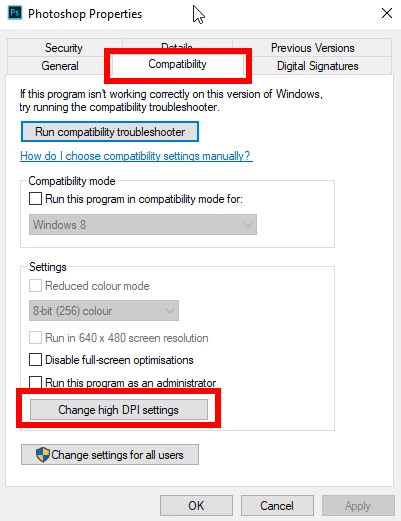
    Try this, close Photoshop and right click on either the Photoshop.exe or the Photoshop shortcut and select properties, then click on the compatibility tab > change high DPI settings

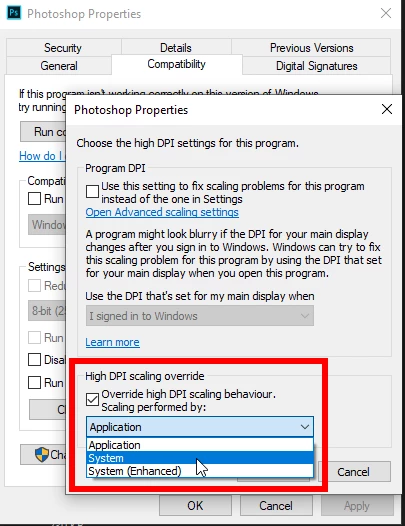
    Apply the settings below

    1 reply

    June 11, 2019

    Hi

    What operating system do you have

    HaagneAuthor
    Participant
    June 11, 2019

    Hi Ged,

    WIN 10 Pro

    Correct answer
    June 11, 2019

    Try this, close Photoshop and right click on either the Photoshop.exe or the Photoshop shortcut and select properties, then click on the compatibility tab > change high DPI settings

    Apply the settings below