

Question
Change font style and colors for letters and words
Hello guys and experienced people
I really hope you help me
After suffering and searching, I found some lines and modified them until I reached this script, but I only want a slight modification to it
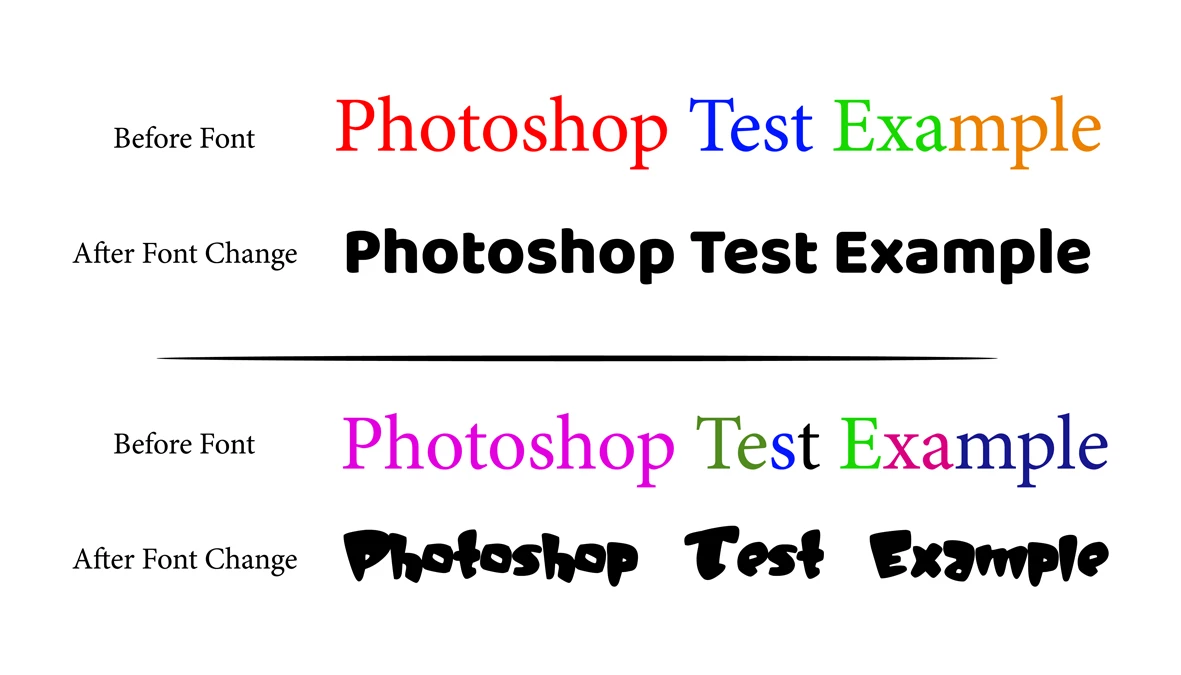
When I change the font of a text layer with colored letters to another font, the color of the entire text is changed to Solid Color
I just want to modify the font to be changed while preserving the color of the letters of the text layer
The problem that appears with me when using the code
try {

var fpsname = "DINNextLTArabic-Heavy";
var fn="DIN Next LT Arabic"
var fnst= "Heavy"

var txt = activeDocument.activeLayer.textItem.contents; // "blablablabla Sport blablablabla sport blablabla Sports";
var AC = activeDocument.activeLayer.textItem.contents;

activeDocument.activeLayer.textItem.contents = activeDocument.activeLayer.textItem.contents;
    color = activeDocument.activeLayer.textItem.color;

var domTextSize = activeDocument.activeLayer.textItem.size;
domTextSize = Math.round(domTextSize*100)/100;


var substr = txt
if (substr)
    {
    var idx = [];
    var i = -1;
    while (1)
        {
        i = txt.indexOf(substr, i+1);
        if (i < 0) break;
        idx.push(i);
        }
    var len = substr.length;
    for (var i = 0; i < idx.length; i++)
        set_text_style(idx[i], substr.length,domTextSize , color, fpsname)
    }
function set_text_style(from, len, size, color, fname)
    {
    try {
        var d = new ActionDescriptor();
        var r = new ActionReference();
        r.putEnumerated(stringIDToTypeID("textLayer"), stringIDToTypeID("ordinal"), stringIDToTypeID("targetEnum"));
        d.putReference(stringIDToTypeID("null"), r);
        var d1 = new ActionDescriptor();
        var list1 = new ActionList();
        var d2 = new ActionDescriptor();
        d2.putInteger(stringIDToTypeID("from"), from);
        d2.putInteger(stringIDToTypeID("to"), from+len);
        var d3 = new ActionDescriptor();
            d3.putUnitDouble(stringIDToTypeID("size"), stringIDToTypeID("pointsUnit"), domTextSize);
            d3.putString(stringIDToTypeID("fontPostScriptName"), fpsname);
            d3.putString(stringIDToTypeID("fontName"), fn);
            d3.putString(stringIDToTypeID("fontStyleName"), fnst);
            //d3.putEnumerated(stringIDToTypeID("textLanguage"), stringIDToTypeID("textLanguage"), stringIDToTypeID("englishLanguage"));
            d3.putEnumerated(stringIDToTypeID("textantiAliasMethod"), stringIDToTypeID("textantiAliasMethod"), stringIDToTypeID("SMOOTH"));
            d3.putEnumerated(stringIDToTypeID("digitSet"), stringIDToTypeID("digitSet"), stringIDToTypeID("HindiDigits"));

           if (color != undefined)
            {
            var d4 = new ActionDescriptor();
            d4.putDouble(stringIDToTypeID("red"),   color.rgb.red);
            d4.putDouble(stringIDToTypeID("green"), color.rgb.green);
            d4.putDouble(stringIDToTypeID("blue"),  color.rgb.blue);
            d3.putObject(stringIDToTypeID("color"), stringIDToTypeID("RGBColor"), d4);
            }
        d2.putObject(stringIDToTypeID("textStyle"), stringIDToTypeID("textStyle"), d3);
        list1.putObject(stringIDToTypeID("textStyleRange"), d2);
        d1.putList(stringIDToTypeID("textStyleRange"), list1);
        d.putObject(stringIDToTypeID("to"), stringIDToTypeID("textLayer"), d1);
        executeAction(stringIDToTypeID("set"), d, DialogModes.NO);
        }

    catch (e) { throw(e); }
    }

} catch (e) { alert(e); }
 AdChoices