Exit
  • Global community
    • Language:
      • Deutsch
      • English
      • Español
      • Français
      • Português
  • 日本語コミュニティ
  • 한국 커뮤니티
5

Change shape operation on path

Engaged ,
Nov 09, 2023 Nov 09, 2023

I'm trying to change the shape operation on a path via a script in Photoshop. Oddly though, using the relevant ScriptListener code results in error.


// SL code ERROR
// =======================================================
var idinvokeCommand = stringIDToTypeID( "invokeCommand" );
    var desc3112 = new ActionDescriptor();
    var idcommandID = stringIDToTypeID( "commandID" );
    desc3112.putInteger( idcommandID, 3404 );
    var idkcanDispatchWhileModal = stringIDToTypeID( "kcanDispatchWhileModal" );
    desc3112.putBoolean( idkcanDispatchWhileModal, true );
executeAction( idinvokeCommand, desc3112, DialogModes.NO );


and my code below is error free, but ultimately doesn't work:


var srcDoc = app.activeDocument;
var pathitem = srcDoc.pathItems.getByName("My path");
pathitem.select();
// pathitem.operation = ShapeOperation.SHAPEADD;

var lineSubPathArray = new SubPathInfo();
lineSubPathArray.operation = ShapeOperation.SHAPEADD; // SHAPEADD  SHAPESUBTRACT  SHAPEXOR  SHAPEINTERSECT
alert(lineSubPathArray.operation)


Not sure where I'm going wrong; unless the subpath operation needs to be done on each path point?? 

Any ideas.
TOPICS
Actions and scripting , Windows
546
Translate
Report
Community guidelines
Be kind and respectful, give credit to the original source of content, and search for duplicates before posting. Learn more
community guidelines

correct answers 1 Correct answer

Community Expert , Nov 22, 2023 Nov 22, 2023


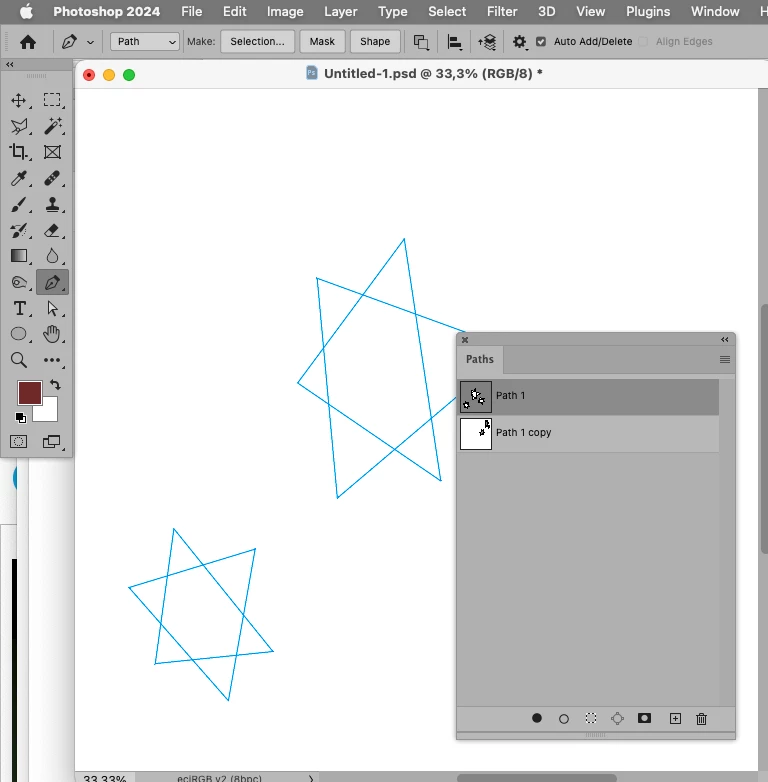
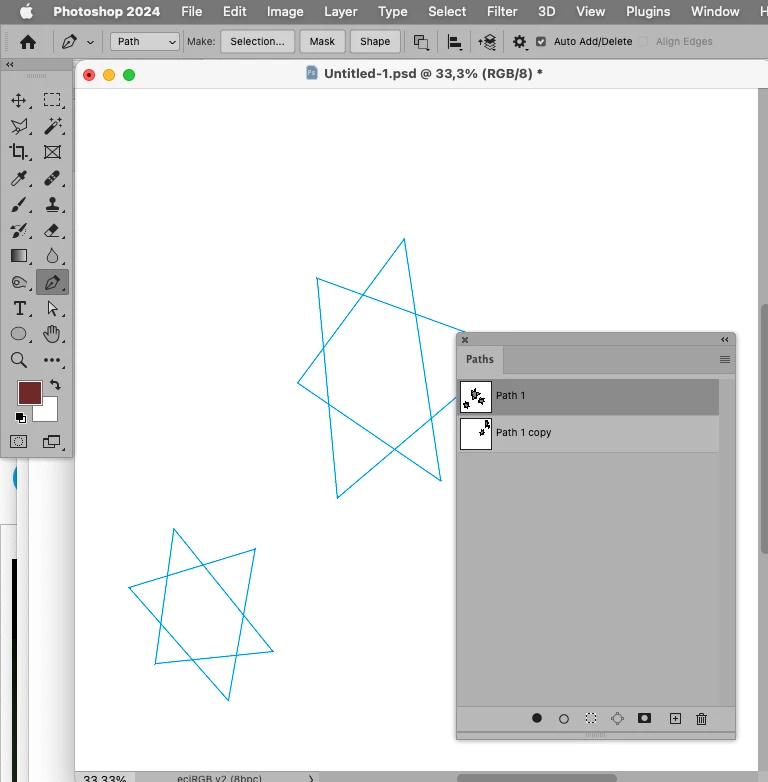
Screenshot 2023-11-22 at 17.44.35.pngScreenshot 2023-11-22 at 17.44.40.png

// change shape operation of selected path’s subpathitems;
// 2023, use it at your own risk;
var aaa = changeSelectedPathShapeOperation (1097098272);
////// change a path based on collectPathInfoFromDesc2023-array //////
function changeSelectedPathShapeOperation(theShapeOperation) {
try {
// thanks to xbytor;
cTID = function(s) { return app.charIDToTypeID(s); };
sTID = function(s) { return app.stringIDToTypeID(s); };
// collect data;
var ref = new ActionReference();
ref.putEnumerated( charIDT
...
Translate
Adobe
Community Expert ,
Nov 19, 2023 Nov 19, 2023

If I remember correctly with DOM Code one would need to collect the information of the subPathItems and create the Path anew with the modified operation. 

The ShapeOperation is applied to the SubPathItem, not the PathPoint. 

Translate
Report
Community guidelines
Be kind and respectful, give credit to the original source of content, and search for duplicates before posting. Learn more
community guidelines
Community Expert ,
Nov 22, 2023 Nov 22, 2023


Screenshot 2023-11-22 at 17.44.35.pngScreenshot 2023-11-22 at 17.44.40.png

// change shape operation of selected path’s subpathitems;
// 2023, use it at your own risk;
var aaa = changeSelectedPathShapeOperation (1097098272);
////// change a path based on collectPathInfoFromDesc2023-array //////
function changeSelectedPathShapeOperation(theShapeOperation) {
try {
// thanks to xbytor;
cTID = function(s) { return app.charIDToTypeID(s); };
sTID = function(s) { return app.stringIDToTypeID(s); };
// collect data;
var ref = new ActionReference();
ref.putEnumerated( charIDToTypeID("Path"), charIDToTypeID("Ordn"), charIDToTypeID("Trgt") ); 
var desc = app.executeActionGet(ref);
var pathComponents = desc.getObjectValue(cTID("PthC")).getList(sTID('pathComponents'));
// apply;
var desc1 = new ActionDescriptor();
var ref1 = new ActionReference();
ref1.putEnumerated( cTID('Path'), charIDToTypeID("Ordn"), charIDToTypeID("Trgt") ); 
desc1.putReference(sTID('null'), ref1);
var list1 = new ActionList();
for (var m = 0; m < pathComponents.count; m++) {
var thisOne = pathComponents.getObjectValue(m);
thisOne.putEnumerated(sTID('shapeOperation'), sTID('shapeOperation'), theShapeOperation);
list1.putObject(cTID('PaCm'), thisOne);
};
desc1.putList(cTID('T   '), list1);
executeAction(cTID('setd'), desc1, DialogModes.NO);
/// get index;
var ref = new ActionReference();
ref.putProperty(stringIDToTypeID("property"), stringIDToTypeID("itemIndex"));
ref.putEnumerated( charIDToTypeID("Path"), charIDToTypeID("Ordn"), charIDToTypeID("Trgt") );
var pathDesc = executeActionGet(ref);
var myPathItem = activeDocument.pathItems[pathDesc.getInteger(stringIDToTypeID("itemIndex")) - 1];
return myPathItem;
} catch (e) {};
};


Translate
Report
Community guidelines
Be kind and respectful, give credit to the original source of content, and search for duplicates before posting. Learn more
community guidelines
Engaged ,
Nov 23, 2023 Nov 23, 2023
LATEST

And if anyone is after those elusive magic numbers then this will help:


var myShapeOperation = "Subtract Front Shape";

var myShapeID = get_shape_operation_numbers(myShapeOperation);
//alert(myShapeID)

change_selected_path_shape_operation(myShapeID);
alert(myShapeOperation);

function get_shape_operation_numbers(str)
{
   var num;
   switch (str)
   {
      case "Combine Shapes":
      num = 1097098272; // phEnumAdd -> 1097098272 -> "Add "  add
      break;

      case "Subtract Front Shape":
      num = 1398961266; // phEnumSubtract -> 1398961266 -> "Sbtr"  subtract
      break;

      case "Intersect Shape Areas":
      num = 1231975538; // phEventIntersect -> 1231975538 -> "Intr"  interfaceIconFrameDimmed
      break;

      case "Exclude Overlapping Shapes":
      num = 1231975511; // phEventIntersectWith -> 1231975511 -> "IntW"  interfaceWhite
      break;

      default:
      num = 1097098272;
   }

    return num;
}
Translate
Report
Community guidelines
Be kind and respectful, give credit to the original source of content, and search for duplicates before posting. Learn more
community guidelines