
Inspiring
August 20, 2025
Answered

Change the background question -- lost.

  • August 20, 2025
  • 1 reply
  • 693 views

I got the Scott Kelby book, How do I do that.. maybe dated? 2024 --

pg 200 change a background.. go to the select subject in toolbar.. (exist in toolbar?) , but I did get as far as select subject with the wand...


He says then... modify selection , expand, generate fill. etc, I could not see-fine  any of  those.


I did get to a properties panel on the right, which has none of that. Thanks.
Correct answer Conrad_C

Thanks Kevin and Jane.  It's 2025   26.9.0


Yeah, even that modify does not get me that " contexual task bar" , that Kelby is mentioning to go to from Lasso or subject selection which then has generate and generate fill button. I cannot find this task bar.  Maybe it it's gone, I get properties bar on right, no generate anything, there is invert.


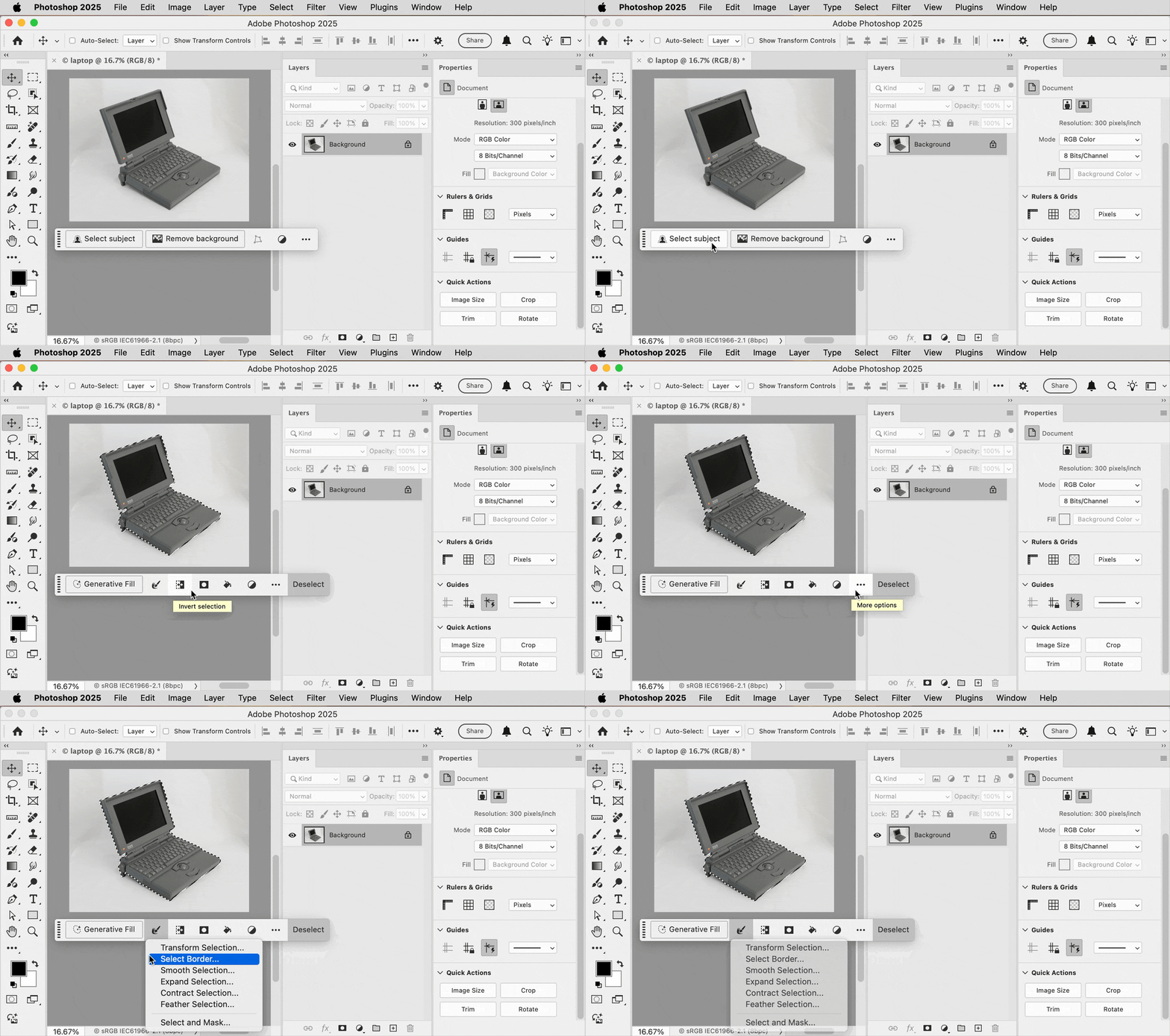
In the demo below, in the Contextual Task Bar I click Select Subject. After the selection is created, the Contextual Task Bar changes to show selection tasks. After hovering the pointer over the icons to find out what the tool tips say they are, I click the first icon (Modify Selection), and the Modify Selection menu drops down with the commands you were asking about.


If you don’t see the Contextual Task Bar, it might be hidden; to show it, choose the command Window > Contextual Task Bar.


1 reply

Kevin Stohlmeyer
Community Expert
Community Expert
August 20, 2025

Hi @larry45 those options are in the Select menu under Modify once you have made an activate selection. 


jane-e
Community Expert
Community Expert
August 20, 2025


I did get to a properties panel on the right, which has none of that.

By @larry45


What are the version numbers of your Photoshop and OS?


Jane

jane-e
Community Expert
Community Expert
August 20, 2025

Thanks Kevin and Jane.  It's 2025   26.9.0


Yeah, even that modify does not get me that " contexual task bar" , that Kelby is mentioning to go to from Lasso or subject selection which then has generate and generate fill button. I cannot find this task bar.  Maybe it it's gone, I get properties bar on right, no generate anything, there is invert.


@larry45 

If you are missing the Contextual Task Bar, you can enable it from the Window menu.

Jane