Participant
July 12, 2021
Answered

Changing Fabric on sofa

  • July 12, 2021
  • 8 replies
  • 15308 views

I work for a fabric company and we have 100s on fabrics that need showing in a more realistic way, is photoshop is the best program to take a photo and change to the fabric on a sofa and chairs, will it look real enough? Any ideas on how to go about this?

Correct answer Trevor.Dennis

I think some of the replies might be over complicating this As Chuck and dave have said, going the Smart object route is a total no brainer.  To make it clearer, you start with the first fabric flat and square and immediately make it a Smart Object.  You'll probably need separate Smart Objects for each panel
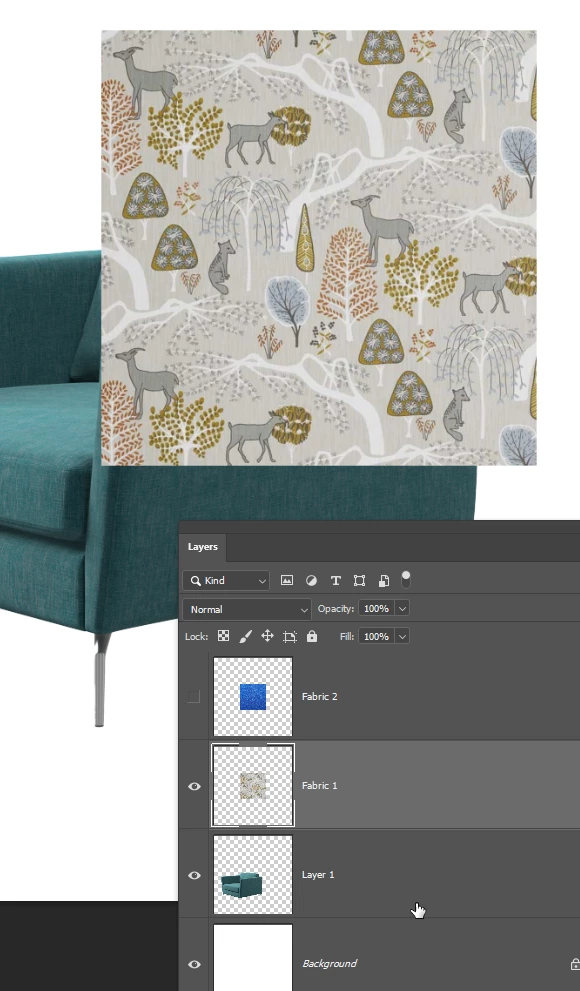
Shape each panel into place with Free Transform and apply shading by clipping a curves layer to the Smart Object
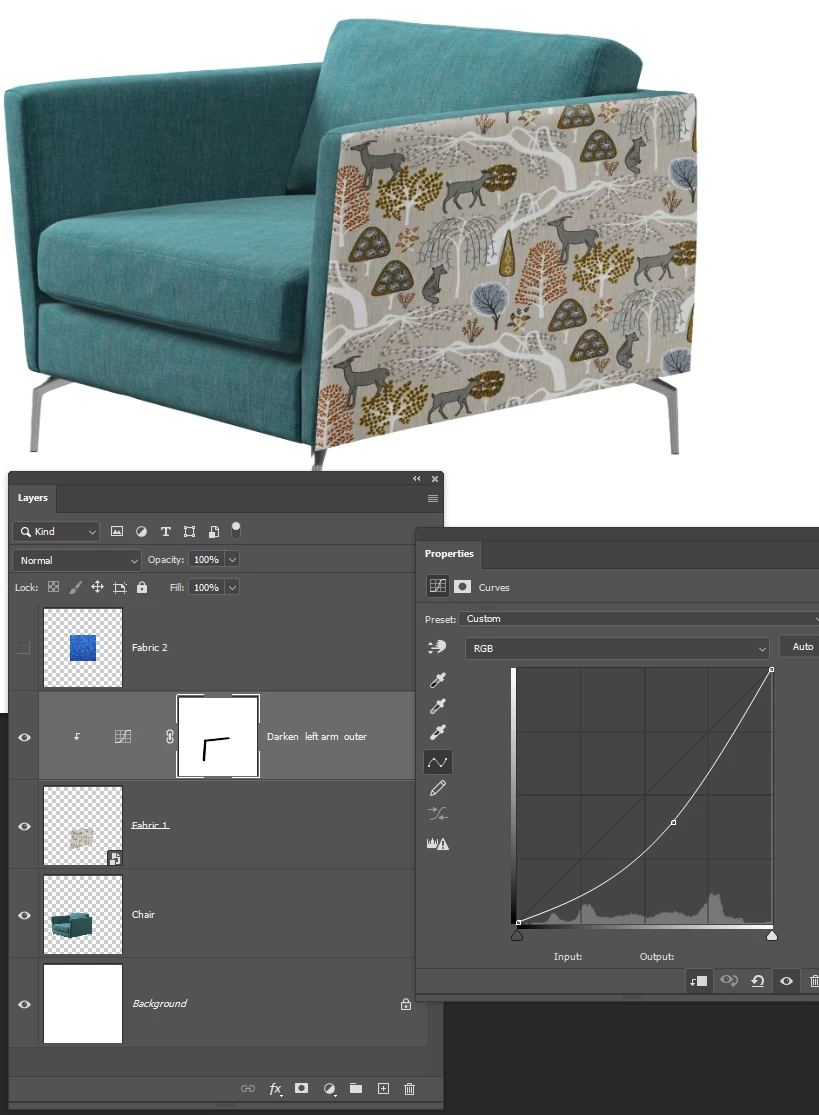
Then to change the fabric double click the Smart object which opens in a new window in its orginal flat and square state.

Add the new fabric as a new layer in the SO edit window, and turn off the first fabric. 
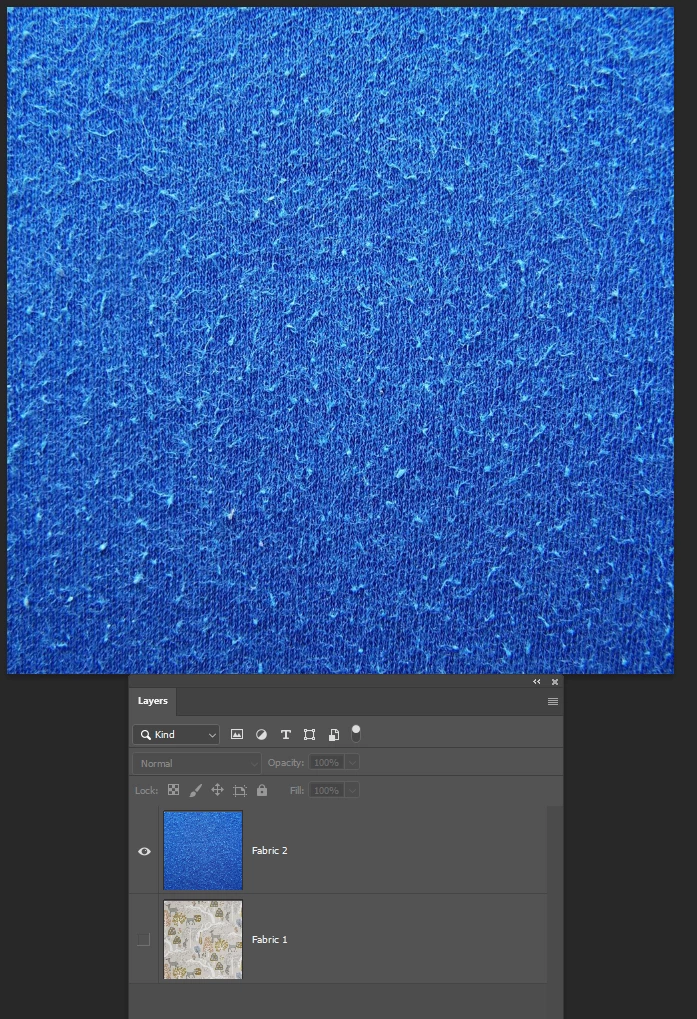
Save the SO and close it 
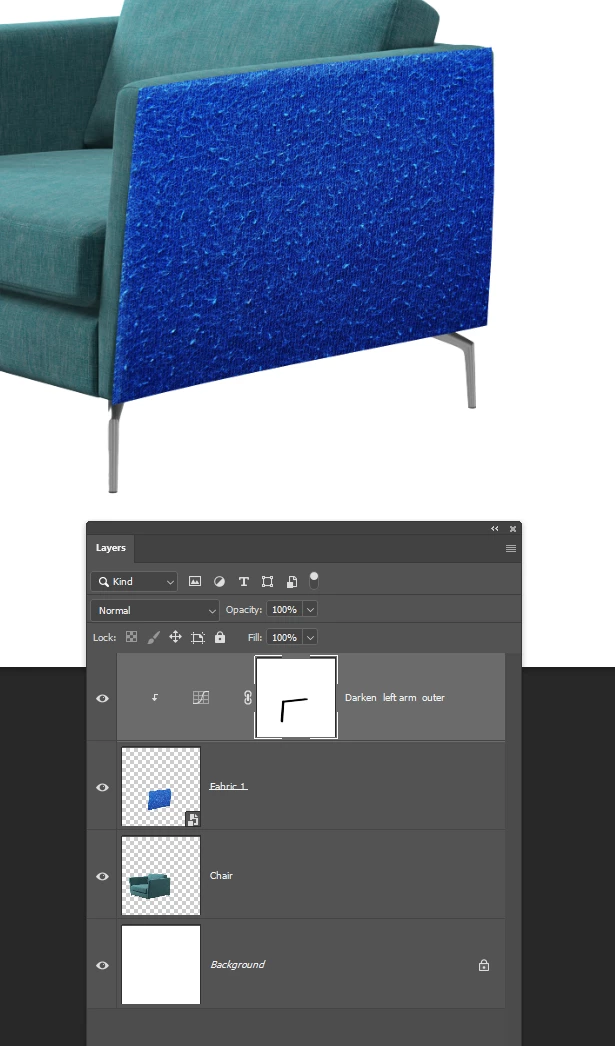
And the new fabric will be transformed and shaded the same as the original.

I have fallen into a wee trap there where the SO is still called Fabric 1 but that came out of me finding a couple of sample fabrics for the screen shot.


I am not sure if it is possible to combine all of the panels into a single nested Smart object to make the changes faster and slicker.  I am thinking about linked Smart Objects, and I am also thinking about using CC Libraries.  Dave or Chuck might have a quick answer for that, but I would need to think about it and try it out.

 

8 replies

davescm
Community Expert
Community Expert
July 13, 2021

Can you do it with smart objects , masks and warps - yes, as below. Would I recommend it - no. 3D would have been much easier 🙂


Dave


jane-e
Community Expert
Community Expert
July 13, 2021

Very nicely done, @davescm ! How long did it take?


~ Jane


davescm
Community Expert
Community Expert
July 14, 2021

@davescm wrote:

What do you want - blood ? I'll see if I get some time later 🙂


No! Stop if it gets bloody Dave 😊

~ Jane


3D render. I modelled a similar chair, textured it, and added it to a previously modelled scene. It is not perfect - I didn't have any dimensions or alternative views to work from, but hopefully you get the idea.

Dave

Trevor.Dennis
Community Expert
Community Expert
July 13, 2021

One of the Sneak Peeks from MAX 2015 would have been useful for this application if it had got into Photoshop.  It was called Extract Shadows and allowed you change a covering while maintaining its shading.  Unfortunately it never got into Photoshop, and we have heard that the project was abandoned.  That was a real pity as it was a tool that could have been incredibly useful to compositors, editors, illustrators etc.

Trevor.Dennis
Community Expert
Trevor.DennisCommunity ExpertCorrect answer
Community Expert
July 13, 2021

I think some of the replies might be over complicating this As Chuck and dave have said, going the Smart object route is a total no brainer.  To make it clearer, you start with the first fabric flat and square and immediately make it a Smart Object.  You'll probably need separate Smart Objects for each panel

Shape each panel into place with Free Transform and apply shading by clipping a curves layer to the Smart Object

Then to change the fabric double click the Smart object which opens in a new window in its orginal flat and square state.

Add the new fabric as a new layer in the SO edit window, and turn off the first fabric. 

Save the SO and close it 

And the new fabric will be transformed and shaded the same as the original.

I have fallen into a wee trap there where the SO is still called Fabric 1 but that came out of me finding a couple of sample fabrics for the screen shot.


I am not sure if it is possible to combine all of the panels into a single nested Smart object to make the changes faster and slicker.  I am thinking about linked Smart Objects, and I am also thinking about using CC Libraries.  Dave or Chuck might have a quick answer for that, but I would need to think about it and try it out.


c.pfaffenbichler
Community Expert
Community Expert
July 13, 2021

I think some of the replies might be over complicating this As Chuck and dave have said, going the Smart object route is a total no brainer. 

But in your example: How many Smart Object instances would you guess you would need to make, transform and mask to fill up all of the upholstery? 

Ljm2021Author
Participant
July 13, 2021


My photoshop skills are good my 3d skills not so. This is the type of image I'm wanting to use and switch the fabric on. 


JJMack
Community Expert
Community Expert
July 13, 2021

I have no 3D skills and Photoshop 3D feature is too basic for what you want to do. My Photoshop  skills are not the best but  there not all that  bad.   I would have a very hard time rapping your fabric around some areas of that chair.   


Adobe new 3D offerings  are design for ease of use with object models you import.  I have not used these products so I can not say that you could create your chair model withe ease.  I believe the chair model may need to be created with a complex complicated 3D application that is hard to use.   I believe Adobe offering like  Dimension, Aero and Substance 3D offerings are not for actually creating the 3D object model  they are more foe using models you  import to create your 3D world  you populate with the models you import.  Their UI are design for ease use to manipulate these models in your 3d world.  I could be wrong there . You may be able to create 3D models. I just look at a few video  that seems to show that 3D is becoming easy.  3D still boggle my mind  it has no capacity left to handle 3D.   Still if you want to cover that chair with your fabric  if you brain still has capacity. You should look into the new bread if 3D applications.


In Photoshop I would not want to try to covet  this area with patterned fabric.


JJMack
c.pfaffenbichler
Community Expert
Community Expert
July 13, 2021

In Photoshop I would not want to try to covet  this area with patterned fabric.

Yeah, the cut of that chair’s upholstery seems challenging. 

Though I suspect creating a 3D model of that chair would not be terribly easy, either. 

davescm
Community Expert
Community Expert
July 12, 2021

You could do this in Photoshop using smart objects as described above.


Alternatively, this is bread and butter for 3D applications. That would involved making a 3D material from a photo of each fabric (Adobe 3D sampler). A model of each piece of furniture - a 3D application (e.g. Blender) which is "unwrapped" so that the 3D material can be applied to the surface. A rendering application to light and render the results (for example Adobe 3D Stager or Blender). The results can be as photorealistic as you like and, once modelled, switching materials and re-rendering is very fast.


Dave


JJMack
Community Expert
Community Expert
July 12, 2021
JJMack
Community Expert
Community Expert
July 12, 2021

How good are your Photoshop skills.  You can create Product Mockup Templates.  Your  Fabric covering sofa and chairs.  However,  your fabric would need to be Places into the templates as smart Object layers which would need to be  transform and warped  the conform the the furniture shape and surface which nay requires a displacement Map.   Templates are not difficult to created but knowledge and Photoshop skill are required.  Without knowledge and Photoshop .kill a templates you create may not look realistic.  Your Fabric sample files will need to be sufficient size to work with the your templates scale the works with the templates.  Your simple fabric files need to be nearly the same size and resolution for the Smart Object layers because The  smart object layer's Object transform, warping, masking, and smart filters are not change when you replace the fabric content. 

JJMack
Chuck Uebele
Community Expert
Community Expert
July 12, 2021

Not sure about other programs, but Photoshop should be very good for this. You would want to create a master file for each piece of furniture, and then use smart object to "reupholster" each piece. You would use transform to adjust the perspective, and masks to make the fabric fit. I would avoid scaling to keep the pattern the same size, other than for perspective reasons. You can duplicate many smart objects for each fabric cut. When done, you should be able to replace the contents of just one of the smart objects and they will all change. Make sure all fabric files are the exact same size in pixels dimensions and that the resolution is the same.

c.pfaffenbichler
Community Expert
Community Expert
July 12, 2021

Depending on the cut of the upholstery, the fabric used in the photograph and the patterns on the replacement fabrics this could be quite a demanding task, though, and I wonder if, depending on the OP’s expectations, a 3D solution may not be necessary. 

JJMack
Community Expert
Community Expert
July 12, 2021

Yes it can be....


For this mockup Template I had to pre-process the fabric for the  Drivers and Passenger seats.  For it was easier to the add seams and binding materials to the flat rectangle fabric then to  create transform and warped  seams and binding overlays in the mockup and try to position the fabric design  for good composition.  So I created and interactive action the let me use the flat seams and findings black overlay like a cookie cutter to cut out flat Driver and Passenger seat covers with the seams and trim with the interactive composure.  Then I could batch process these into different model Car model  mockup templates. This just show one template  populated twice.  The seat covers can be populated into many templates. I found the tenplates on line.  I wanted to be abble to Batch Process then.  Therefore I created the Car seat interactive action to pre process fabric sort of an interactive batch process.

JJMack
c.pfaffenbichler
Community Expert
Community Expert
July 12, 2021

How about some examples of both the fabrics and the furniture? 


»will it look real enough?«

What does »real enough« mean?