

melissapiccone
Community Expert
Community Expert
March 21, 2019
Answered

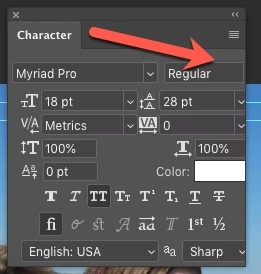
Character panel cut off on right side

  • March 21, 2019
  • 2 replies
  • 928 views

I have not seen anyone complain about this, so I'm wondering if it's me. Taught this week, my students didn't have any problems. I've reset the prefs several times. I can't resize the panel. It's cut off on the right side and I can't choose the style of my text. Myriad Pro has bold, italic, etc, but no way to access it in the character panel, I have to use the options bar which is a pain in the butt. I'm on a late 2012 iMac running Mojave. No other PS problems...
    This topic has been closed for replies.
    Correct answer Jeff Arola

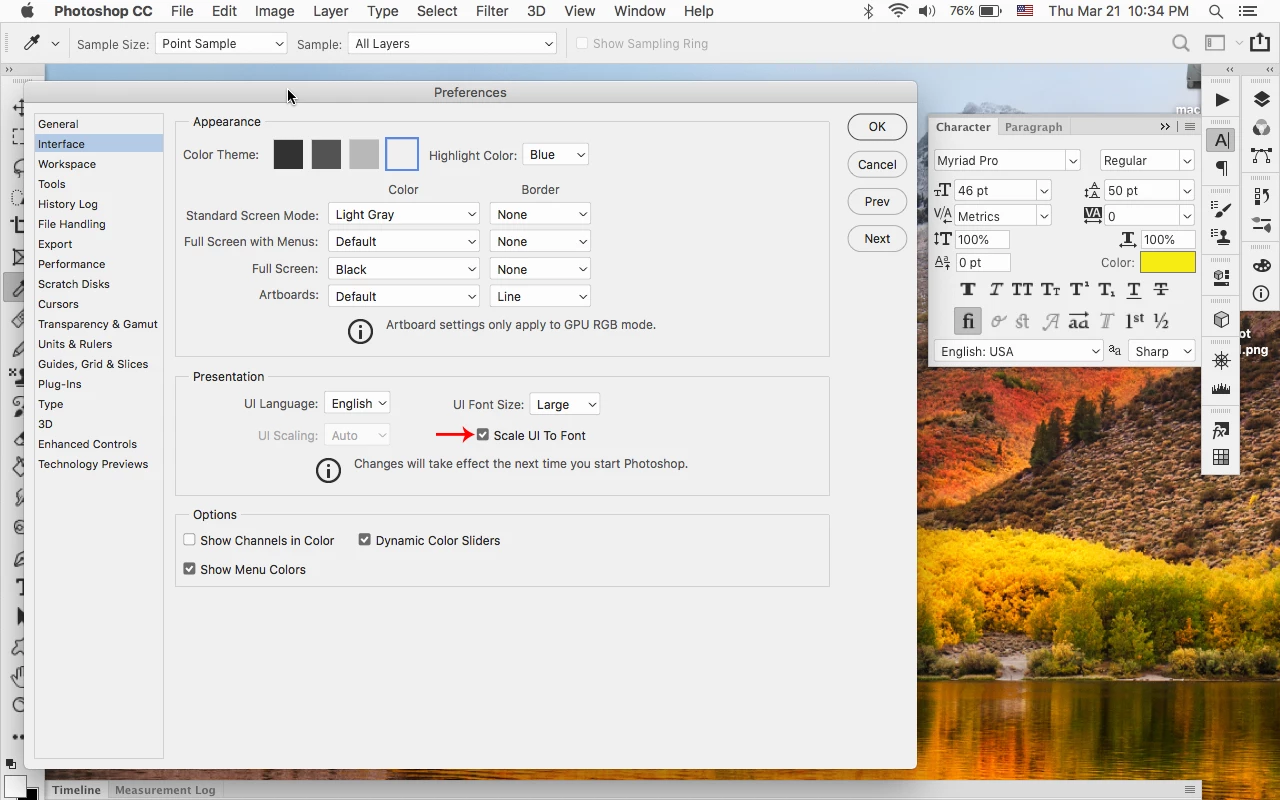
    After actually looking at photoshop cc 20.0.4 where the problem seems to be, going to Photoshop CC>Interface, checking

    Scale UI To Font and restarting photoshop seems to work.

    2 replies

    Jeff Arola
    Community Expert
    Jeff ArolaCommunity ExpertCorrect answer
    Community Expert
    March 22, 2019

    After actually looking at photoshop cc 20.0.4 where the problem seems to be, going to Photoshop CC>Interface, checking

    Scale UI To Font and restarting photoshop seems to work.

    gener7
    Community Expert
    Community Expert
    March 22, 2019

    Good sleuthing on that, Jeff. It cleared the problem in 20.0.4/10.13.6. There was nothing wrong with the Character Panel under Mojave, but I checked Scale UI to Font before I forget. Might as well head that one off at the pass. Now we'll see how well it worked for Melissa.

    Gene

    Jeff Arola
    Community Expert
    Community Expert
    March 21, 2019

    Is that photoshop 20.0.4?

    If you go to Photoshop CC>Preferences>Interface, set the UI Font Size to Small and restart photoshop, does that make a difference?

    gener7
    Community Expert
    Community Expert
    March 22, 2019

    I'm seeing this in High Sierra. To change the Style, I can double-click the name and use the up/down arrow keys to change it.

    Or place your cursor slightly inside of the blue highlighted box from the right and click. (screenshot will not display the mouse pointer).