

Clean SL
Hello gang!
I just wanted to share with you my small utility tool for Photoshop called Clean SL that cleans ScriptingListenerJS.log file to make it more readable.
Recently watched Davide_Barranca's Adobe Photoshop HTML Panels Development course and realised how painful it is to work with Action Manager's code and how unreadable it is right off the box. I know there are quite a few other tools that cleans log file, however it doesn't hurt to have an option to choose.
Interested? Grab it here: rendertom / Clean SL / source / — Bitbucket
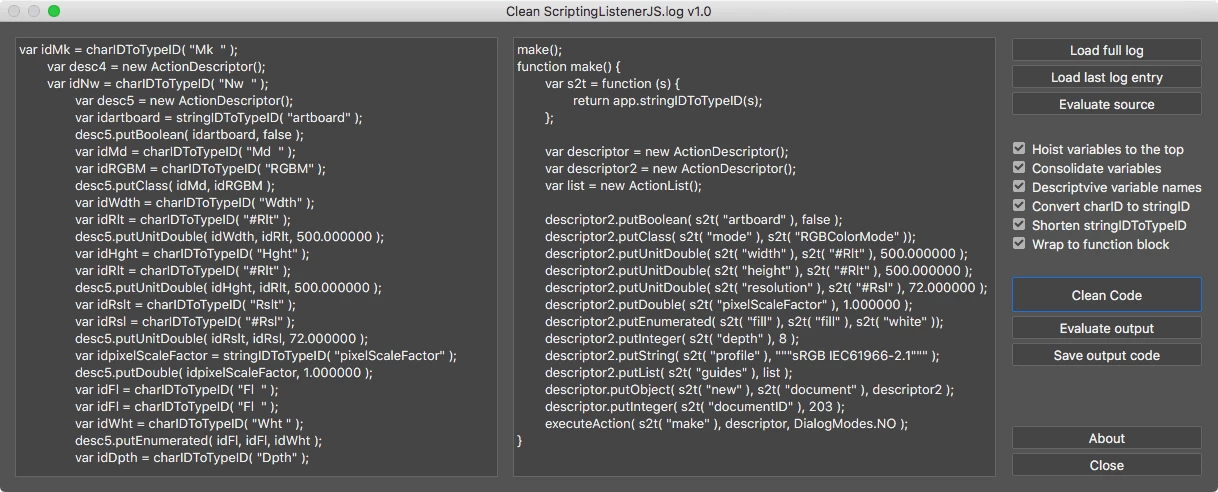
Script performs multiple actions such as cleaning-up variable names and hoisting them to the top, wraps code block into function, converts charID to string ID for better readability and such. Resulting code is clean and maintains better readability.
Features:
- Load entire ScriptingListenerJS.log content
- Load only last entry in ScriptingListenerJS.log
- Enter ScriptingListenerJS code manually
Options:
- Hoist variable declaration to the top
- Consolidate variables
- Give descriptive variable names
- Convert charID to stringID for better readability
- Replace stringIDToTypeID() to s2t() function
- Wrap to function block.
Example:
From this:
var idHStr = charIDToTypeID( "HStr" );
var desc21 = new ActionDescriptor();
var idpresetKind = stringIDToTypeID( "presetKind" );
var idpresetKindType = stringIDToTypeID( "presetKindType" );
var idpresetKindCustom = stringIDToTypeID( "presetKindCustom" );
desc21.putEnumerated( idpresetKind, idpresetKindType, idpresetKindCustom );
var idClrz = charIDToTypeID( "Clrz" );
desc21.putBoolean( idClrz, false );
var idAdjs = charIDToTypeID( "Adjs" );
var list1 = new ActionList();
var desc22 = new ActionDescriptor();
var idH = charIDToTypeID( "H " );
desc22.putInteger( idH, 39 );
var idStrt = charIDToTypeID( "Strt" );
desc22.putInteger( idStrt, 23 );
var idLght = charIDToTypeID( "Lght" );
desc22.putInteger( idLght, -27 );
var idHsttwo = charIDToTypeID( "Hst2" );
list1.putObject( idHsttwo, desc22 );
desc21.putList( idAdjs, list1 );
executeAction( idHStr, desc21, DialogModes.NO );
to this:
hueSaturation();
function hueSaturation() {
var s2t = function (s) {
return app.stringIDToTypeID(s);
};
var descriptor = new ActionDescriptor();
var list = new ActionList();
var descriptor2 = new ActionDescriptor();
descriptor.putEnumerated( s2t( "presetKind" ), s2t( "presetKindType" ), s2t( "presetKindCustom" ));
descriptor.putBoolean( s2t( "colorize" ), false );
descriptor2.putInteger( s2t( "hue" ), 39 );
descriptor2.putInteger( s2t( "saturation" ), 23 );
descriptor2.putInteger( s2t( "lightness" ), -27 );
list.putObject( s2t( "hueSatAdjustmentV2" ), descriptor2 );
descriptor.putList( s2t( "adjustment" ), list );
executeAction( s2t( "hueSaturation" ), descriptor, DialogModes.NO );
}
Installation
Clone or download repository and place Clean SJ.jsx script to Photoshop’s Scripts folder:
Adobe Photoshop CC 20XX -> Presets -> Scripts -> Clean JS.jsx
Restart Photoshop to access Clean JS script from File -> Scripts
------------------------------------------------
Since I am rather new to Photoshop Scripting, I might have missed something of my code brakes. So if you find any bugs or issues, please do not hesitate to let me know so I could fix it.
So, happy cleaning everybody!
 AdChoices