Inspiring
December 7, 2024
Answered

Clear Layer Style Missing in Photoshop 26.1.0

  • December 7, 2024
  • 10 replies
  • 1788 views

Photoshop started with a pop-up about the new update so I reluctantly installed it. The option to clear layer style is missing. Please fix this.  Thanks.

Correct answer Jeff Arola

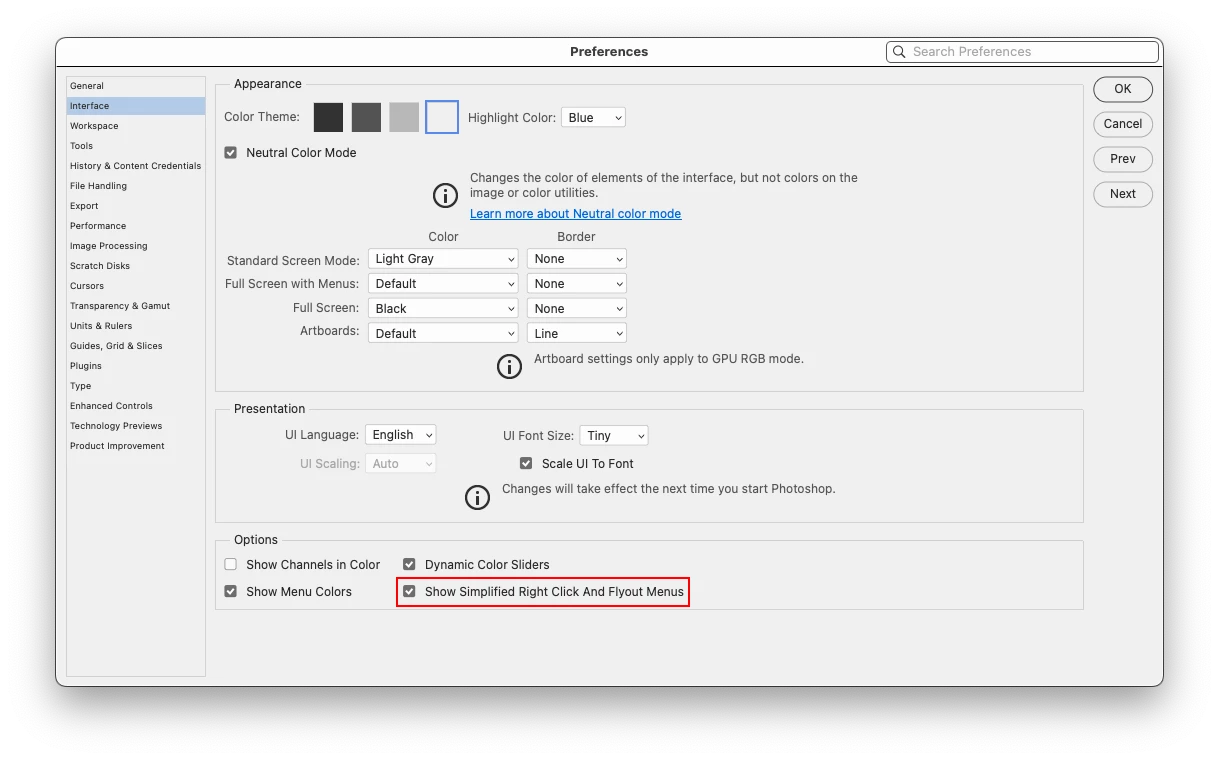
It seems if a user has Show Simplified Right Click And Flyout Menus enabled, then Clear Layer Style shows


10 replies

Jeff Arola
Community Expert
Community Expert
August 8, 2025

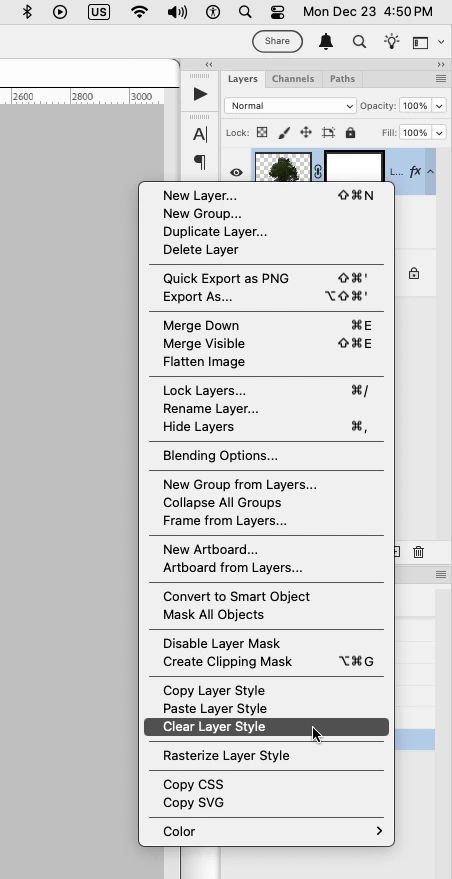
Actually in Photoshop 2024 and older when right clicking on the Blend-If symbol or anywhere to the right of the thumbnail in the Layers panel, Clear Layer Style is listed, while the Clear Layer Style menu item is missing in Photoshop 2025 unless simplified right click menus is enabled.


In Photoshop 2025 (ps ver 26.9) if Show Simplified Right Click And Flyout Menus is enabled in Preferences (Settings)>Interface, then right clicking somewhere between the Layers panel thumbnail and Blend-If symbol, Clear Layer Style appears on the menu.


Participating Frequently
February 4, 2025

I am on version 26.3.0, on Mac OS 14.6.1 and it is also missing.

Used it a lot but now it's missing.

Already tried what Jeff said and it didn't work.


I have noticed this: if you set a layer style like "Drop Shadow" and right click on the layer,  "Clear layer style" is there. But if I set only a "blend if" on that layer, no matter what I do, "Clear layer style" is missing.

Participant
August 4, 2025

Indeed. Clear layer style" is missing if you use "blend if".  Those changes are unacceptable. At least give us the option to revert back to the classic menu  I subscribed for the Adobe Plan but I´m forced to use an older version because of Muscle Memory. What a joke!

Jeff Arola
Community Expert
Jeff ArolaCommunity ExpertCorrect answer
Community Expert
December 23, 2024

It seems if a user has Show Simplified Right Click And Flyout Menus enabled, then Clear Layer Style shows


Trevor.Dennis
Community Expert
Community Expert
December 23, 2024

Same thing here Jeff.  (My release version opened and worked OK after a restart)


Do we need to inform @CShubert or @Pete.Green ?

Trevor.Dennis
Community Expert
Community Expert
December 23, 2024

It feels rude asking this with present company, but are you all selecting a layer that has a Layer Style?  The right click menu is highly contextualised now.  


Trevor.Dennis
Community Expert
Community Expert
December 23, 2024

Hmmm... just noticed that these are both beta 26.3.  I had a problem opening the release version, and had to clear a process with Windows Task Manager. Ctrl J was not working ether.  I think I need to restart my computer and try again

Jeff Arola
Community Expert
Community Expert
December 23, 2024

Clear Layer Style appears to be missing in Photoshop 2025 (ps versions 26.1 and 26.2 and the latest Beta 26.3)

on both Mac and Windows.


If one right clicks on the Layer to the right of the Layer thumbnail or layer mask, the Clear Layer Style is missing, however if one right clicks on the small fx or in the area where the Effects are, the Clear Layer Style is there.


pixxxelschubser
Community Expert
Community Expert
December 23, 2024

Hmmh?
Not for me (with 26.1.0) - see also my previous screenshot


“Clear Layer Style” is still there when I try to delete an existing style. But I usually drag the effects to the trash can.


pixxxelschubser
Community Expert
Community Expert
December 23, 2024

Strange.
I'm on Windows with PS 26.1.0


Stephen Marsh
Community Expert
Community Expert
December 7, 2024

Is it still in the main layer menu?

Participant
December 23, 2024

Not OP but yes, it's still there, but it's missing from the Layers panel.

Jeff Arola
Community Expert
Community Expert
December 7, 2024

Yes i see that on the Mac side as well with Photoshop 2025 (ps ver 26.1.0)

JP2019Author
Inspiring
December 7, 2024

Hi! When I right-click on the thumbnail in the layers panel, there used to be a "clear layer style" option mixed in with the "copy/paste layer style," but it is now missing. I just did the update today and am running on Windows 10 Pro with all the latest updates installed. 


missing.

Jeff Arola
Community Expert
Community Expert
December 7, 2024

From which Menu is the Clear Layer Style missing?