

melchior377
Participant
December 18, 2024
Answered

Click & drag delay in Photoshop when using Huion Kamvas display tablet

  • December 18, 2024
  • 3 replies
  • 370 views

Click & drag delay in Photoshop when using Huion Kamvas display tablet.

Using Windows 10, PS 2025, Huion Kamvas Plus 22" (GS2202).

Drawing works fine, but when I try to do the following actions there is a significant delay: 

- Using sliders such as hue/saturation. When I click & drag the slider to make a subtle change, it does nothing. But when I drag it out really far, it starts working. 

- Using transform tool. When I click & drag the edge of the transform box to make a subtle change, it does nothing. But when I drag it out really far, it starts working. 

- When I try to turn on/off layers too quickly, it will turn off/on multiple layers at once.  This is a weird one. 

As you can imagine, as an artist these issues really impede my process! 

Any tips or suggestions? 

Thank You -M- 


Correct answer defaultt0pxb05axykr

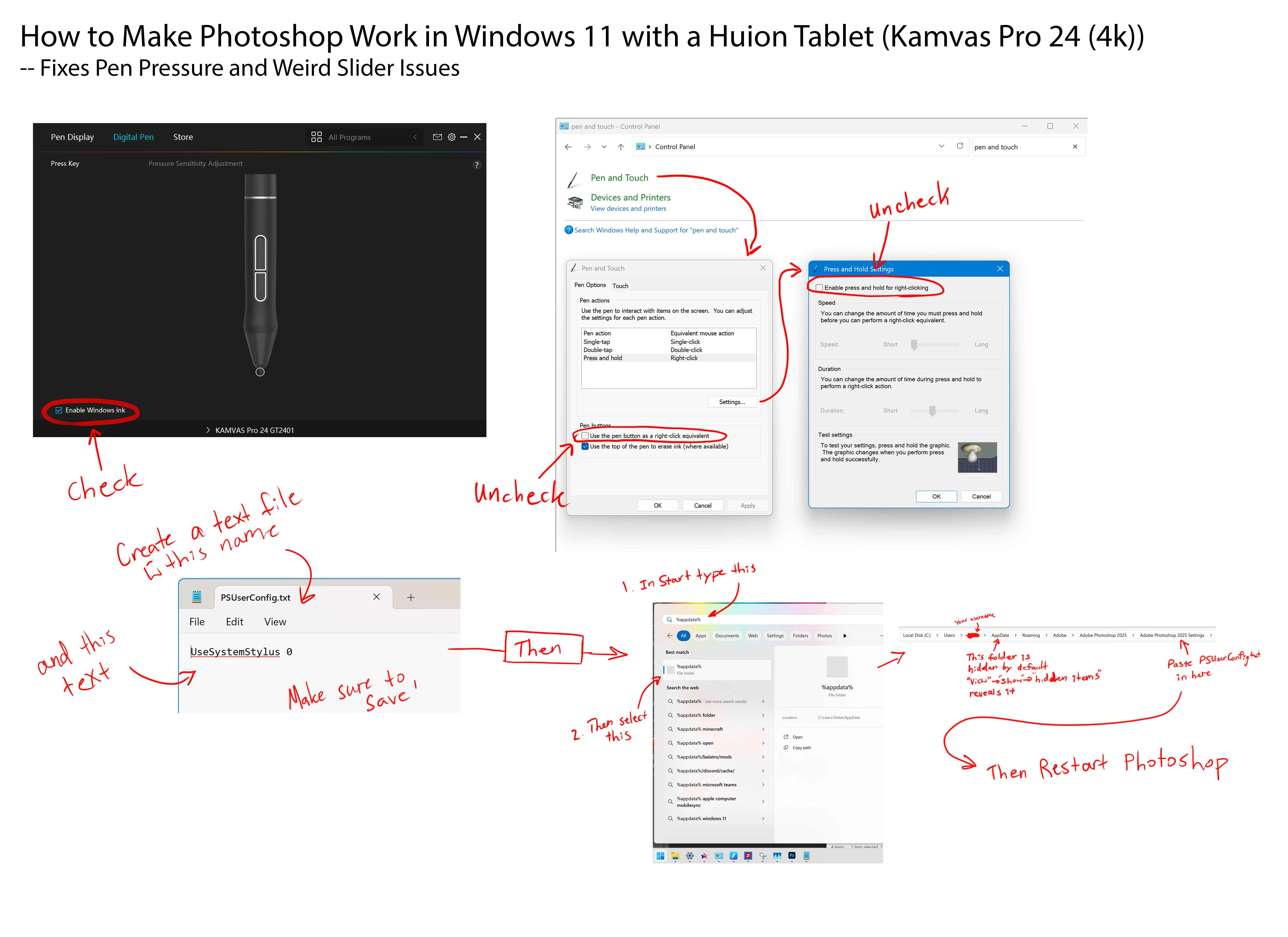
I found the solution for this in this forum post: https://community.adobe.com/t5/photoshop-ecosystem-discussions/photoshop-interface-lag-with-huion-drawing-tablet/m-p/12846066/page/2


I made a little sheet explaining the steps for it here: 

3 replies

defaultt0pxb05axykrCorrect answer
Participant
May 30, 2025

I found the solution for this in this forum post: https://community.adobe.com/t5/photoshop-ecosystem-discussions/photoshop-interface-lag-with-huion-drawing-tablet/m-p/12846066/page/2


I made a little sheet explaining the steps for it here: 

Participant
May 29, 2025

I've also encountered this issue with Windows 11 on a Huion Kamvas Pro 24. It's really annoying! It stops being an issue if you disable Windows Ink on the Huion Tablet Digital Pen settings but then you lose pressure sensitivity in photoshop. 


Would love to find a solution for this.

jane-e
Community Expert
Community Expert
January 15, 2025

@melchior377 


Apologies for not seeing your post for a month.


"Adobe does not test or officially support non-Wacom third-party tablets. Contact the original manufacturer for help with using their tablets."

  • Huion Support

https://helpx.adobe.com/photoshop/kb/tablet-support-faq-photoshop.html


Adobe recommends that you contact Huion support:

https://www.huion.com/support.html


I hope this helps.


Jane