Answered
Clicking a layer to one underneath
Does anyone know how to click the top layer to get the arrow and box next to 'Girl copy' please? I'm new to photoshop and can't work out what the tutor in the video is doing! Video attched too. Thank you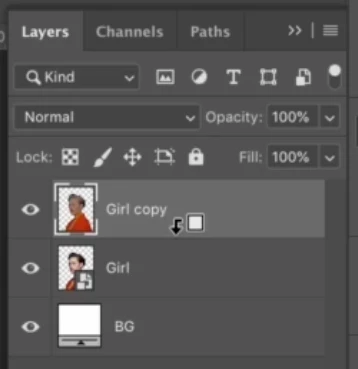

Does anyone know how to click the top layer to get the arrow and box next to 'Girl copy' please? I'm new to photoshop and can't work out what the tutor in the video is doing! Video attched too. Thank you
If you want a top layer to be the clipping mask, hold down the Opt/Alt key, then click the box with the arrow. The picture on the top layer should move to the right. I can't seem to drag the layer to make a clipping mask on my Mac as in the video. Maybe something was changed.
"Create Clipping Mask" in the Layers Panel menu does the same thing:

Already have an account? Login
Enter your E-mail address. We'll send you an e-mail with instructions to reset your password.
 AdChoices