Participating Frequently
January 14, 2017
Answered

Clip Image to Type Layer

  • January 14, 2017
  • 3 replies
  • 1486 views

Hey Everyone!

I am trying to add an image to a text for a design. I have the text but can't figure out how to add the image i want.

    This topic has been closed for replies.
    Correct answer davescm

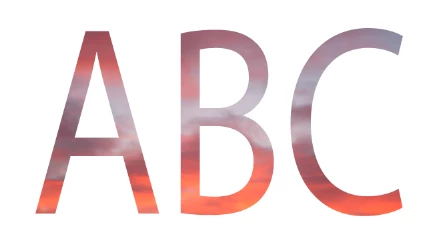
    Put your image on a layer above the text, then Alt click on the boundary between them in the layers panel. This will clip the image to the text.

    Dave

    3 replies

    Trevor.Dennis
    Community Expert
    Community Expert
    January 14, 2017

    Another option — because this thread is too much fun to leave it all to Dave — There are a few things going on here, but the writing is freehand one stroke at a time, using Lazy Nezumi Pro to smooth the lines.  I used a smaller brush for the second word, and I'd have taken more time, rotating the canvas if I was doing it for real.

    An idea for the crown...  Use the pen tool and hit the escape key after the first stroke to make that a subpath.  Then start at the other end of the next stroke, make the stroke and hit escape again.  When done activate one subpath at a time, and stroke it with Simulate Pressure checked. You can see how that works.  Using the elliptical shape tool (set to path) gives the same effect.  Free transform to rotate the end point into best position.

    BTW  A wee tip when tracing lines freehand, is to look where you want to get to, rather than immediately in front of you.  It's like riding a motorbike.  Look at the vanishing point at the end of the bend and that's where the bike will go (but hopefully not off the cliff at the end of it ;-)  )

    davescm
    Community Expert
    Community Expert
    January 14, 2017

    Haha. It must be Sunday morning where you are Trevor. I thought you wouldn't be able to resist this one

    Dave

    Trevor.Dennis
    Community Expert
    Community Expert
    January 14, 2017

    davescm wrote:

    Haha. It must be Sunday morning where you are Trevor. I thought you wouldn't be able to resist this one

    Dave

    11am and I am not even dressed yet!  (sorry about the unfortunate mind picture).  Yep, time to get a into gear — it's hot and muggy here and the Marlborough winds are sucking the moister out of everything.  The nearest town to us (Blenheim) caught fire last night — least ways some horrible hooligan set it on fire.  This was just as Chris was about to leave for her night shift, and Saturday nights are bad enough as it is with all those delightful drunk people (NOT) who come into ED and want to punch the staff.  As well as being in charge at the hospital on her night shifts, she is also the liaison with our Civil Defense, and they would have been on alert because fires can very quickly get out of control this time of the year, and she hates all that stuff.   I suspect folk in the likes of California and Texas would know all about that!  Mind you... the latest we have heard about America (other than Trumpkins) is that it is flooded.  I'm almost glad that I am old and will be gone before the world turns completely to shite.   (Dave do you have moderator rights yet?)

    Participating Frequently
    January 14, 2017

    Ok thanks. Is it the same with a pre existing image with text i uploaded from my photo library? Im new to photoshop. sorry for all the questions

    davescm
    Community Expert
    davescmCommunity ExpertCorrect answer
    Community Expert
    January 14, 2017

    Put your image on a layer above the text, then Alt click on the boundary between them in the layers panel. This will clip the image to the text.

    Dave

    Participating Frequently
    January 14, 2017

    Ok thanks. Is it the same with a pre existing image with text i uploaded from my photo library? I have a picture my buddy drew and I'm trying to edit that make the words crisp and maybe arch it.  Im new to photoshop. sorry for all the questions

    davescm
    Community Expert
    Community Expert
    January 14, 2017

    No problem with asking questions - that is what teh forum is for. However, I am not sure what you mean?

    Do you have a separate text layer and image layer - or are they already combined?

    Perhaps if you uploaded a screenshot of what you are starting with - plus a screenshot of your layers panel and either confirm what I showed above is what you are trying to do, or describe what exactly you want to do, we will be able to help you better

    Dave