Rand0mtazk
Participant
October 9, 2017
Answered

Clipping Mask on Hidden Group Still Being Selected

  • October 9, 2017
  • 2 replies
  • 509 views

I'm working on a complex with many layers, groups, clipping masks, and adjustment layers.  For some reason, if I have a layer clipped to a group, the group is not correctly masking the clipped layer.  Visually, the layer is masked out, but if I try to Auto Select (command + click) a lower layer, the clipped layer will be selected instead. 
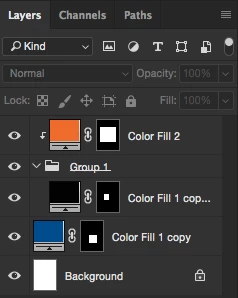
So if I try to select the blue square layer with Auto Select, the orange square layer will be selected instead.  The really messed up part is that even if I hide the group, that orange square layer will STILL get selected. 

Normal layers clip and function correctly, but it seems like this is not the case with groups.  Is there a setting that needs to be toggled somewhere?  As it stands, this is a HUGE problem and is seriously affecting my workflow.  

I am using the current version of Photoshop CC (2017.1.1) on a Mac running Yosemite.

This topic has been closed for replies.
Correct answer Akash Sharma

This issue should be fixed with the Photoshop CC 2018 (19.1.2) update which is now available.

Please install the update and let us know if you still see this issue.

To update, click Update next to Photoshop CC in the Creative Cloud desktop application.

If you don't see the update right away, click the 3 dots in the upper right and choose Check for App Updates.

Regards,

Akash

2 replies

Akash Sharma
Akash SharmaCorrect answer
Legend
March 13, 2018

This issue should be fixed with the Photoshop CC 2018 (19.1.2) update which is now available.

Please install the update and let us know if you still see this issue.

To update, click Update next to Photoshop CC in the Creative Cloud desktop application.

If you don't see the update right away, click the 3 dots in the upper right and choose Check for App Updates.

Regards,

Akash

Participant
March 13, 2018

This issue is unrelated to the original post:

I just installed the newest version of PS and when I try to select a layer, like any layer in the PS file, it will select a different one (or 2) and then just draw a dotted (moving ants) select box but then the select box disappears and I never get to move the original layer that I'm trying to work with.. I've never seen anything like this before so sorry if my description is weird but I need some help with this. I'm assuming it's some sort of bug but even when I try and just install one of the old versions of PS to use instead of the newest one it reverts back to the newest version and I have the same issue I described above.

davescm
Community Expert
Community Expert
March 13, 2018

Hi brookenyellow

Try this:

With the move tool selected - look in the options bar and uncheck "Auto-Select" layer

Dave

davescm
Community Expert
Community Expert
October 9, 2017

It looks like a bug to me - I can replicate it on CC2017.1.1 in Windows 10 and on CS6 . So if it is a bug it has been around for a long time

If you wish to raise it with Adobe you can do so here:

Photoshop Family Customer Community

Dave