
grfern
Known Participant
November 29, 2019
Answered

Clone stamp moving layer

  • November 29, 2019
  • 3 replies
  • 5039 views

Hello- I am not new to Phtotshop but in no way an expert. Recently my Clone Stamp (and Healing Brush) have  acted up and I'm frustrated. In searching the forum I've tried everything that has been suggested in any other problem people have asked about. I, however have not seem this problem anywhere. After I make a new layer and select clone stamp I make sure 'aligned' and 'current and below' are selected. I 'alt-click' (I'm running Win 10) but after selecting as I move my mouse the layer moves as I move to where I would like the cloning to take place! I've uninstalled and re-installed Photoshop (I'm a CC subsciber), I've re-set my brushes, locked all layers and locked individual layers. Explicitly it seems that after I've selced my clone source (alt-click) when I move my mouse the whole layer moves as if I've selected the move tool. What is more exasperatilng is that if I've sreated a new transparent layer, selected the transparent layer in the pallete and 'current layer and below' after alt-clicking it is like I've selected the move tool and there are two layers (the top moving) even though the top is tranparent. Any help would be appreciated. BTW- I use an XP-Pen tablet to do dodging and burning so I turned it off and the clone stamp still didn't work. Thanks-
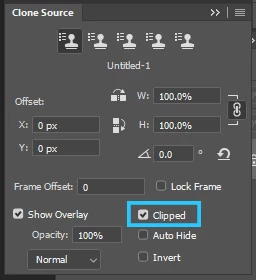
Correct answer PECourtejoie

Hello,

You need to check the "clipped" button in the Clone Source window, otherwise, your preview is the entire layer, (you are not actually moving it, just a preview) and it not just clipped to your brush size, as you were used to before.


3 replies

PECourtejoie
Community Expert
PECourtejoieCommunity ExpertCorrect answer
Community Expert
November 29, 2019

Hello,

You need to check the "clipped" button in the Clone Source window, otherwise, your preview is the entire layer, (you are not actually moving it, just a preview) and it not just clipped to your brush size, as you were used to before.


PECourtejoie
Community Expert
Community Expert
November 29, 2019
grfern
grfernAuthor
Known Participant
November 29, 2019
Thanks so much for the very good link you shared. It turned out that when I
CC updated my PS app the clone source overlay button was not checked by
default. I didn't even know about the clone stamp source window! I learned
something today, not I just have to read the article you sent and find out
all the X & Y's and other options in the clone stamp source window. It is
not in the tool bar so I can access it better. You interest was
greatly appreciated.
Chuck Uebele
Community Expert
Community Expert
November 29, 2019

Make sure you brush isn't bigger than you canvas. Also try unchecking "Show Oeverlay" in the clone source panel.

grfern
grfernAuthor
Known Participant
November 29, 2019
Thanks so much for your input. Your solution worked. I know my way around
PS fairly well but I didn't know anything about the Clone Stamp Source
window! It seems that when CC updated my Creative Cloud PS program the
'overlay' button was not checked by default. It was quite frustrating
alt-clicking on the source but then as I moved the cursor to use the stamp
the whole layer moved! I have no idea why you would want the source layer
to move! Once the cursor moved off the canvas the second 'layer' snapped
back into position. Anyway- I learned something today, hopefully I can
remember. I have now kept the clone stamp source button on the tool panel
by the brush settings. Thanks again.
lambiloon
Community Expert
Community Expert
November 29, 2019

Hi which is your photoshop version now ?

Ali Sajjad / Graphic Design Trainer / Freelancer / Adobe Certified Professional
grfern
grfernAuthor
Known Participant
November 29, 2019
Hi- The version I am using is CC Photoshop 21.0.1. I am right now getting
ready to try a solution someone else messaged but to be honest I have tried
it before. I'll be following their steps exactly to see what happens. I'm
preparing to make some screen shots for anyone who might want them. I
appreciate your help.