

Clone stamp moving layer
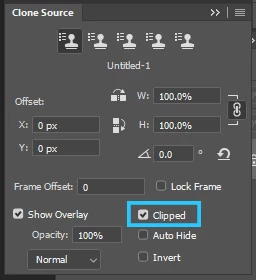
Hello- I am not new to Phtotshop but in no way an expert. Recently my Clone Stamp (and Healing Brush) have acted up and I'm frustrated. In searching the forum I've tried everything that has been suggested in any other problem people have asked about. I, however have not seem this problem anywhere. After I make a new layer and select clone stamp I make sure 'aligned' and 'current and below' are selected. I 'alt-click' (I'm running Win 10) but after selecting as I move my mouse the layer moves as I move to where I would like the cloning to take place! I've uninstalled and re-installed Photoshop (I'm a CC subsciber), I've re-set my brushes, locked all layers and locked individual layers. Explicitly it seems that after I've selced my clone source (alt-click) when I move my mouse the whole layer moves as if I've selected the move tool. What is more exasperatilng is that if I've sreated a new transparent layer, selected the transparent layer in the pallete and 'current layer and below' after alt-clicking it is like I've selected the move tool and there are two layers (the top moving) even though the top is tranparent. Any help would be appreciated. BTW- I use an XP-Pen tablet to do dodging and burning so I turned it off and the clone stamp still didn't work. Thanks-
 AdChoices