
Answered

Hi Scott,
It's early morning here and I'm on my iPad. You should be able to remove the shortcuts in Edit > Keyboard Shortcuts. If you can't find it in this dialog, I'll look for the exact location in a short while.
~ Jane
Thanks, Jane.
Do you know if there is a way to disable the F-key feature? I never want to use it.
By @scotwllm
Hi Scott,
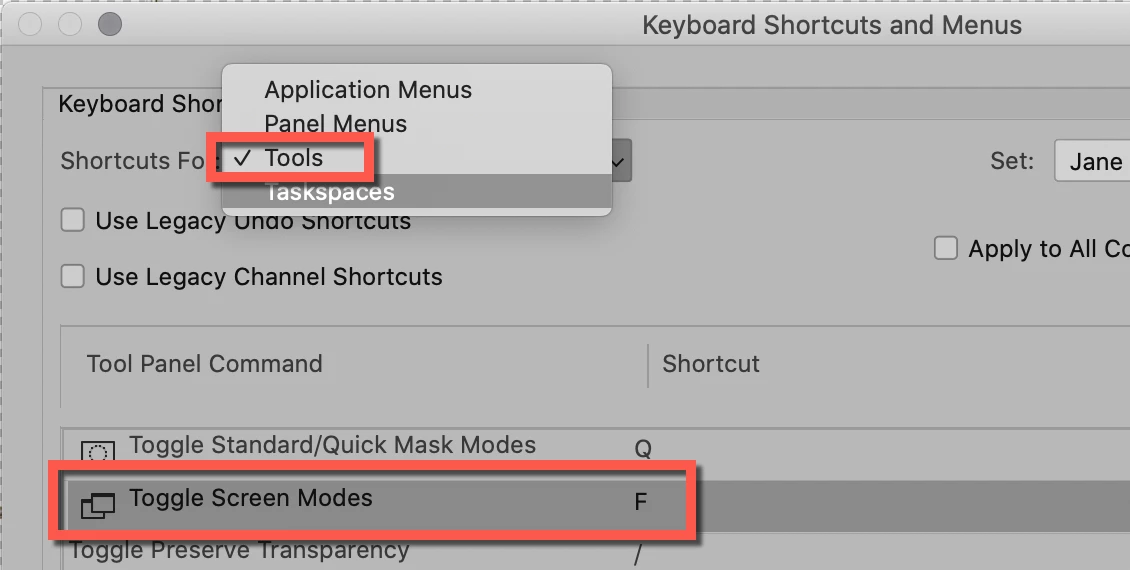
Go to Edit > Keyboard Shortcuts and select Tools from the popup. Click the "F" and delete it to remove the shortcut. Save the customized keyboard shortcuts and close.

~ Jane
Already have an account? Login
Enter your E-mail address. We'll send you an e-mail with instructions to reset your password.
 AdChoices