Exit
  • Global community
    • Language:
      • Deutsch
      • English
      • Español
      • Français
      • Português
  • 日本語コミュニティ
  • 한국 커뮤니티
0

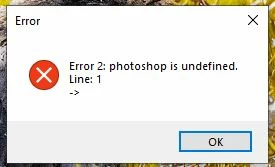
Closing photoshop, I get Error 2: photoshop undefined and then can't write new document presets file

Community Beginner ,
Aug 19, 2022 Aug 19, 2022

In the last couple of months I've gotten these two messages, The Error 2 shows up when I close a photo after saving. The second one shows up when I shut down Photoshop. I have reset my Preferences, and it seemed to work for about an hour or two.

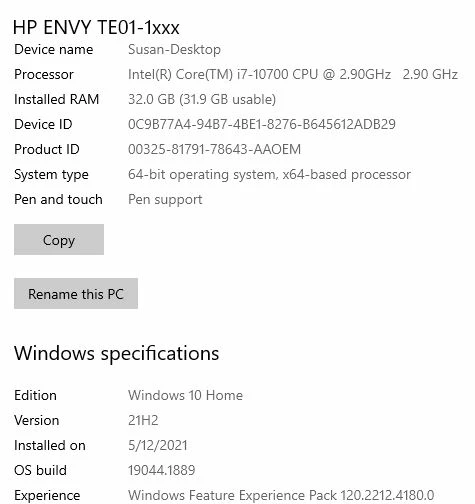
Is there any other fix for this? Do I have to uninstall PS, and then reinstall? I'm not looking forward to that, as I have a ton of actions, presets for Photoshop, and extensions. Any help would be helpful. I'm also adding my system's configuration. Thanks in advance
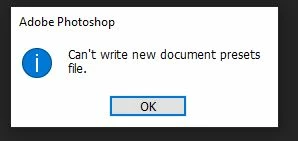
can'twrite.JPG

Capture.JPG


error 2.JPG


TOPICS
Windows
414
Translate
Report
Community guidelines
Be kind and respectful, give credit to the original source of content, and search for duplicates before posting. Learn more
community guidelines
Adobe
Community Expert ,
Aug 19, 2022 Aug 19, 2022

What version of Photoshop are you running?

Are you an admin account on this machine?

The common fix for this error is to reset preferences and it rebuilds a new set.

If that does not work (doesn't sound like it) an uninstall and reinstall may be in order.

You can do this using the CC desktop application.


Translate
Report
Community guidelines
Be kind and respectful, give credit to the original source of content, and search for duplicates before posting. Learn more
community guidelines
Community Beginner ,
Aug 19, 2022 Aug 19, 2022

I just updated PS yesterday with the newest update. I will check to see if it still gives the errors later this morning. Thank you

Translate
Report
Community guidelines
Be kind and respectful, give credit to the original source of content, and search for duplicates before posting. Learn more
community guidelines
LEGEND ,
Aug 19, 2022 Aug 19, 2022

Please don't post the same thing in multiple forums. Thanks!

Translate
Report
Community guidelines
Be kind and respectful, give credit to the original source of content, and search for duplicates before posting. Learn more
community guidelines
Community Beginner ,
Aug 19, 2022 Aug 19, 2022

oops, thanks, noticed it was in the wrong one and didn't know how to move it. Sorry

Translate
Report
Community guidelines
Be kind and respectful, give credit to the original source of content, and search for duplicates before posting. Learn more
community guidelines
Community Expert ,
Aug 20, 2022 Aug 20, 2022
LATEST

https://community.adobe.com/t5/photoshop-ecosystem-discussions/when-i-try-to-save-my-psd-it-says-cou...

is it possible you photoshop art is over 2GB? If so this link explains it very well

Lee- Graphic Designer, Print Specialist, Photographer
Translate
Report
Community guidelines
Be kind and respectful, give credit to the original source of content, and search for duplicates before posting. Learn more
community guidelines