Participating Frequently
March 30, 2023
Answered

CMYK TO DUOTONE

  • March 30, 2023
  • 4 replies
  • 2085 views

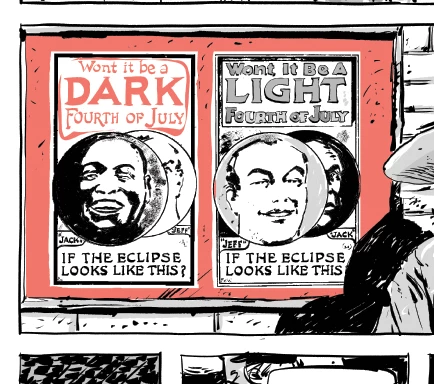
Hi, I have a bunch of cmyk images (312) that were originally duotones (Black + pantone). Now I need them back to duotone, since the client only provided cmyk files, i've been trying to separate black from the other channels with no luck, Does anyone know any script or action I can build to prepare those files for 2 ink printing? Any help would be apreciated! 
Here's an example: 


This topic has been closed for replies.
Correct answer Stephen Marsh

@Vivacious_Flower0D44 


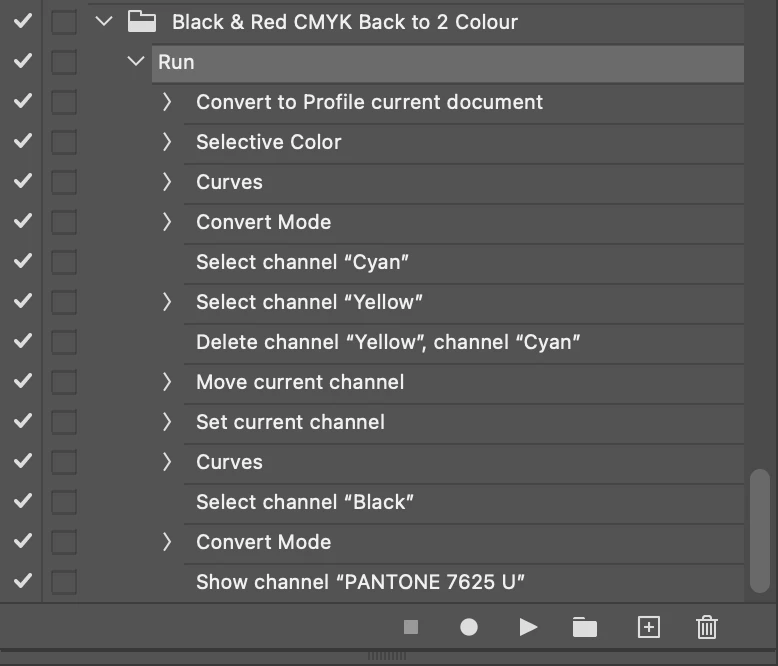
Try this action:


https://www.dropbox.com/s/kfh78fhkofugr09/Black%20%26%20Red%20CMYK%20Back%20to%202%20Colour.atn?dl=0


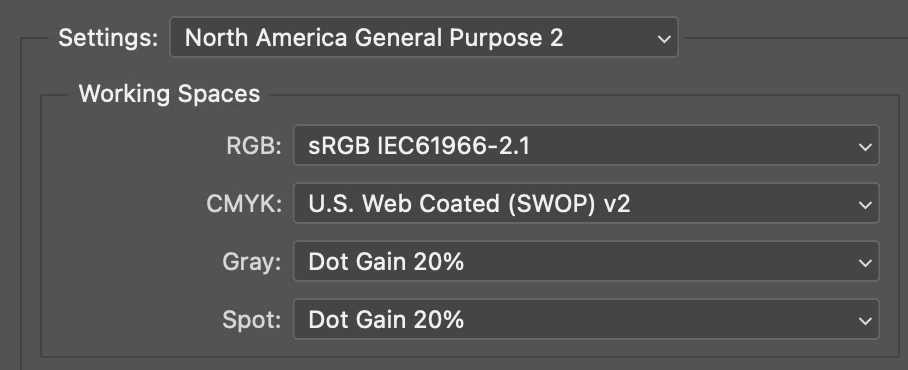
Colour settings to achieve the same result that I did:


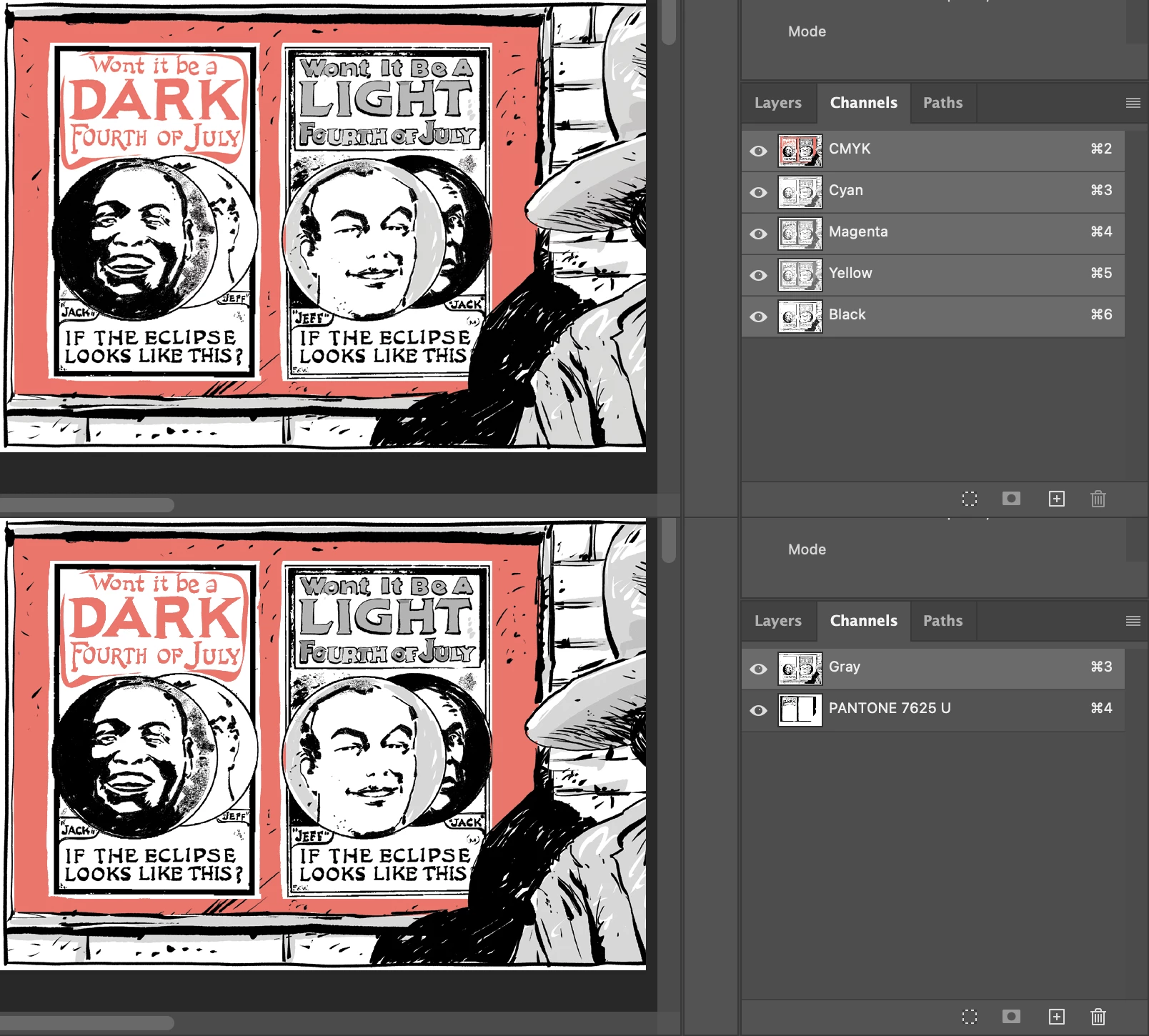
Here is a visual, the upper is the original CMYK, while the lower image is the 2 colour conversion:


Please check the results with care, particularly "scum dots" or unwanted light tints of red in black or black in red. Also check that solids are solids.


You can use File > Automate > Batch to run the action over the bulk images (test on a small quantity first). You may also wish to add steps to the action to save in your preferred file format to retain the spot channel (PDF or PSD for modern Adobe apps such as InDesign).

4 replies

Stephen Marsh
Community Expert
Stephen MarshCommunity ExpertCorrect answer
Community Expert
April 1, 2023

@Vivacious_Flower0D44 


Try this action:


https://www.dropbox.com/s/kfh78fhkofugr09/Black%20%26%20Red%20CMYK%20Back%20to%202%20Colour.atn?dl=0


Colour settings to achieve the same result that I did:


Here is a visual, the upper is the original CMYK, while the lower image is the 2 colour conversion:


Please check the results with care, particularly "scum dots" or unwanted light tints of red in black or black in red. Also check that solids are solids.


You can use File > Automate > Batch to run the action over the bulk images (test on a small quantity first). You may also wish to add steps to the action to save in your preferred file format to retain the spot channel (PDF or PSD for modern Adobe apps such as InDesign).

Participating Frequently
April 1, 2023

OMG, it works like charm. Thank u so much You are a lifesaver! 

Stephen Marsh
Community Expert
Community Expert
April 1, 2023
quote

OMG, it works like charm. Thank u so much You are a lifesaver! 


By @Vivacious_Flower0D44


You're welcome, please check the results with all due care.


I'm just curious, what is the print process, lithographic, risographic etc?

Stephen Marsh
Community Expert
Community Expert
March 30, 2023

This could be automated, however, you will need to attach the original CMYK files and please provide at least two or three that broadly represent the range of images to convert. Also, please provide a sample if there are any that are very different in structure to the other images as this will be a one size fits all approach and any outliers will of course result in a poor result.

Participating Frequently
March 31, 2023

Hi @Stephen Marsh thanks for ur answer, my editor refuses to share any of the original files, size is the same for all images so the issue is still the same, 2 colors convertet to cmyk that need to be isolated, if ur still willing to help here's anothe example... 


Stephen Marsh
Community Expert
Community Expert
March 31, 2023

@Vivacious_Flower0D44 


Sadly, an RGB file is useless.


Can you tell me the CMYK values of the red colour?


Same for the black. Is it K only or a rich black mix of CMYK?


Are all 312 images only red and black?


Should the red reproduce as a solid of the spot colour, or is it a tint?


EDIT: Even a small crop of the original CMYK that includes solid black, black tint and red would be helpful for evaluation and creation of an action or script to convert to two colour.

Kevin Stohlmeyer
Community Expert
Community Expert
March 30, 2023

Hi @Vivacious_Flower0D44 creating a duotone for print is not the same as using a Duotone color mode. What you'll need to do is establish some Spot channels, then using selection tools fill the black spot channels with the appropriate color fills:

Then you can convert your color mode to Multichannel and remove the CMYK channels leaving you with a true 2-color PMS/Black image.


You'll then need save out as a PSD or Photoshop DCS 2.0


Kevin Stohlmeyer
Community Expert
Community Expert
March 30, 2023

@Vivacious_Flower0D44 to answer your original query - no I am not aware of anything that can accurately convert CMYK images into a two spot channel format, at least with good enough accuracy to pass my standards.

Participating Frequently
March 30, 2023

Hi, I have a bunch of cmyk images (312) that were originally duotones (Black + pantone). Now I need them back to duotone, since the client only provided cmyk files, i've been trying to separate black from the other channels with no luck, Does anyone know any script or action I can build to prepare those files for 2 ink printing? Any help would be apreciated! 
Here's an example: 


Kevin Stohlmeyer
Community Expert
Community Expert
March 30, 2023

Hi @Vivacious_Flower0D44 you posted twice so I merged the two conversations.