
Color changes from Adobe Color CC to Photoshop CC
When I make a color theme in Adobe Color CC and then opens it in Photoshop CC. It changes its visual apperance, in some colors alot and others less and even CMYK/RGB code changes depending from where i select the color. why is that?
Let´s take CYAN as an example, on this color this is probably most apperant. (See picture and following text)
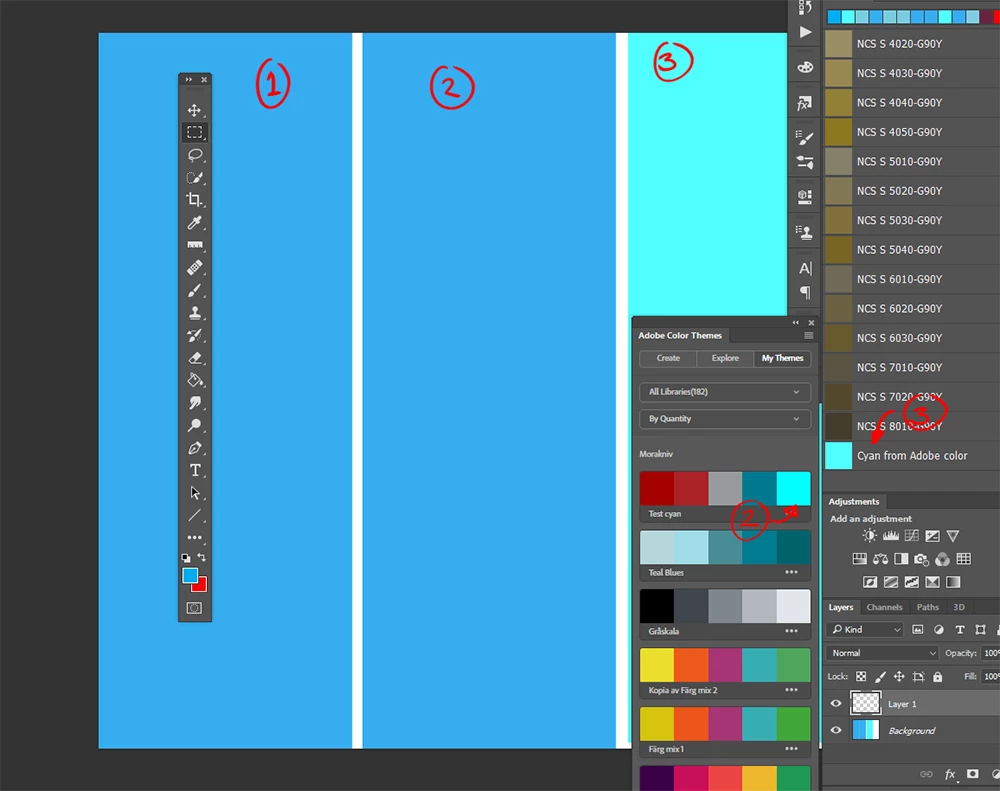
1: The color CYAN selected in photoshop. (100,0,0,0)
2: the color cyan from adobe color. selected thru the Adobe color themes panel. The visual of the color on the panel is very different but the result is the same when applied (100,0,0,0)
3: The color CYAN is added to the swatches panel from adobe color themes panel. And then applied. In this case the "CYAN" color turns in to (46,0,11,0)
Can anyone help me explain what is happening and why?
Why does the colors in Adobe Color CC look so different from Photoshop and why does it change in Phooshop depending on how i apply it???
The same phenomenon occurs in both RGB and CMYK mode. I´m running a windows computer and haven´t seen any differences in Chrome and Explorer on how Adobe Color shows the colors. I have monitors callibrated regularly a Eizo and Wacom zintiq. So I am pretty sure that the screens does'nt play me any tricks.
 AdChoices