Participating Frequently
January 2, 2023
Answered

Color display difference in adobe products

  • January 2, 2023
  • 4 replies
  • 1486 views

PHOTOSHOP version 24.0
Windows 10
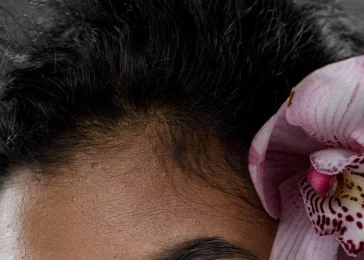
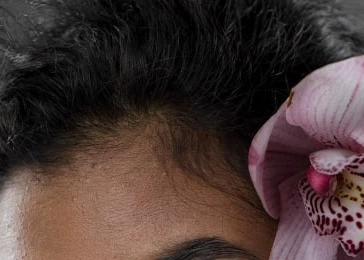
Hello. There is a problem with the color display in bridge and photoshop. On my PC, in the Adobe products, colors are different from what other people see on their PC in photoshop , bridge and other programs. When I convert a photo I set the srgb profile, color space in photoshop also srgb. Even when I upload a jpeg to photoshop, it looks different (shadows are much lighter than they really are, contrast is lower, colors are less vivid). The problem remains regardless of the photoshop version.


This topic has been closed for replies.
Correct answer D Fosse

You're confusing monitor profile with calibration. They're not the same thing. The monitor profile is a description of the monitor in its calibrated state. A calibrator will write a profile after the calibration is finished.


A bad monitor profile can often affect applications differently - in fact, that's a typical smoking gun.


The monitor profile is a standard icc profile just like any other icc profile (like e.g. sRGB). It's a description, or a map, of a color space. The application uses this profile in a standard profile conversion from the document profile into the monitor profile. This is performed by the application on the fly, as you work.


If the profile is bad, the conversion gives the wrong result, and Photoshop can't display correctly. But a marginal profile, or one not written to correct icc specification, can often work in one application but fail in another.


In addition, the source color spaces can be different, and so the conversion is different, and again, one may work and the other fail.


Open the Windows color management dialog (type it in Search if you don't know where it is), take a screenshot and post it here:
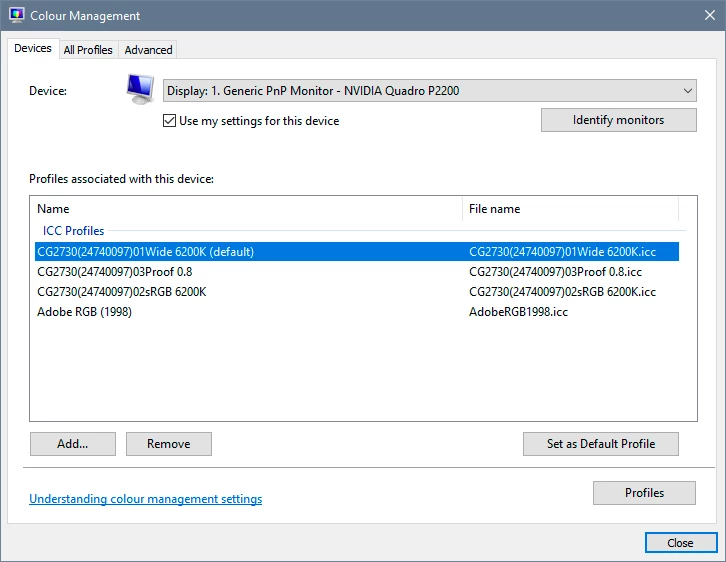
Many monitor manufacturers distribute profiles through Windows Update. These profiles are remarkably often defective in various ways. The fix is to use a calibrator, or as a temporary measure use a generic profile like sRGB or Adobe RGB (depending on type of monitor). This will not be entirely accurate, but better than a broken profile.


Applications that do not support color management don't do any of this. They just send the document RGB numbers straight to screen uncorrected. They will not be affected by a bad profile; they're not using it anyway. But they will never display accurately either.

 

4 replies

davescm
Community Expert
Community Expert
January 2, 2023

Thread moved from bugs to discussions. As answered by D Fosse above, this does indeed have the symptoms a defective monitor profile, rather than an application bug.

Dave

D Fosse
Community Expert
D FosseCommunity ExpertCorrect answer
Community Expert
January 2, 2023

You're confusing monitor profile with calibration. They're not the same thing. The monitor profile is a description of the monitor in its calibrated state. A calibrator will write a profile after the calibration is finished.


A bad monitor profile can often affect applications differently - in fact, that's a typical smoking gun.


The monitor profile is a standard icc profile just like any other icc profile (like e.g. sRGB). It's a description, or a map, of a color space. The application uses this profile in a standard profile conversion from the document profile into the monitor profile. This is performed by the application on the fly, as you work.


If the profile is bad, the conversion gives the wrong result, and Photoshop can't display correctly. But a marginal profile, or one not written to correct icc specification, can often work in one application but fail in another.


In addition, the source color spaces can be different, and so the conversion is different, and again, one may work and the other fail.


Open the Windows color management dialog (type it in Search if you don't know where it is), take a screenshot and post it here:

Many monitor manufacturers distribute profiles through Windows Update. These profiles are remarkably often defective in various ways. The fix is to use a calibrator, or as a temporary measure use a generic profile like sRGB or Adobe RGB (depending on type of monitor). This will not be entirely accurate, but better than a broken profile.


Applications that do not support color management don't do any of this. They just send the document RGB numbers straight to screen uncorrected. They will not be affected by a bad profile; they're not using it anyway. But they will never display accurately either.
 

Participating Frequently
January 2, 2023

Got it. Thank you. Here is a screenshot of my color management.

The word in brackets is (default).

D Fosse
Community Expert
Community Expert
January 2, 2023

OK. Replace that profile with sRGB IEC61966-2.1 and see if it looks better.


Click "add" which brings you to the profile list. Find sRGB IEC61966-2.1, and "set as default profile". Note - you need to relaunch Photoshop when done, it loads the profile at application startup.


Again, the proper way to do this is to use a calibrator, but sRGB is often close enough for non-critical use.

Participating Frequently
January 2, 2023

Thank you for the answer. All these photos are screenshots from one monitor. I chose dark photos because they show the problem better. The situation does not change on well converted photos, it is just not so obvious. The main problem is that the color in Photoshop is different from the color in other programs, as well as from the color that other users see in Photoshop on their PCs. And it does not depend on whether the calibration is correct or not.

D Fosse
Community Expert
Community Expert
January 2, 2023

There is pretty extreme black clipping in all these examples; I don't think any of them look correct, just more or less wrong.


Assuming the images all have the sRGB profile correctly embedded, this looks like a bad/defective/incorrect monitor profile to me. Where does the monitor profile come from? Are you using a calibrator?