
Participant
October 30, 2023
Answered

Color Handwriting

  • October 30, 2023
  • 3 replies
  • 1122 views

I know this is the most basic question, but can someone tell me how to change the color of some text I've just handwritten in Photoshop? I did it in a separate layer. It's currently white. All I want to do is mess with different colors using the dropper tool.


As you can see in the attachment, I've handwrriten "It Must Be Christmas Time" and I'm just trying to change the color.


Everything I've watched for coloring is for stuff that is way more advanced than what I'm trying to do. If someone could help me, that would be greatly appreciated.
This topic has been closed for replies.
Correct answer Jeff Arola

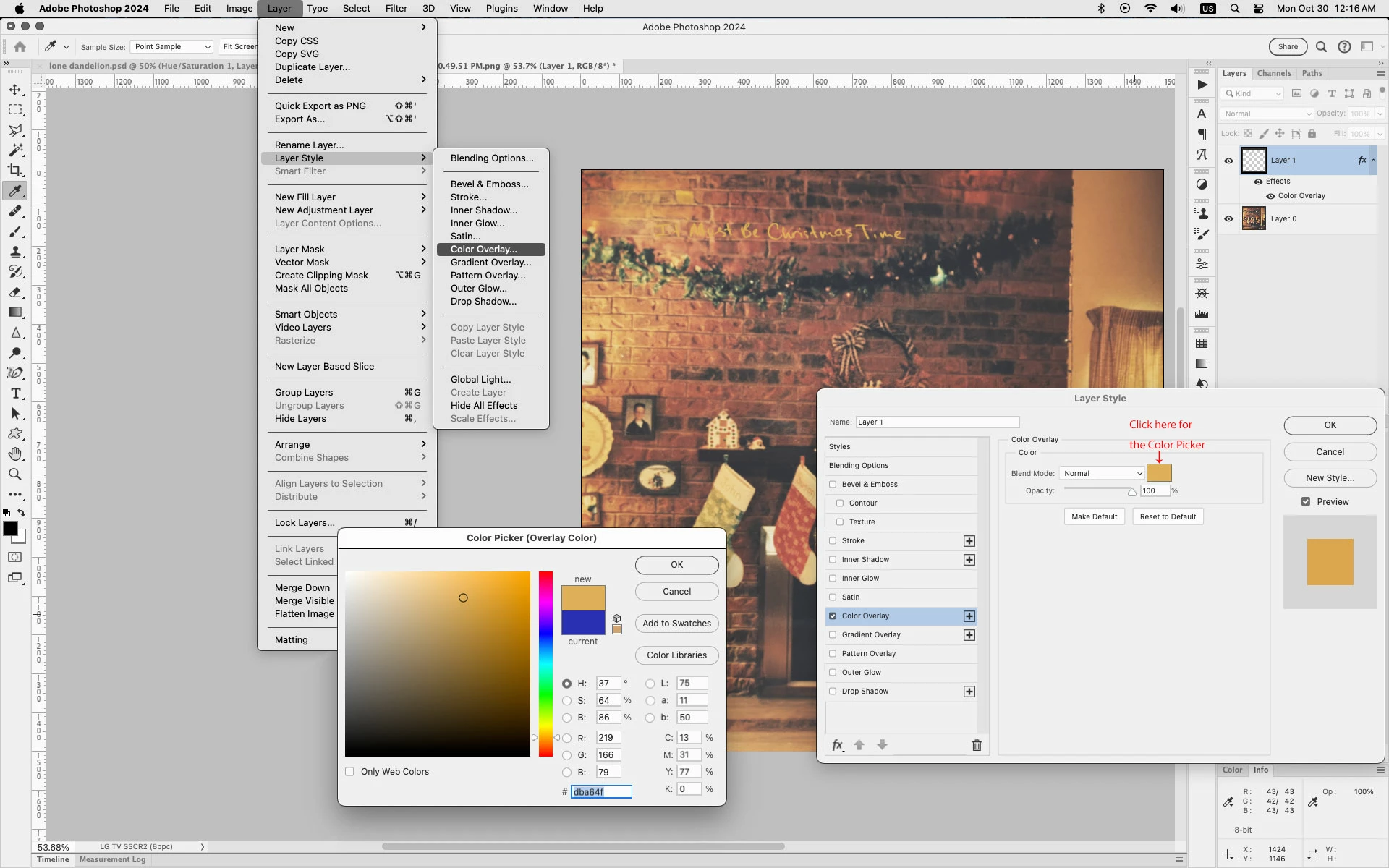
One of many ways to change the color of the text is to go to:


1. Layer>Layer Style>Color Overlay


2. Click on the Color Chip just to the right of the Blending Mode dropdown to bring up the Color picker


3. Click around in your image to sample different colors and see the result on the text.


3 replies

Jeff Arola
Community Expert
Community Expert
October 30, 2023

I forgot to add if the color isn't being sampled with the Color Picker open go to the tool options and change the Sample to All Layers.


Jeff Arola
Community Expert
Jeff ArolaCommunity ExpertCorrect answer
Community Expert
October 30, 2023

One of many ways to change the color of the text is to go to:


1. Layer>Layer Style>Color Overlay


2. Click on the Color Chip just to the right of the Blending Mode dropdown to bring up the Color picker


3. Click around in your image to sample different colors and see the result on the text.


Participant
October 30, 2023

You are my hero Jeff. I knew it would be simple. Sometimes its hard to find an answer to some of the beginner stuff on here so thank you for helping me out!!!

Participant
October 30, 2023

I figured it out or at least one way... hold command and hit the layer to select what i wrote... then hit content fill and choose the color. The only problem with this is that it doesn't preview the color. You have to select it and hit okay just to see it.