
marinay95740358
Known Participant
July 4, 2020
Question

Color Lookup problem

  • July 4, 2020
  • 3 replies
  • 611 views

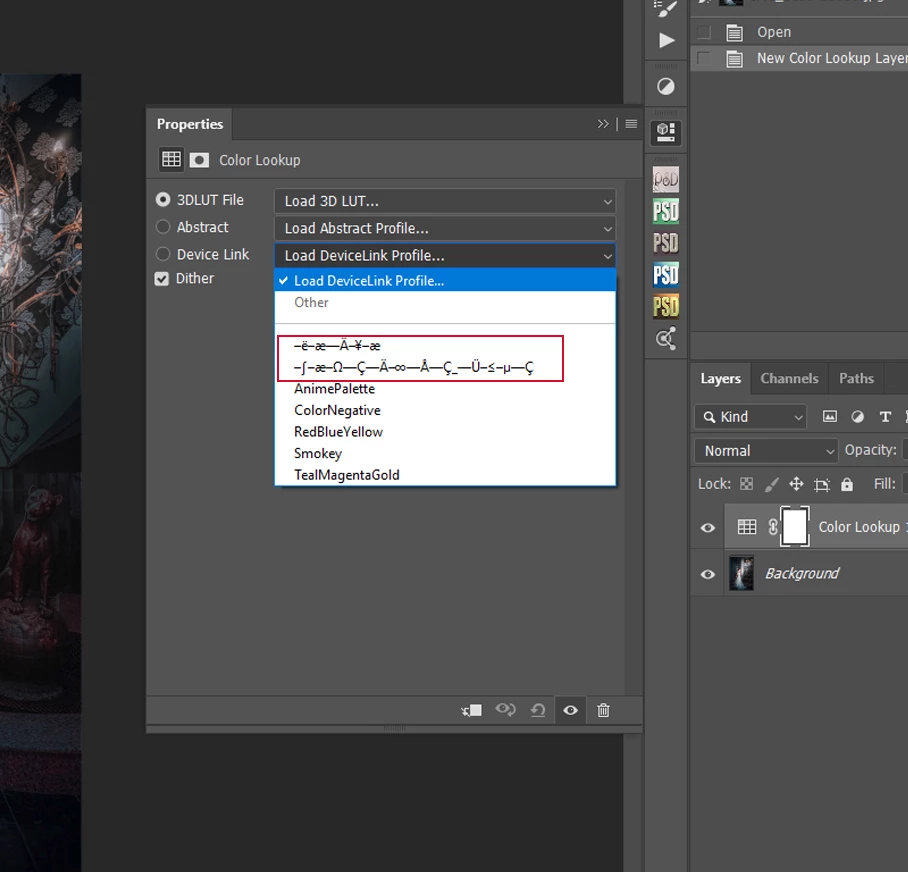
in the Color Lookup drop-down menu, my abstract profiles appear with incorrect names! Why? What's wrong with my names: ContrastColor.ICC; Bordeaux.ICC

This topic has been closed for replies.

3 replies

davescm
Community Expert
Community Expert
July 12, 2020

Test Screen name gave the answer in his first post.

An ICC profile has two names. There is the name of the file that you see on your computer, in Windows explorer or Mac Finder, e.g. abcdef.icc  and there is also a second name stored within that file. That second, internal, name is used in the profile list in Photoshop and other applications. Often the names are the same but they don't have to be. The application that makes the profile adds the second name, when the file is created, either through manually inputting it or adding it automatically.

It looks like the internal names on those profiles in your screenshot have been corrupted.

Dave

Legend
July 12, 2020

If I had to do a wild guess, it looks as if you might be using English language software on a Japanese language system, with a profile containing a name in Japanese. This is typical mojibake.

marinay95740358
Known Participant
July 12, 2020

Sorry. Will they answer my question???? Will I get help?

Legend
July 12, 2020

If none of the people who visit the forum has seen your problem, then there is not likely to be a reply. It is nobody's job to answer.

Legend
July 4, 2020

The name shown isn't the file name but comes from inside the profile. The app which makes the profiles put this junk in there.

marinay95740358
Known Participant
July 6, 2020

Thanks. But I didn't understand.

Installed as recommended here:

https://community.adobe.com/t5/photoshop/where-are-abstract-and-devicelink-profiles-for-color-lookup-in-ps-cc-2019/td-p/10520930?page=1

(in the last message)

Tell me what I'm doing wrong?