
Participant
November 28, 2020
Answered

Color picker does not show sampling ring preview [PS 22.0.1]

  • November 28, 2020
  • 1 reply
  • 5140 views

I've search for solutions before, but none of them worked for me. My settings are OK, yet the sampling ring on the eyedropper tool does not show for me.

The first image is my settings for the tool now.
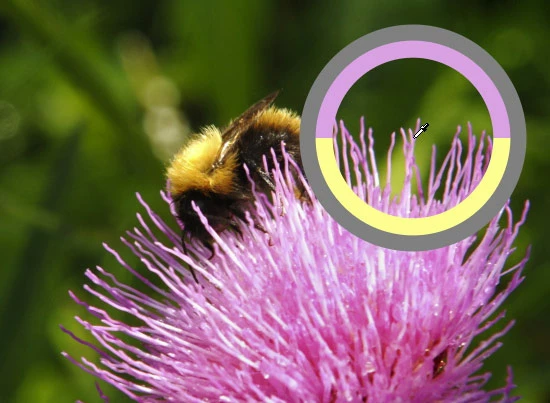
The second one, it's how it should be.

Can anyone help me fix it?

This topic has been closed for replies.
Correct answer jane-e

Hi

It's a known issue in 22.0.1. You can add your comments here for the Adobe developers:

https://feedback.photoshop.com/conversations/photoshop/photoshop-2201-eye-dropper-sampling-ring-missing/5fb5ab4c2bd82446a3a5ee71

If you need it now, revert to 22.0.0 in the Creative Cloud app.

EDIT: This is fixed in 22.5.1


~ Jane

1 reply

jane-e
Community Expert
jane-eCommunity ExpertCorrect answer
Community Expert
November 28, 2020

Hi

It's a known issue in 22.0.1. You can add your comments here for the Adobe developers:

https://feedback.photoshop.com/conversations/photoshop/photoshop-2201-eye-dropper-sampling-ring-missing/5fb5ab4c2bd82446a3a5ee71

If you need it now, revert to 22.0.0 in the Creative Cloud app.

EDIT: This is fixed in 22.5.1


~ Jane

Participant
November 29, 2020

No problem, I just thought that it was something with my settings.

I'll wait for the fix, thanks for the feedback!

jane-e
Community Expert
Community Expert
November 29, 2020

You're welcome, @douglas biangulo.

~ Jane