Answered
Color Picker issue: Photoshop CS6
Over the last few days, my Color Picker has imported a faded moon in the top-left quadrant and a black band at the bottom - any idea how to fix - please?
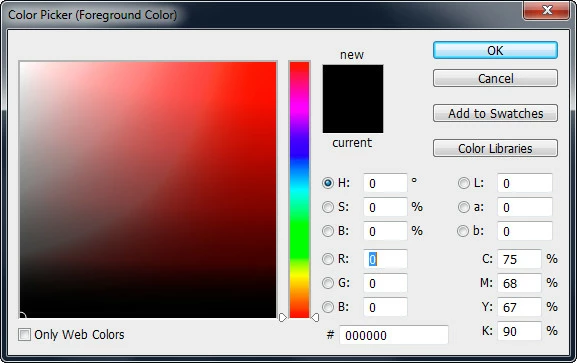

Over the last few days, my Color Picker has imported a faded moon in the top-left quadrant and a black band at the bottom - any idea how to fix - please?
Success!!! I went into my Windows 7 Color Management and chanced adding the Adobe RGB (1998) profile and set it as default. My monitor had been appearing as the default.
The only puzzle now is how did Adobe RGB (1998) profile get deleted to cause this issue and I'm wondering had it been there as standard or had I added it years ago during a now forgotten drama.
Already have an account? Login
Enter your E-mail address. We'll send you an e-mail with instructions to reset your password.
 AdChoices